# Use your spreadsheet data to train ML models
You can train, evaluate and deploy machine learning models from tabular data
using [TensorFlow Decision Forests](https://www.tensorflow.org/decision_forests)
(TF-DF). This process is fast as TF-DF only requires a small amount of code and
trains in seconds. But if your data is in a spreadsheet, what is the most
straightforward way to use the data in your spreadsheet to train a machine
learning model and make predictions on the data?

You can use **Simple ML for Sheets** to do most of your ML work directly in
Google Sheets. With Simple ML:
1. You don't need to write any code.
2. Training runs locally in your browser in a few seconds.
3. You can export the models that Simple ML generates to TensorFlow, Colab or TF Serving.
Simple ML uses the same code as TensorFlow Decision Forests to train your models, so you are not sacrificing quality for ease of use.
## Get started
- Get the Simple ML addon from the [WorkPlace marketplace](https://workspace.google.com/marketplace/app/simple_ml_for_sheets/685936641092).
- Try out the introductory [Simple ML for Sheets tutorial](https://simplemlforsheets.com/tutorial.html) to use machine learning in spreadsheets in a matter of minutes!
## Let's take a look
For example, the following figure shows a spreadsheet containing a copy of the
[Palmer Penguins dataset](https://allisonhorst.github.io/palmerpenguins/). Each
row represents a penguin. Notice that some of the values of the **species**
column are missing. Using the Simple ML addon for Google Sheets, you can use
machine learning to predict the missing values.
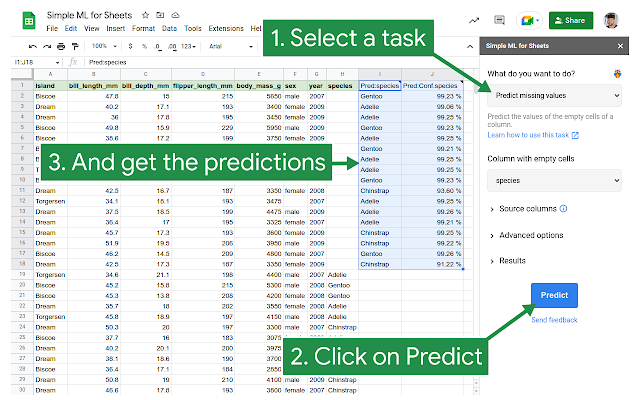"
Under the hood, the **Predict Missing Values** task trains a model on the rows
that contain values in the given column (in this case, the *species* column),
and then uses that model to predict the missing values. You don't
have to create or tune a model, and you also don't have to configure how
the input features are consumed by the model -- Simple ML handles all that for
you.
## What can you do with Simple ML?
After enabling the Simple ML add-on in Google sheets, you can predict missing
values and identify abnormal values in your data. Simple ML creates new columns
in your spreadsheet to contain the values and also the confidence in the new
values.
To complete these tasks, Simple ML creates an ML model in the background and
trains it on the data in your spreadsheet. The model is saved in a folder called
**simple_ml_for_sheets** on your Google Drive folder.
You can also train a model by choosing which columns of data to train the model
on, and optionally selecting a training algorithm.
After a model has been trained, you can use it to perform tasks including
predicting all the values in a specified column
You can evaluate and understand the model.
You can export the model to use it in Colab.
You can view details of a model, and rename and delete the models that Simple ML
creates.
## Simple ML keeps your data safe
Simple ML preserves your spreadsheet data. Simple ML never overwrites the
existing data, instead it creates new columns showing the predicted values as
well as a confidence probability of the prediction. This way, you won't lose
data by mistake.
Simple ML's training operations all run directly in your browser, which means
your data remains entirely in your Google Sheet. Benefits include:
- Privacy: The dataset and models are not sent to a third party outside of Google Sheets (other than Google Drive).
- Responsiveness: Training is instantaneous (on small datasets).
- No quota limit: Since you are using your machine for the training, you can train as many models and for as long as you want.
## Simple ML trains models on the data in your spreadsheet
Simple ML lets you use the power of ML in your spreadsheets without having to
worry about the details. You only have to worry about the big picture -- what are
you going to do with those predictions?
However, for developers who know more about developing and using ML models,
Simple ML gives you access to your models. For example, you can manually train,
evaluate, apply or analyze a model, and you can choose a training algorithm when
creating a new model.
When you use Simple ML to perform tasks such as predicting missing values, it
generates an ML model and saves it in your Google Drive in a folder called
**simple_ml_for_sheets**. You can then use that model to make predictions and
analyze other data. For example, you can upload the saved model in a colab to
write and run code that uses it.
## Learn more about using Simple ML for Sheets
To get started, see the
[ML for Sheets introductory tutorial](https://simplemlforsheets.com/tutorial.html).
To learn more about how to use Simple ML see the
[Simple ML for Sheets](https://simplemlforsheets.com/)
documentation.