|---|---|---|---|
| [View on TensorFlow.org](https://www.tensorflow.org/guide/autodiff) | [Run in Google Colab](https://colab.research.google.com/github/tensorflow/docs/blob/master/site/en/guide/autodiff.ipynb) | [View source on GitHub](https://github.com/tensorflow/docs/blob/master/site/en/guide/autodiff.ipynb) | [Download notebook](https://storage.googleapis.com/tensorflow_docs/docs/site/en/guide/autodiff.ipynb) |
## Automatic Differentiation and Gradients
[Automatic differentiation](https://en.wikipedia.org/wiki/Automatic_differentiation)
is useful for implementing machine learning algorithms such as
[backpropagation](https://en.wikipedia.org/wiki/Backpropagation) for training
neural networks.
In this guide, you will explore ways to compute gradients with TensorFlow, especially in eager execution.
## Setup
import numpy as np
import matplotlib.pyplot as plt
import tensorflow as tf
## Computing gradients
To differentiate automatically, TensorFlow needs to remember what operations happen in what order during the *forward* pass. Then, during the *backward pass*, TensorFlow traverses this list of operations in reverse order to compute gradients.
## Gradient tapes
TensorFlow provides the [`tf.GradientTape`](https://www.tensorflow.org/api_docs/python/tf/GradientTape) API for automatic differentiation; that is, computing the gradient of a computation with respect to some inputs, usually [`tf.Variable`](https://www.tensorflow.org/api_docs/python/tf/Variable)s.
TensorFlow "records" relevant operations executed inside the context of a [`tf.GradientTape`](https://www.tensorflow.org/api_docs/python/tf/GradientTape) onto a "tape". TensorFlow then uses that tape to compute the gradients of a "recorded" computation using [reverse mode differentiation](https://en.wikipedia.org/wiki/Automatic_differentiation).
Here is a simple example:
x = tf.Variable(3.0)
with tf.GradientTape() as tape:
y = x**2
Once you've recorded some operations, use [`GradientTape.gradient(target, sources)`](https://www.tensorflow.org/api_docs/python/tf/GradientTape#gradient) to calculate the gradient of some target (often a loss) relative to some source (often the model's variables):
# dy = 2x * dx
dy_dx = tape.gradient(y, x)
dy_dx.numpy()
```
np.float32(6.0)
```
The above example uses scalars, but [`tf.GradientTape`](https://www.tensorflow.org/api_docs/python/tf/GradientTape) works as easily on any tensor:
w = tf.Variable(tf.random.normal((3, 2)), name='w')
b = tf.Variable(tf.zeros(2, dtype=tf.float32), name='b')
x = [[1., 2., 3.]]
with tf.GradientTape(persistent=True) as tape:
y = x @ w + b
loss = tf.reduce_mean(y**2)
To get the gradient of `loss` with respect to both variables, you can pass both as sources to the `gradient` method. The tape is flexible about how sources are passed and will accept any nested combination of lists or dictionaries and return the gradient structured the same way (see [`tf.nest`](https://www.tensorflow.org/api_docs/python/tf/nest)).
[dl_dw, dl_db] = tape.gradient(loss, [w, b])
The gradient with respect to each source has the shape of the source:
print(w.shape)
print(dl_dw.shape)
```
(3, 2)
(3, 2)
```
Here is the gradient calculation again, this time passing a dictionary of variables:
my_vars = {
'w': w,
'b': b
}
grad = tape.gradient(loss, my_vars)
grad['b']
```
```
## Gradients with respect to a model
It's common to collect `tf.Variables` into a [`tf.Module`](https://www.tensorflow.org/api_docs/python/tf/Module) or one of its subclasses ([`layers.Layer`](https://www.tensorflow.org/api_docs/python/tf/keras/Layer), [`keras.Model`](https://www.tensorflow.org/api_docs/python/tf/keras/Model)) for [checkpointing](https://www.tensorflow.org/guide/checkpoint) and [exporting](https://www.tensorflow.org/guide/saved_model).
In most cases, you will want to calculate gradients with respect to a model's trainable variables. Since all subclasses of [`tf.Module`](https://www.tensorflow.org/api_docs/python/tf/Module) aggregate their variables in the [`Module.trainable_variables`](https://www.tensorflow.org/api_docs/python/tf/Module#trainable_variables) property, you can calculate these gradients in a few lines of code:
layer = tf.keras.layers.Dense(2, activation='relu')
x = tf.constant([[1., 2., 3.]])
with tf.GradientTape() as tape:
# Forward pass
y = layer(x)
loss = tf.reduce_mean(y**2)
# Calculate gradients with respect to every trainable variable
grad = tape.gradient(loss, layer.trainable_variables)
for var, g in zip(layer.trainable_variables, grad):
print(f'{var.name}, shape: {g.shape}')
```
kernel, shape: (3, 2)
bias, shape: (2,)
```
## Controlling what the tape watches
The default behavior is to record all operations after accessing a trainable [`tf.Variable`](https://www.tensorflow.org/api_docs/python/tf/Variable). The reasons for this are:
- The tape needs to know which operations to record in the forward pass to calculate the gradients in the backwards pass.
- The tape holds references to intermediate outputs, so you don't want to record unnecessary operations.
- The most common use case involves calculating the gradient of a loss with respect to all a model's trainable variables.
For example, the following fails to calculate a gradient because the [`tf.Tensor`](https://www.tensorflow.org/api_docs/python/tf/Tensor) is not "watched" by default, and the [`tf.Variable`](https://www.tensorflow.org/api_docs/python/tf/Variable) is not trainable:
# A trainable variable
x0 = tf.Variable(3.0, name='x0')
# Not trainable
x1 = tf.Variable(3.0, name='x1', trainable=False)
# Not a Variable: A variable + tensor returns a tensor.
x2 = tf.Variable(2.0, name='x2') + 1.0
# Not a variable
x3 = tf.constant(3.0, name='x3')
with tf.GradientTape() as tape:
y = (x0**2) + (x1**2) + (x2**2)
grad = tape.gradient(y, [x0, x1, x2, x3])
for g in grad:
print(g)
```
tf.Tensor(6.0, shape=(), dtype=float32)
None
None
None
```
You can list the variables being watched by the tape using the [`GradientTape.watched_variables`](https://www.tensorflow.org/api_docs/python/tf/GradientTape#watched_variables) method:
[var.name for var in tape.watched_variables()]
```
['x0:0']
```
[`tf.GradientTape`](https://www.tensorflow.org/api_docs/python/tf/GradientTape) provides hooks that give the user control over what is or is not watched.
To record gradients with respect to a [`tf.Tensor`](https://www.tensorflow.org/api_docs/python/tf/Tensor), you need to call [`GradientTape.watch(x)`](https://www.tensorflow.org/api_docs/python/tf/GradientTape#watch):
x = tf.constant(3.0)
with tf.GradientTape() as tape:
tape.watch(x)
y = x**2
# dy = 2x * dx
dy_dx = tape.gradient(y, x)
print(dy_dx.numpy())
```
6.0
```
Conversely, to disable the default behavior of watching all `tf.Variables`, set `watch_accessed_variables=False` when creating the gradient tape. This calculation uses two variables, but only connects the gradient for one of the variables:
x0 = tf.Variable(0.0)
x1 = tf.Variable(10.0)
with tf.GradientTape(watch_accessed_variables=False) as tape:
tape.watch(x1)
y0 = tf.math.sin(x0)
y1 = tf.nn.softplus(x1)
y = y0 + y1
ys = tf.reduce_sum(y)
Since [`GradientTape.watch`](https://www.tensorflow.org/api_docs/python/tf/GradientTape#watch) was not called on `x0`, no gradient is computed with respect to it:
# dys/dx1 = exp(x1) / (1 + exp(x1)) = sigmoid(x1)
grad = tape.gradient(ys, {'x0': x0, 'x1': x1})
print('dy/dx0:', grad['x0'])
print('dy/dx1:', grad['x1'].numpy())
```
dy/dx0: None
dy/dx1: 0.9999546
```
## Intermediate results
You can also request gradients of the output with respect to intermediate values computed inside the [`tf.GradientTape`](https://www.tensorflow.org/api_docs/python/tf/GradientTape) context.
x = tf.constant(3.0)
with tf.GradientTape() as tape:
tape.watch(x)
y = x * x
z = y * y
# Use the tape to compute the gradient of z with respect to the
# intermediate value y.
# dz_dy = 2 * y and y = x ** 2 = 9
print(tape.gradient(z, y).numpy())
```
18.0
```
By default, the resources held by a `GradientTape` are released as soon as the [`GradientTape.gradient`](https://www.tensorflow.org/api_docs/python/tf/GradientTape#gradient) method is called. To compute multiple gradients over the same computation, create a gradient tape with `persistent=True`. This allows multiple calls to the `gradient` method as resources are released when the tape object is garbage collected. For example:
x = tf.constant([1, 3.0])
with tf.GradientTape(persistent=True) as tape:
tape.watch(x)
y = x * x
z = y * y
print(tape.gradient(z, x).numpy()) # [4.0, 108.0] (4 * x**3 at x = [1.0, 3.0])
print(tape.gradient(y, x).numpy()) # [2.0, 6.0] (2 * x at x = [1.0, 3.0])
```
[ 4. 108.]
[2. 6.]
```
del tape # Drop the reference to the tape
## Notes on performance
- There is a tiny overhead associated with doing operations inside a gradient tape context. For most eager execution this will not be a noticeable cost, but you should still use tape context around the areas only where it is required.
- Gradient tapes use memory to store intermediate results, including inputs and outputs, for use during the backwards pass.
For efficiency, some ops (like `ReLU`) don't need to keep their intermediate results and they are pruned during the forward pass. However, if you use `persistent=True` on your tape, *nothing is discarded* and your peak memory usage will be higher.
## Gradients of non-scalar targets
A gradient is fundamentally an operation on a scalar.
x = tf.Variable(2.0)
with tf.GradientTape(persistent=True) as tape:
y0 = x**2
y1 = 1 / x
print(tape.gradient(y0, x).numpy())
print(tape.gradient(y1, x).numpy())
```
4.0
-0.25
```
Thus, if you ask for the gradient of multiple targets, the result for each source is:
- The gradient of the sum of the targets, or equivalently
- The sum of the gradients of each target.
x = tf.Variable(2.0)
with tf.GradientTape() as tape:
y0 = x**2
y1 = 1 / x
print(tape.gradient({'y0': y0, 'y1': y1}, x).numpy())
```
3.75
```
Similarly, if the target(s) are not scalar the gradient of the sum is calculated:
x = tf.Variable(2.)
with tf.GradientTape() as tape:
y = x * [3., 4.]
print(tape.gradient(y, x).numpy())
```
7.0
```
This makes it simple to take the gradient of the sum of a collection of losses, or the gradient of the sum of an element-wise loss calculation.
If you need a separate gradient for each item, refer to [Jacobians](https://www.tensorflow.org/guide/advanced_autodiff#jacobians).
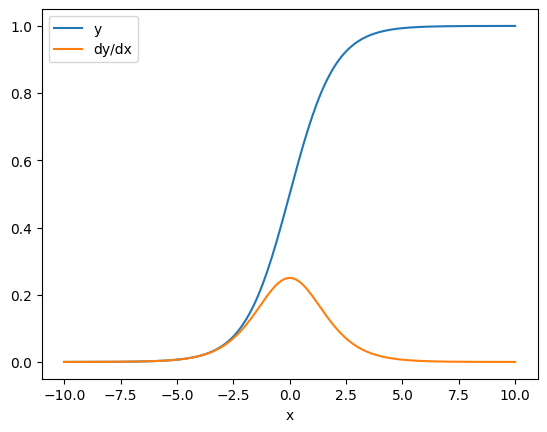
In some cases you can skip the Jacobian. For an element-wise calculation, the gradient of the sum gives the derivative of each element with respect to its input-element, since each element is independent:
x = tf.linspace(-10.0, 10.0, 200+1)
with tf.GradientTape() as tape:
tape.watch(x)
y = tf.nn.sigmoid(x)
dy_dx = tape.gradient(y, x)
plt.plot(x, y, label='y')
plt.plot(x, dy_dx, label='dy/dx')
plt.legend()
_ = plt.xlabel('x')
## Control flow
Because a gradient tape records operations as they are executed, Python control flow is naturally handled (for example, `if` and `while` statements).
Here a different variable is used on each branch of an `if`. The gradient only connects to the variable that was used:
x = tf.constant(1.0)
v0 = tf.Variable(2.0)
v1 = tf.Variable(2.0)
with tf.GradientTape(persistent=True) as tape:
tape.watch(x)
if x > 0.0:
result = v0
else:
result = v1**2
dv0, dv1 = tape.gradient(result, [v0, v1])
print(dv0)
print(dv1)
```
tf.Tensor(1.0, shape=(), dtype=float32)
None
```
Just remember that the control statements themselves are not differentiable, so they are invisible to gradient-based optimizers.
Depending on the value of `x` in the above example, the tape either records `result = v0` or `result = v1**2`. The gradient with respect to `x` is always `None`.
dx = tape.gradient(result, x)
print(dx)
```
None
```
## Cases where `gradient` returns `None`
When a target is not connected to a source, `gradient` will return `None`.
x = tf.Variable(2.)
y = tf.Variable(3.)
with tf.GradientTape() as tape:
z = y * y
print(tape.gradient(z, x))
```
None
```
Here `z` is obviously not connected to `x`, but there are several less-obvious ways that a gradient can be disconnected.
### 1. Replaced a variable with a tensor
In the section on ["controlling what the tape watches"](https://www.tensorflow.org/guide/autodiff#watches) you saw that the tape will automatically watch a [`tf.Variable`](https://www.tensorflow.org/api_docs/python/tf/Variable) but not a [`tf.Tensor`](https://www.tensorflow.org/api_docs/python/tf/Tensor).
One common error is to inadvertently replace a [`tf.Variable`](https://www.tensorflow.org/api_docs/python/tf/Variable) with a [`tf.Tensor`](https://www.tensorflow.org/api_docs/python/tf/Tensor), instead of using [`Variable.assign`](https://www.tensorflow.org/api_docs/python/tf/Variable#assign) to update the [`tf.Variable`](https://www.tensorflow.org/api_docs/python/tf/Variable). Here is an example:
x = tf.Variable(2.0)
for epoch in range(2):
with tf.GradientTape() as tape:
y = x+1
print(type(x).__name__, ":", tape.gradient(y, x))
x = x + 1 # This should be `x.assign_add(1)`
```
ResourceVariable : tf.Tensor(1.0, shape=(), dtype=float32)
EagerTensor : None
```
### 2. Did calculations outside of TensorFlow
The tape can't record the gradient path if the calculation exits TensorFlow.
For example:
x = tf.Variable([[1.0, 2.0],
[3.0, 4.0]], dtype=tf.float32)
with tf.GradientTape() as tape:
x2 = x**2
# This step is calculated with NumPy
y = np.mean(x2, axis=0)
# Like most ops, reduce_mean will cast the NumPy array to a constant tensor
# using `tf.convert_to_tensor`.
y = tf.reduce_mean(y, axis=0)
print(tape.gradient(y, x))
```
None
```
### 3. Took gradients through an integer or string
Integers and strings are not differentiable. If a calculation path uses these data types there will be no gradient.
Nobody expects strings to be differentiable, but it's easy to accidentally create an `int` constant or variable if you don't specify the `dtype`.
x = tf.constant(10)
with tf.GradientTape() as g:
g.watch(x)
y = x * x
print(g.gradient(y, x))
```
WARNING:tensorflow:The dtype of the watched tensor must be floating (e.g. tf.float32), got tf.int32
None
```
TensorFlow doesn't automatically cast between types, so, in practice, you'll often get a type error instead of a missing gradient.
### 4. Took gradients through a stateful object
State stops gradients. When you read from a stateful object, the tape can only observe the current state, not the history that lead to it.
A [`tf.Tensor`](https://www.tensorflow.org/api_docs/python/tf/Tensor) is immutable. You can't change a tensor once it's created. It has a *value* , but no *state* . All the operations discussed so far are also stateless: the output of a [`tf.matmul`](https://www.tensorflow.org/api_docs/python/tf/linalg/matmul) only depends on its inputs.
A [`tf.Variable`](https://www.tensorflow.org/api_docs/python/tf/Variable) has internal state---its value. When you use the variable, the state is read. It's normal to calculate a gradient with respect to a variable, but the variable's state blocks gradient calculations from going farther back. For example:
x0 = tf.Variable(3.0)
x1 = tf.Variable(0.0)
with tf.GradientTape() as tape:
# Update x1 = x1 + x0.
x1.assign_add(x0)
# The tape starts recording from x1.
y = x1**2 # y = (x1 + x0)**2
# This doesn't work.
print(tape.gradient(y, x0)) #dy/dx0 = 2*(x1 + x0)
```
None
```
Similarly, [`tf.data.Dataset`](https://www.tensorflow.org/api_docs/python/tf/data/Dataset) iterators and [`tf.queue`](https://www.tensorflow.org/api_docs/python/tf/queue)s are stateful, and will stop all gradients on tensors that pass through them.
## No gradient registered
Some [`tf.Operation`](https://www.tensorflow.org/api_docs/python/tf/Operation)s are **registered as being non-differentiable** and will return `None`. Others have **no gradient registered**.
The [`tf.raw_ops`](https://www.tensorflow.org/api_docs/python/tf/raw_ops) page shows which low-level ops have gradients registered.
If you attempt to take a gradient through a float op that has no gradient registered the tape will throw an error instead of silently returning `None`. This way you know something has gone wrong.
For example, the [`tf.image.adjust_contrast`](https://www.tensorflow.org/api_docs/python/tf/image/adjust_contrast) function wraps [`raw_ops.AdjustContrastv2`](https://www.tensorflow.org/api_docs/python/tf/raw_ops/AdjustContrastv2), which could have a gradient but the gradient is not implemented:
image = tf.Variable([[[0.5, 0.0, 0.0]]])
delta = tf.Variable(0.1)
with tf.GradientTape() as tape:
new_image = tf.image.adjust_contrast(image, delta)
try:
print(tape.gradient(new_image, [image, delta]))
assert False # This should not happen.
except LookupError as e:
print(f'{type(e).__name__}: {e}')
```
LookupError: gradient registry has no entry for: AdjustContrastv2
```
If you need to differentiate through this op, you'll either need to implement the gradient and register it (using [`tf.RegisterGradient`](https://www.tensorflow.org/api_docs/python/tf/RegisterGradient)) or re-implement the function using other ops.
## Zeros instead of None
In some cases it would be convenient to get 0 instead of `None` for unconnected gradients. You can decide what to return when you have unconnected gradients using the `unconnected_gradients` argument:
x = tf.Variable([2., 2.])
y = tf.Variable(3.)
with tf.GradientTape() as tape:
z = y**2
print(tape.gradient(z, x, unconnected_gradients=tf.UnconnectedGradients.ZERO))
```
tf.Tensor([0. 0.], shape=(2,), dtype=float32)
```