|---|---|---|---|
| [View on TensorFlow.org](https://www.tensorflow.org/guide/checkpoint) | [Run in Google Colab](https://colab.research.google.com/github/tensorflow/docs/blob/master/site/en/guide/checkpoint.ipynb) | [View source on GitHub](https://github.com/tensorflow/docs/blob/master/site/en/guide/checkpoint.ipynb) | [Download notebook](https://storage.googleapis.com/tensorflow_docs/docs/site/en/guide/checkpoint.ipynb) |
The phrase "Saving a TensorFlow model" typically means one of two things:
1. Checkpoints, OR
2. SavedModel.
Checkpoints capture the exact value of all parameters ([`tf.Variable`](https://www.tensorflow.org/api_docs/python/tf/Variable) objects) used by a model. Checkpoints do not contain any description of the computation defined by the model and thus are typically only useful when source code that will use the saved parameter values is available.
The SavedModel format on the other hand includes a serialized description of the computation defined by the model in addition to the parameter values (checkpoint). Models in this format are independent of the source code that created the model. They are thus suitable for deployment via TensorFlow Serving, TensorFlow Lite, TensorFlow.js, or programs in other programming languages (the C, C++, Java, Go, Rust, C# etc. TensorFlow APIs).
This guide covers APIs for writing and reading checkpoints.
## Setup
!pip install -q tf-keras
import os
# Enable legacy tf-keras so later cells can inspect low-level tf_keras checkpoint variable paths.
os.environ["TF_USE_LEGACY_KERAS"] = "1"
import tensorflow as tf
class Net(tf.keras.Model):
"""A simple linear model."""
def __init__(self):
super(Net, self).__init__()
self.l1 = tf.keras.layers.Dense(5)
def call(self, x):
return self.l1(x)
net = Net()
## Saving from [`tf.keras`](https://www.tensorflow.org/api_docs/python/tf/keras) training APIs
See the [](https://www.tensorflow.org/guide/keras/save_and_serialize)[`tf.keras`](https://www.tensorflow.org/api_docs/python/tf/keras) guide on saving and
restoring.
[`tf.keras.Model.save_weights`](https://www.tensorflow.org/api_docs/python/tf/keras/Model#save_weights) saves model weights to a `.weights.h5` file while [`tf.train.Checkpoint`](https://www.tensorflow.org/api_docs/python/tf/train/Checkpoint) writes TensorFlow checkpoints.
net(tf.zeros([1, 1]))
net.save_weights('easy_checkpoint.weights.h5')
## Writing checkpoints
The persistent state of a TensorFlow model is stored in [`tf.Variable`](https://www.tensorflow.org/api_docs/python/tf/Variable) objects. These can be constructed directly, but are often created through high-level APIs like [`tf.keras.layers`](https://www.tensorflow.org/api_docs/python/tf/keras/layers) or [`tf.keras.Model`](https://www.tensorflow.org/api_docs/python/tf/keras/Model).
The easiest way to manage variables is by attaching them to Python objects, then referencing those objects.
Subclasses of [`tf.train.Checkpoint`](https://www.tensorflow.org/api_docs/python/tf/train/Checkpoint), [`tf.keras.layers.Layer`](https://www.tensorflow.org/api_docs/python/tf/keras/Layer), and [`tf.keras.Model`](https://www.tensorflow.org/api_docs/python/tf/keras/Model) automatically track variables assigned to their attributes. The following example constructs a simple linear model, then writes checkpoints which contain values for all of the model's variables.
[`Model.save_weights`](https://www.tensorflow.org/api_docs/python/tf/keras/Model#save_weights) saves model weights to a `.weights.h5` file while [`tf.train.Checkpoint`](https://www.tensorflow.org/api_docs/python/tf/train/Checkpoint) writes TensorFlow checkpoints.
### Manual checkpointing
#### Setup
To help demonstrate all the features of [`tf.train.Checkpoint`](https://www.tensorflow.org/api_docs/python/tf/train/Checkpoint), define a toy dataset and optimization step:
def toy_dataset():
inputs = tf.range(10.)[:, None]
labels = inputs * 5. + tf.range(5.)[None, :]
return tf.data.Dataset.from_tensor_slices(
dict(x=inputs, y=labels)).repeat().batch(2)
def train_step(net, example, optimizer):
"""Trains `net` on `example` using `optimizer`."""
with tf.GradientTape() as tape:
output = net(example['x'])
loss = tf.reduce_mean(tf.abs(output - example['y']))
variables = net.trainable_variables
gradients = tape.gradient(loss, variables)
optimizer.apply_gradients(zip(gradients, variables))
return loss
#### Create the checkpoint objects
Use a [`tf.train.Checkpoint`](https://www.tensorflow.org/api_docs/python/tf/train/Checkpoint) object to manually create a checkpoint, where the objects you want to checkpoint are set as attributes on the object.
A [`tf.train.CheckpointManager`](https://www.tensorflow.org/api_docs/python/tf/train/CheckpointManager) can also be helpful for managing multiple checkpoints.
opt = tf.keras.optimizers.Adam(0.1)
dataset = toy_dataset()
iterator = iter(dataset)
ckpt = tf.train.Checkpoint(step=tf.Variable(1), optimizer=opt, net=net, iterator=iterator)
manager = tf.train.CheckpointManager(ckpt, './tf_ckpts', max_to_keep=3)
#### Train and checkpoint the model
The following training loop creates an instance of the model and of an optimizer, then gathers them into a [`tf.train.Checkpoint`](https://www.tensorflow.org/api_docs/python/tf/train/Checkpoint) object. It calls the training step in a loop on each batch of data, and periodically writes checkpoints to disk.
def train_and_checkpoint(net, manager):
ckpt.restore(manager.latest_checkpoint)
if manager.latest_checkpoint:
print("Restored from {}".format(manager.latest_checkpoint))
else:
print("Initializing from scratch.")
for _ in range(50):
example = next(iterator)
loss = train_step(net, example, opt)
ckpt.step.assign_add(1)
if int(ckpt.step) % 10 == 0:
save_path = manager.save()
print("Saved checkpoint for step {}: {}".format(int(ckpt.step), save_path))
print("loss {:1.2f}".format(loss.numpy()))
train_and_checkpoint(net, manager)
```
Initializing from scratch.
Saved checkpoint for step 10: ./tf_ckpts/ckpt-1
loss 28.04
Saved checkpoint for step 20: ./tf_ckpts/ckpt-2
loss 21.46
Saved checkpoint for step 30: ./tf_ckpts/ckpt-3
loss 14.90
Saved checkpoint for step 40: ./tf_ckpts/ckpt-4
loss 8.47
Saved checkpoint for step 50: ./tf_ckpts/ckpt-5
loss 2.56
```
#### Restore and continue training
After the first training cycle you can pass a new model and manager, but pick up training exactly where you left off:
opt = tf.keras.optimizers.Adam(0.1)
net = Net()
dataset = toy_dataset()
iterator = iter(dataset)
ckpt = tf.train.Checkpoint(step=tf.Variable(1), optimizer=opt, net=net, iterator=iterator)
manager = tf.train.CheckpointManager(ckpt, './tf_ckpts', max_to_keep=3)
train_and_checkpoint(net, manager)
```
Restored from ./tf_ckpts/ckpt-5
Saved checkpoint for step 60: ./tf_ckpts/ckpt-6
loss 1.23
Saved checkpoint for step 70: ./tf_ckpts/ckpt-7
loss 0.45
Saved checkpoint for step 80: ./tf_ckpts/ckpt-8
loss 0.65
Saved checkpoint for step 90: ./tf_ckpts/ckpt-9
loss 0.27
Saved checkpoint for step 100: ./tf_ckpts/ckpt-10
loss 0.21
```
The [`tf.train.CheckpointManager`](https://www.tensorflow.org/api_docs/python/tf/train/CheckpointManager) object deletes old checkpoints. Above it's configured to keep only the three most recent checkpoints.
print(manager.checkpoints) # List the three remaining checkpoints
```
['./tf_ckpts/ckpt-8', './tf_ckpts/ckpt-9', './tf_ckpts/ckpt-10']
```
These paths, e.g. `'./tf_ckpts/ckpt-10'`, are not files on disk. Instead they are prefixes for an `index` file and one or more data files which contain the variable values. These prefixes are grouped together in a single `checkpoint` file (`'./tf_ckpts/checkpoint'`) where the `CheckpointManager` saves its state.
ls ./tf_ckpts
```
checkpoint ckpt-8.data-00000-of-00001 ckpt-9.index
ckpt-10.data-00000-of-00001 ckpt-8.index
ckpt-10.index ckpt-9.data-00000-of-00001
```
## Loading mechanics
TensorFlow matches variables to checkpointed values by traversing a directed graph with named edges, starting from the object being loaded. Edge names typically come from attribute names in objects, for example the `"l1"` in `self.l1 = tf.keras.layers.Dense(5)`. `tf.train.Checkpoint` uses its keyword argument names, as in the `"step"` in `tf.train.Checkpoint(step=...)`.
The dependency graph from the example above looks like this:
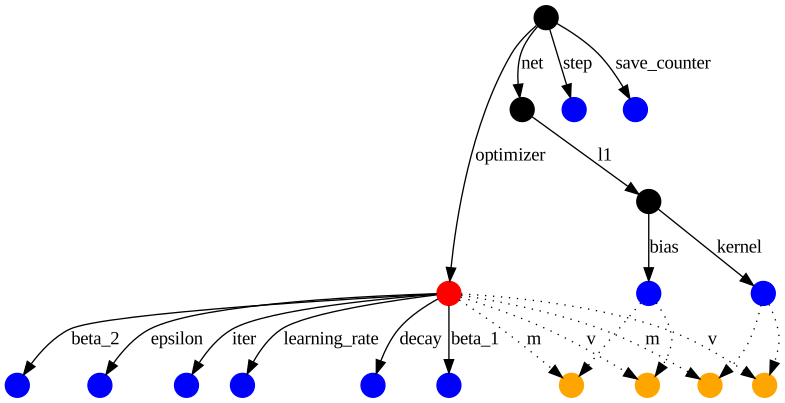
The optimizer is in red, regular variables are in blue, and the optimizer slot variables are in orange. The other nodes---for example, representing the [`tf.train.Checkpoint`](https://www.tensorflow.org/api_docs/python/tf/train/Checkpoint)---are in black.
Slot variables are part of the optimizer's state, but are created for a specific variable. For example, the `'m'` edges above correspond to momentum, which the Adam optimizer tracks for each variable. Slot variables are only saved in a checkpoint if the variable and the optimizer would both be saved, thus the dashed edges.
Calling `restore` on a [`tf.train.Checkpoint`](https://www.tensorflow.org/api_docs/python/tf/train/Checkpoint) object queues the requested restorations, restoring variable values as soon as there's a matching path from the `Checkpoint` object. For example, you can load just the bias from the model you defined above by reconstructing one path to it through the network and the layer.
to_restore = tf.Variable(tf.zeros([5]))
print(to_restore.numpy()) # All zeros
fake_layer = tf.train.Checkpoint(bias=to_restore)
fake_net = tf.train.Checkpoint(l1=fake_layer)
new_root = tf.train.Checkpoint(net=fake_net)
status = new_root.restore(tf.train.latest_checkpoint('./tf_ckpts/'))
print(to_restore.numpy()) # This gets the restored value.
```
[0. 0. 0. 0. 0.]
[2.5353425 2.0858872 3.6863103 3.7090518 4.013672 ]
```
The dependency graph for these new objects is a much smaller subgraph of the larger checkpoint you wrote above. It includes only the bias and a save counter that [`tf.train.Checkpoint`](https://www.tensorflow.org/api_docs/python/tf/train/Checkpoint) uses to number checkpoints.
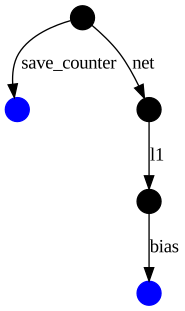
`restore` returns a status object, which has optional assertions. All of the objects created in the new `Checkpoint` have been restored, so `status.assert_existing_objects_matched` passes.
status.assert_existing_objects_matched()
```
```
There are many objects in the checkpoint which haven't matched, including the layer's kernel and the optimizer's variables. `status.assert_consumed` only passes if the checkpoint and the program match exactly, and would throw an exception here.
### Deferred restorations
`Layer` objects in TensorFlow may defer the creation of variables to their first call, when input shapes are available. For example, the shape of a `Dense` layer's kernel depends on both the layer's input and output shapes, and so the output shape required as a constructor argument is not enough information to create the variable on its own. Since calling a `Layer` also reads the variable's value, a restore must happen between the variable's creation and its first use.
To support this idiom, [`tf.train.Checkpoint`](https://www.tensorflow.org/api_docs/python/tf/train/Checkpoint) defers restores which don't yet have a matching variable.
deferred_restore = tf.Variable(tf.zeros([1, 5]))
print(deferred_restore.numpy()) # Not restored; still zeros
fake_layer.kernel = deferred_restore
print(deferred_restore.numpy()) # Restored
```
[[0. 0. 0. 0. 0.]]
[[4.604535 4.816921 4.6983075 4.855273 4.977423 ]]
```
### Manually inspecting checkpoints
[`tf.train.load_checkpoint`](https://www.tensorflow.org/api_docs/python/tf/train/load_checkpoint) returns a `CheckpointReader` that gives lower level access to the checkpoint contents. It contains mappings from each variable's key, to the shape and dtype for each variable in the checkpoint. A variable's key is its object path, like in the graphs displayed above.
> [!NOTE]
> **Note:** There is no higher level structure to the checkpoint. It only know's the paths and values for the variables, and has no concept of `models`, `layers` or how they are connected.
reader = tf.train.load_checkpoint('./tf_ckpts/')
shape_from_key = reader.get_variable_to_shape_map()
dtype_from_key = reader.get_variable_to_dtype_map()
sorted(shape_from_key.keys())
```
['_CHECKPOINTABLE_OBJECT_GRAPH',
'iterator/.ATTRIBUTES/ITERATOR_STATE',
'net/l1/bias/.ATTRIBUTES/VARIABLE_VALUE',
'net/l1/kernel/.ATTRIBUTES/VARIABLE_VALUE',
'optimizer/_iterations/.ATTRIBUTES/VARIABLE_VALUE',
'optimizer/_learning_rate/.ATTRIBUTES/VARIABLE_VALUE',
'optimizer/_variables/1/.ATTRIBUTES/VARIABLE_VALUE',
'optimizer/_variables/2/.ATTRIBUTES/VARIABLE_VALUE',
'optimizer/_variables/3/.ATTRIBUTES/VARIABLE_VALUE',
'optimizer/_variables/4/.ATTRIBUTES/VARIABLE_VALUE',
'save_counter/.ATTRIBUTES/VARIABLE_VALUE',
'step/.ATTRIBUTES/VARIABLE_VALUE']
```
So if you're interested in the value of `net.l1.kernel` you can get the value with the following code:
key = 'net/l1/kernel/.ATTRIBUTES/VARIABLE_VALUE'
print("Shape:", shape_from_key[key])
print("Dtype:", dtype_from_key[key].name)
```
Shape: [1, 5]
Dtype: float32
```
It also provides a `get_tensor` method allowing you to inspect the value of a variable:
reader.get_tensor(key)
```
array([[4.604535 , 4.816921 , 4.6983075, 4.855273 , 4.977423 ]],
dtype=float32)
```
### Object tracking
Checkpoints save and restore the values of [`tf.Variable`](https://www.tensorflow.org/api_docs/python/tf/Variable) objects by "tracking" any variable or trackable object set in one of its attributes. When executing a save, variables are gathered recursively from all of the reachable tracked objects.
As with direct attribute assignments like `self.l1 = tf.keras.layers.Dense(5)`, assigning lists and dictionaries to attributes will track their contents.
save = tf.train.Checkpoint()
save.listed = [tf.Variable(1.)]
save.listed.append(tf.Variable(2.))
save.mapped = {'one': save.listed[0]}
save.mapped['two'] = save.listed[1]
save_path = save.save('./tf_list_example')
restore = tf.train.Checkpoint()
v2 = tf.Variable(0.)
assert 0. == v2.numpy() # Not restored yet
restore.mapped = {'two': v2}
restore.restore(save_path)
assert 2. == v2.numpy()
You may notice wrapper objects for lists and dictionaries. These wrappers are checkpointable versions of the underlying data-structures. Just like the attribute based loading, these wrappers restore a variable's value as soon as it's added to the container.
restore.listed = []
print(restore.listed) # ListWrapper([])
v1 = tf.Variable(0.)
restore.listed.append(v1) # Restores v1, from restore() in the previous cell
assert 1. == v1.numpy()
```
ListWrapper([])
```
Trackable objects include [`tf.train.Checkpoint`](https://www.tensorflow.org/api_docs/python/tf/train/Checkpoint), [`tf.Module`](https://www.tensorflow.org/api_docs/python/tf/Module) and its subclasses (e.g. [`keras.layers.Layer`](https://www.tensorflow.org/api_docs/python/tf/keras/Layer) and [`keras.Model`](https://www.tensorflow.org/api_docs/python/tf/keras/Model)), and recognized Python containers:
- `dict` (and `collections.OrderedDict`)
- `list`
- `tuple` (and `collections.namedtuple`, `typing.NamedTuple`)
Other container types are **not supported**, including:
- `collections.defaultdict`
- `set`
All other Python objects are **ignored**, including:
- `int`
- `string`
- `float`
## Summary
TensorFlow objects provide an easy automatic mechanism for saving and restoring the values of variables they use.