|---|---|---|---|
| [View on TensorFlow.org](https://www.tensorflow.org/guide/sparse_tensor) | [Run in Google Colab](https://colab.research.google.com/github/tensorflow/docs/blob/master/site/en/guide/sparse_tensor.ipynb) | [View on GitHub](https://github.com/tensorflow/docs/blob/master/site/en/guide/sparse_tensor.ipynb) | [Download notebook](https://storage.googleapis.com/tensorflow_docs/docs/site/en/guide/sparse_tensor.ipynb) |
When working with tensors that contain a lot of zero values, it is important to store them in a space- and time-efficient manner. Sparse tensors enable efficient storage and processing of tensors that contain a lot of zero values. Sparse tensors are used extensively in encoding schemes like [TF-IDF](https://en.wikipedia.org/wiki/Tf%E2%80%93idf) as part of data pre-processing in NLP applications and for pre-processing images with a lot of dark pixels in computer vision applications.
## Sparse tensors in TensorFlow
TensorFlow represents sparse tensors through the [`tf.sparse.SparseTensor`](https://www.tensorflow.org/api_docs/python/tf/sparse/SparseTensor) object. Currently, sparse tensors in TensorFlow are encoded using the coordinate list (COO) format. This encoding format is optimized for hyper-sparse matrices such as embeddings.
The COO encoding for sparse tensors is comprised of:
- `values`: A 1D tensor with shape `[N]` containing all nonzero values.
- `indices`: A 2D tensor with shape `[N, rank]`, containing the indices of the nonzero values.
- `dense_shape`: A 1D tensor with shape `[rank]`, specifying the shape of the tensor.
A ***nonzero*** value in the context of a [`tf.sparse.SparseTensor`](https://www.tensorflow.org/api_docs/python/tf/sparse/SparseTensor) is a value that's not explicitly encoded. It is possible to explicitly include zero values in the `values` of a COO sparse matrix, but these "explicit zeros" are generally not included when referring to nonzero values in a sparse tensor.
> [!NOTE]
> **Note:** [`tf.sparse.SparseTensor`](https://www.tensorflow.org/api_docs/python/tf/sparse/SparseTensor) does not require that indices/values be in any particular order, but several ops assume that they're in row-major order. Use [`tf.sparse.reorder`](https://www.tensorflow.org/api_docs/python/tf/sparse/reorder) to create a copy of the sparse tensor that is sorted in the canonical row-major order.
## Creating a [`tf.sparse.SparseTensor`](https://www.tensorflow.org/api_docs/python/tf/sparse/SparseTensor)
Construct sparse tensors by directly specifying their `values`, `indices`, and `dense_shape`.
import tensorflow as tf
st1 = tf.sparse.SparseTensor(indices=[[0, 3], [2, 4]],
values=[10, 20],
dense_shape=[3, 10])
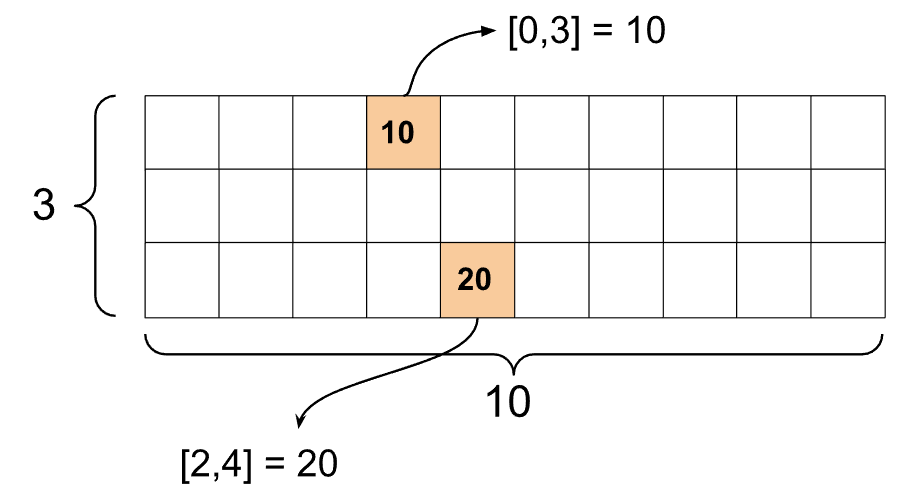
When you use the `print()` function to print a sparse tensor, it shows the contents of the three component tensors:
print(st1)
```
SparseTensor(indices=tf.Tensor(
[[0 3]
[2 4]], shape=(2, 2), dtype=int64), values=tf.Tensor([10 20], shape=(2,), dtype=int32), dense_shape=tf.Tensor([ 3 10], shape=(2,), dtype=int64))
```
It is easier to understand the contents of a sparse tensor if the nonzero `values` are aligned with their corresponding `indices`. Define a helper function to pretty-print sparse tensors such that each nonzero value is shown on its own line.
def pprint_sparse_tensor(st):
s = ""
print(pprint_sparse_tensor(st1))
```
```
You can also construct sparse tensors from dense tensors by using [`tf.sparse.from_dense`](https://www.tensorflow.org/api_docs/python/tf/sparse/from_dense), and convert them back to dense tensors by using [`tf.sparse.to_dense`](https://www.tensorflow.org/api_docs/python/tf/sparse/to_dense).
st2 = tf.sparse.from_dense([[1, 0, 0, 8], [0, 0, 0, 0], [0, 0, 3, 0]])
print(pprint_sparse_tensor(st2))
```
```
st3 = tf.sparse.to_dense(st2)
print(st3)
```
tf.Tensor(
[[1 0 0 8]
[0 0 0 0]
[0 0 3 0]], shape=(3, 4), dtype=int32)
```
## Manipulating sparse tensors
Use the utilities in the [`tf.sparse`](https://www.tensorflow.org/api_docs/python/tf/sparse) package to manipulate sparse tensors. Ops like [`tf.math.add`](https://www.tensorflow.org/api_docs/python/tf/math/add) that you can use for arithmetic manipulation of dense tensors do not work with sparse tensors.
Add sparse tensors of the same shape by using [`tf.sparse.add`](https://www.tensorflow.org/api_docs/python/tf/sparse/add).
st_a = tf.sparse.SparseTensor(indices=[[0, 2], [3, 4]],
values=[31, 2],
dense_shape=[4, 10])
st_b = tf.sparse.SparseTensor(indices=[[0, 2], [3, 0]],
values=[56, 38],
dense_shape=[4, 10])
st_sum = tf.sparse.add(st_a, st_b)
print(pprint_sparse_tensor(st_sum))
```
```
Use [`tf.sparse.sparse_dense_matmul`](https://www.tensorflow.org/api_docs/python/tf/sparse/sparse_dense_matmul) to multiply sparse tensors with dense matrices.
st_c = tf.sparse.SparseTensor(indices=([0, 1], [1, 0], [1, 1]),
values=[13, 15, 17],
dense_shape=(2,2))
mb = tf.constant([[4], [6]])
product = tf.sparse.sparse_dense_matmul(st_c, mb)
print(product)
```
tf.Tensor(
[[ 78]
[162]], shape=(2, 1), dtype=int32)
```
Put sparse tensors together by using [`tf.sparse.concat`](https://www.tensorflow.org/api_docs/python/tf/sparse/concat) and take them apart by using [`tf.sparse.slice`](https://www.tensorflow.org/api_docs/python/tf/sparse/slice).
sparse_pattern_A = tf.sparse.SparseTensor(indices = [[2,4], [3,3], [3,4], [4,3], [4,4], [5,4]],
values = [1,1,1,1,1,1],
dense_shape = [8,5])
sparse_pattern_B = tf.sparse.SparseTensor(indices = [[0,2], [1,1], [1,3], [2,0], [2,4], [2,5], [3,5],
[4,5], [5,0], [5,4], [5,5], [6,1], [6,3], [7,2]],
values = [1,1,1,1,1,1,1,1,1,1,1,1,1,1],
dense_shape = [8,6])
sparse_pattern_C = tf.sparse.SparseTensor(indices = [[3,0], [4,0]],
values = [1,1],
dense_shape = [8,6])
sparse_patterns_list = [sparse_pattern_A, sparse_pattern_B, sparse_pattern_C]
sparse_pattern = tf.sparse.concat(axis=1, sp_inputs=sparse_patterns_list)
print(tf.sparse.to_dense(sparse_pattern))
```
tf.Tensor(
[[0 0 0 0 0 0 0 1 0 0 0 0 0 0 0 0 0]
[0 0 0 0 0 0 1 0 1 0 0 0 0 0 0 0 0]
[0 0 0 0 1 1 0 0 0 1 1 0 0 0 0 0 0]
[0 0 0 1 1 0 0 0 0 0 1 1 0 0 0 0 0]
[0 0 0 1 1 0 0 0 0 0 1 1 0 0 0 0 0]
[0 0 0 0 1 1 0 0 0 1 1 0 0 0 0 0 0]
[0 0 0 0 0 0 1 0 1 0 0 0 0 0 0 0 0]
[0 0 0 0 0 0 0 1 0 0 0 0 0 0 0 0 0]], shape=(8, 17), dtype=int32)
```
sparse_slice_A = tf.sparse.slice(sparse_pattern_A, start = [0,0], size = [8,5])
sparse_slice_B = tf.sparse.slice(sparse_pattern_B, start = [0,5], size = [8,6])
sparse_slice_C = tf.sparse.slice(sparse_pattern_C, start = [0,10], size = [8,6])
print(tf.sparse.to_dense(sparse_slice_A))
print(tf.sparse.to_dense(sparse_slice_B))
print(tf.sparse.to_dense(sparse_slice_C))
```
tf.Tensor(
[[0 0 0 0 0]
[0 0 0 0 0]
[0 0 0 0 1]
[0 0 0 1 1]
[0 0 0 1 1]
[0 0 0 0 1]
[0 0 0 0 0]
[0 0 0 0 0]], shape=(8, 5), dtype=int32)
tf.Tensor(
[[0]
[0]
[1]
[1]
[1]
[1]
[0]
[0]], shape=(8, 1), dtype=int32)
tf.Tensor([], shape=(8, 0), dtype=int32)
```
If you're using TensorFlow 2.4 or above, use [`tf.sparse.map_values`](https://www.tensorflow.org/api_docs/python/tf/sparse/map_values) for elementwise operations on nonzero values in sparse tensors.
st2_plus_5 = tf.sparse.map_values(tf.add, st2, 5)
print(tf.sparse.to_dense(st2_plus_5))
```
tf.Tensor(
[[ 6 0 0 13]
[ 0 0 0 0]
[ 0 0 8 0]], shape=(3, 4), dtype=int32)
```
Note that only the nonzero values were modified -- the zero values stay zero.
Equivalently, you can follow the design pattern below for earlier versions of TensorFlow:
st2_plus_5 = tf.sparse.SparseTensor(
st2.indices,
st2.values + 5,
st2.dense_shape)
print(tf.sparse.to_dense(st2_plus_5))
```
tf.Tensor(
[[ 6 0 0 13]
[ 0 0 0 0]
[ 0 0 8 0]], shape=(3, 4), dtype=int32)
```
## Using [`tf.sparse.SparseTensor`](https://www.tensorflow.org/api_docs/python/tf/sparse/SparseTensor) with other TensorFlow APIs
Sparse tensors work transparently with these TensorFlow APIs:
- [`tf.keras`](https://www.tensorflow.org/api_docs/python/tf/keras)
- [`tf.data`](https://www.tensorflow.org/api_docs/python/tf/data)
- `tf.Train.Example` protobuf
- [`tf.function`](https://www.tensorflow.org/api_docs/python/tf/function)
- [`tf.while_loop`](https://www.tensorflow.org/api_docs/python/tf/while_loop)
- [`tf.cond`](https://www.tensorflow.org/api_docs/python/tf/cond)
- [`tf.identity`](https://www.tensorflow.org/api_docs/python/tf/identity)
- [`tf.cast`](https://www.tensorflow.org/api_docs/python/tf/cast)
- [`tf.print`](https://www.tensorflow.org/api_docs/python/tf/print)
- [`tf.saved_model`](https://www.tensorflow.org/api_docs/python/tf/saved_model)
- [`tf.io.serialize_sparse`](https://www.tensorflow.org/api_docs/python/tf/io/serialize_sparse)
- [`tf.io.serialize_many_sparse`](https://www.tensorflow.org/api_docs/python/tf/io/serialize_many_sparse)
- [`tf.io.deserialize_many_sparse`](https://www.tensorflow.org/api_docs/python/tf/io/deserialize_many_sparse)
- [`tf.math.abs`](https://www.tensorflow.org/api_docs/python/tf/math/abs)
- [`tf.math.negative`](https://www.tensorflow.org/api_docs/python/tf/math/negative)
- [`tf.math.sign`](https://www.tensorflow.org/api_docs/python/tf/math/sign)
- [`tf.math.square`](https://www.tensorflow.org/api_docs/python/tf/math/square)
- [`tf.math.sqrt`](https://www.tensorflow.org/api_docs/python/tf/math/sqrt)
- [`tf.math.erf`](https://www.tensorflow.org/api_docs/python/tf/math/erf)
- [`tf.math.tanh`](https://www.tensorflow.org/api_docs/python/tf/math/tanh)
- [`tf.math.bessel_i0e`](https://www.tensorflow.org/api_docs/python/tf/math/bessel_i0e)
- [`tf.math.bessel_i1e`](https://www.tensorflow.org/api_docs/python/tf/math/bessel_i1e)
Examples are shown below for a few of the above APIs.
### [`tf.keras`](https://www.tensorflow.org/api_docs/python/tf/keras)
A subset of the [`tf.keras`](https://www.tensorflow.org/api_docs/python/tf/keras) API supports sparse tensors without expensive casting or conversion ops. The Keras API lets you pass sparse tensors as inputs to a Keras model. Set `sparse=True` when calling [`tf.keras.Input`](https://www.tensorflow.org/api_docs/python/tf/keras/Input) or [`tf.keras.layers.InputLayer`](https://www.tensorflow.org/api_docs/python/tf/keras/layers/InputLayer). You can pass sparse tensors between Keras layers, and also have Keras models return them as outputs. If you use sparse tensors in [`tf.keras.layers.Dense`](https://www.tensorflow.org/api_docs/python/tf/keras/layers/Dense) layers in your model, they will output dense tensors.
The example below shows you how to pass a sparse tensor as an input to a Keras model if you use only layers that support sparse inputs.
x = tf.keras.Input(shape=(4,), sparse=True)
y = tf.keras.layers.Dense(4)(x)
model = tf.keras.Model(x, y)
sparse_data = tf.sparse.SparseTensor(
indices = [(0,0),(0,1),(0,2),
(4,3),(5,0),(5,1)],
values = [1,1,1,1,1,1],
dense_shape = (6,4)
)
model(sparse_data)
model.predict(sparse_data)
```
1/1 [==============================] - 0s 99ms/step
array([[ 0.11133444, 1.1475544 , 0.2441709 , 0.19548666],
[ 0. , 0. , 0. , 0. ],
[ 0. , 0. , 0. , 0. ],
[ 0. , 0. , 0. , 0. ],
[-0.40700883, -0.18721598, -0.8376361 , 0.1375032 ],
[-0.4296469 , 0.38327914, -0.14766544, -0.3752368 ]],
dtype=float32)
```
### [`tf.data`](https://www.tensorflow.org/api_docs/python/tf/data)
The [`tf.data`](https://www.tensorflow.org/api_docs/python/tf/data) API enables you to build complex input pipelines from simple, reusable pieces. Its core data structure is [`tf.data.Dataset`](https://www.tensorflow.org/api_docs/python/tf/data/Dataset), which represents a sequence of elements in which each element consists of one or more components.
#### Building datasets with sparse tensors
Build datasets from sparse tensors using the same methods that are used to build them from [`tf.Tensor`](https://www.tensorflow.org/api_docs/python/tf/Tensor)s or NumPy arrays, such as [`tf.data.Dataset.from_tensor_slices`](https://www.tensorflow.org/api_docs/python/tf/data/Dataset#from_tensor_slices). This op preserves the sparsity (or sparse nature) of the data.
dataset = tf.data.Dataset.from_tensor_slices(sparse_data)
for element in dataset:
print(pprint_sparse_tensor(element))
```
```
#### Batching and unbatching datasets with sparse tensors
You can batch (combine consecutive elements into a single element) and unbatch datasets with sparse tensors using the [`Dataset.batch`](https://www.tensorflow.org/api_docs/python/tf/data/Dataset#batch) and [`Dataset.unbatch`](https://www.tensorflow.org/api_docs/python/tf/data/Dataset#unbatch) methods respectively.
batched_dataset = dataset.batch(2)
for element in batched_dataset:
print (pprint_sparse_tensor(element))
```
```
unbatched_dataset = batched_dataset.unbatch()
for element in unbatched_dataset:
print (pprint_sparse_tensor(element))
```
```
You can also use [`tf.data.experimental.dense_to_sparse_batch`](https://www.tensorflow.org/api_docs/python/tf/data/experimental/dense_to_sparse_batch) to batch dataset elements of varying shapes into sparse tensors.
#### Transforming Datasets with sparse tensors
Transform and create sparse tensors in Datasets using [`Dataset.map`](https://www.tensorflow.org/api_docs/python/tf/data/Dataset#map).
transform_dataset = dataset.map(lambda x: x*2)
for i in transform_dataset:
print(pprint_sparse_tensor(i))
```
```
### tf.train.Example
[`tf.train.Example`](https://www.tensorflow.org/api_docs/python/tf/train/Example) is a standard protobuf encoding for TensorFlow data. When using sparse tensors with [`tf.train.Example`](https://www.tensorflow.org/api_docs/python/tf/train/Example), you can:
- Read variable-length data into a [`tf.sparse.SparseTensor`](https://www.tensorflow.org/api_docs/python/tf/sparse/SparseTensor) using [`tf.io.VarLenFeature`](https://www.tensorflow.org/api_docs/python/tf/io/VarLenFeature). However, you should consider using [`tf.io.RaggedFeature`](https://www.tensorflow.org/api_docs/python/tf/io/RaggedFeature) instead.
- Read arbitrary sparse data into a [`tf.sparse.SparseTensor`](https://www.tensorflow.org/api_docs/python/tf/sparse/SparseTensor) using [`tf.io.SparseFeature`](https://www.tensorflow.org/api_docs/python/tf/io/SparseFeature), which uses three separate feature keys to store the `indices`, `values`, and `dense_shape`.
### [`tf.function`](https://www.tensorflow.org/api_docs/python/tf/function)
The [`tf.function`](https://www.tensorflow.org/api_docs/python/tf/function) decorator precomputes TensorFlow graphs for Python functions, which can substantially improve the performance of your TensorFlow code. Sparse tensors work transparently with both [`tf.function`](https://www.tensorflow.org/api_docs/python/tf/function) and [concrete functions](https://www.tensorflow.org/guide/function#obtaining_concrete_functions).
@tf.function
def f(x,y):
return tf.sparse.sparse_dense_matmul(x,y)
a = tf.sparse.SparseTensor(indices=[[0, 3], [2, 4]],
values=[15, 25],
dense_shape=[3, 10])
b = tf.sparse.to_dense(tf.sparse.transpose(a))
c = f(a,b)
print(c)
```
tf.Tensor(
[[225 0 0]
[ 0 0 0]
[ 0 0 625]], shape=(3, 3), dtype=int32)
```
## Distinguishing missing values from zero values
Most ops on [`tf.sparse.SparseTensor`](https://www.tensorflow.org/api_docs/python/tf/sparse/SparseTensor)s treat missing values and explicit zero values identically. This is by design --- a [`tf.sparse.SparseTensor`](https://www.tensorflow.org/api_docs/python/tf/sparse/SparseTensor) is supposed to act just like a dense tensor.
However, there are a few cases where it can be useful to distinguish zero values from missing values. In particular, this allows for one way to encode missing/unknown data in your training data. For example, consider a use case where you have a tensor of scores (that can have any floating point value from -Inf to +Inf), with some missing scores. You can encode this tensor using a sparse tensor where the explicit zeros are known zero scores but the implicit zero values actually represent missing data and not zero.
> [!NOTE]
> **Note:** This is generally not the intended usage of [`tf.sparse.SparseTensor`](https://www.tensorflow.org/api_docs/python/tf/sparse/SparseTensor)s; and you might want to also consider other techniques for encoding this such as for example using a separate mask tensor that identifies the locations of known/unknown values. However, exercise caution while using this approach, since most sparse operations will treat explicit and implicit zero values identically.
Note that some ops like [`tf.sparse.reduce_max`](https://www.tensorflow.org/api_docs/python/tf/sparse/reduce_max) do not treat missing values as if they were zero. For example, when you run the code block below, the expected output is `0`. However, because of this exception, the output is `-3`.
print(tf.sparse.reduce_max(tf.sparse.from_dense([-5, 0, -3])))
```
tf.Tensor(-3, shape=(), dtype=int32)
```
In contrast, when you apply [`tf.math.reduce_max`](https://www.tensorflow.org/api_docs/python/tf/math/reduce_max) to a dense tensor, the output is 0 as expected.
print(tf.math.reduce_max([-5, 0, -3]))
```
tf.Tensor(0, shape=(), dtype=int32)
```
## Further reading and resources
- Refer to the [tensor guide](https://www.tensorflow.org/guide/tensor) to learn about tensors.
- Read the [ragged tensor guide](https://www.tensorflow.org/guide/ragged_tensor) to learn how to work with ragged tensors, a type of tensor that lets you work with non-uniform data.
- Check out this object detection model in the [TensorFlow Model Garden](https://github.com/tensorflow/models) that uses sparse tensors in a [`tf.Example` data decoder](https://github.com/tensorflow/models/blob/9139a7b90112562aec1d7e328593681bd410e1e7/research/object_detection/data_decoders/tf_example_decoder.py).