|---|---|---|---|
| [View on TensorFlow.org](https://www.tensorflow.org/guide/tf_numpy) | [Run in Google Colab](https://colab.research.google.com/github/tensorflow/docs/blob/master/site/en/guide/tf_numpy.ipynb) | [View source on GitHub](https://github.com/tensorflow/docs/blob/master/site/en/guide/tf_numpy.ipynb) | [Download notebook](https://storage.googleapis.com/tensorflow_docs/docs/site/en/guide/tf_numpy.ipynb) |
## Overview
TensorFlow implements a subset of the [NumPy API](https://numpy.org/doc/stable/index.html), available as [`tf.experimental.numpy`](https://www.tensorflow.org/api_docs/python/tf/experimental/numpy). This allows running NumPy code, accelerated by TensorFlow, while also allowing access to all of TensorFlow's APIs.
## Setup
import matplotlib.pyplot as plt
import numpy as np
import tensorflow as tf
import tensorflow.experimental.numpy as tnp
import timeit
print("Using TensorFlow version %s" % tf.__version__)
```
Using TensorFlow version 2.21.0
```
### Enabling NumPy behavior
In order to use `tnp` as NumPy, enable NumPy behavior for TensorFlow:
tnp.experimental_enable_numpy_behavior()
This call enables type promotion in TensorFlow and also changes type inference, when converting literals to tensors, to more strictly follow the NumPy standard.
> [!NOTE]
> **Note:** This call will change the behavior of entire TensorFlow, not just the [`tf.experimental.numpy`](https://www.tensorflow.org/api_docs/python/tf/experimental/numpy) module.
## TensorFlow NumPy ND array
An instance of [`tf.experimental.numpy.ndarray`](https://www.tensorflow.org/api_docs/python/tf/Tensor), called **ND Array** , represents a multidimensional dense array of a given `dtype` placed on a certain device. It is an alias to [`tf.Tensor`](https://www.tensorflow.org/api_docs/python/tf/Tensor). Check out the ND array class for useful methods like `ndarray.T`, `ndarray.reshape`, `ndarray.ravel` and others.
First create an ND array object, and then invoke different methods.
# Create an ND array and check out different attributes.
ones = tnp.ones([5, 3], dtype=tnp.float32)
print("Created ND array with shape = %s, rank = %s, "
"dtype = %s on device = %s\n" % (
ones.shape, ones.ndim, ones.dtype, ones.device))
# `ndarray` is just an alias to `tf.Tensor`.
print("Is `ones` an instance of tf.Tensor: %s\n" % isinstance(ones, tf.Tensor))
# Try commonly used member functions.
print("ndarray.T has shape %s" % str(ones.T.shape))
print("narray.reshape(-1) has shape %s" % ones.reshape(-1).shape)
```
Created ND array with shape = (5, 3), rank = 2, dtype = on device = /job:localhost/replica:0/task:0/device:GPU:0
Is `ones` an instance of tf.Tensor: True
ndarray.T has shape (3, 5)
narray.reshape(-1) has shape (15,)
```
### Type promotion
There are 4 options for type promotion in TensorFlow.
- By default, TensorFlow raises errors instead of promoting types for mixed type operations.
- Running `tf.numpy.experimental_enable_numpy_behavior()` switches TensorFlow to use `NumPy` type promotion rules (described below).
- After TensorFlow 2.15, there are two new options (refer to [TF NumPy Type Promotion](https://www.tensorflow.org/guide/tf_numpy_type_promotion) for details):
- `tf.numpy.experimental_enable_numpy_behavior(dtype_conversion_mode="all")` uses Jax type promotion rules.
- `tf.numpy.experimental_enable_numpy_behavior(dtype_conversion_mode="safe")` uses Jax type promotion rules, but disallows certain unsafe promotions.
#### NumPy Type Promotion
TensorFlow NumPy APIs have well-defined semantics for converting literals to ND array, as well as for performing type promotion on ND array inputs. Please see [`np.result_type`](https://numpy.org/doc/1.16/reference/generated/numpy.result_type.html) for more details.
TensorFlow APIs leave [`tf.Tensor`](https://www.tensorflow.org/api_docs/python/tf/Tensor) inputs unchanged and do not perform type promotion on them, while TensorFlow NumPy APIs promote all inputs according to NumPy type promotion rules. In the next example, you will perform type promotion. First, run addition on ND array inputs of different types and note the output types. None of these type promotions would be allowed by TensorFlow APIs.
print("Type promotion for operations")
values = [tnp.asarray(1, dtype=d) for d in
(tnp.int32, tnp.int64, tnp.float32, tnp.float64)]
for i, v1 in enumerate(values):
for v2 in values[i + 1:]:
print("%s + %s => %s" %
(v1.dtype.name, v2.dtype.name, (v1 + v2).dtype.name))
```
Type promotion for operations
int32 + int64 => int64
int32 + float32 => float64
int32 + float64 => float64
int64 + float32 => float64
int64 + float64 => float64
float32 + float64 => float64
```
Finally, convert literals to ND array using `ndarray.asarray` and note the resulting type.
print("Type inference during array creation")
print("tnp.asarray(1).dtype == tnp.%s" % tnp.asarray(1).dtype.name)
print("tnp.asarray(1.).dtype == tnp.%s\n" % tnp.asarray(1.).dtype.name)
```
Type inference during array creation
tnp.asarray(1).dtype == tnp.int64
tnp.asarray(1.).dtype == tnp.float64
```
When converting literals to ND array, NumPy prefers wide types like `tnp.int64` and `tnp.float64`. In contrast, [`tf.convert_to_tensor`](https://www.tensorflow.org/api_docs/python/tf/convert_to_tensor) prefers [`tf.int32`](https://www.tensorflow.org/api_docs/python/tf#int32) and [`tf.float32`](https://www.tensorflow.org/api_docs/python/tf#float32) types for converting constants to [`tf.Tensor`](https://www.tensorflow.org/api_docs/python/tf/Tensor). TensorFlow NumPy APIs adhere to the NumPy behavior for integers. As for floats, the `prefer_float32` argument of `experimental_enable_numpy_behavior` lets you control whether to prefer [`tf.float32`](https://www.tensorflow.org/api_docs/python/tf#float32) over [`tf.float64`](https://www.tensorflow.org/api_docs/python/tf#float64) (default to `False`). For example:
tnp.experimental_enable_numpy_behavior(prefer_float32=True)
print("When prefer_float32 is True:")
print("tnp.asarray(1.).dtype == tnp.%s" % tnp.asarray(1.).dtype.name)
print("tnp.add(1., 2.).dtype == tnp.%s" % tnp.add(1., 2.).dtype.name)
tnp.experimental_enable_numpy_behavior(prefer_float32=False)
print("When prefer_float32 is False:")
print("tnp.asarray(1.).dtype == tnp.%s" % tnp.asarray(1.).dtype.name)
print("tnp.add(1., 2.).dtype == tnp.%s" % tnp.add(1., 2.).dtype.name)
```
When prefer_float32 is True:
tnp.asarray(1.).dtype == tnp.float32
tnp.add(1., 2.).dtype == tnp.float32
When prefer_float32 is False:
tnp.asarray(1.).dtype == tnp.float64
tnp.add(1., 2.).dtype == tnp.float64
```
### Broadcasting
Similar to TensorFlow, NumPy defines rich semantics for "broadcasting" values.
You can check out the [NumPy broadcasting guide](https://numpy.org/doc/1.16/user/basics.broadcasting.html) for more information and compare this with [TensorFlow broadcasting semantics](https://www.tensorflow.org/guide/tensor#broadcasting).
x = tnp.ones([2, 3])
y = tnp.ones([3])
z = tnp.ones([1, 2, 1])
print("Broadcasting shapes %s, %s and %s gives shape %s" % (
x.shape, y.shape, z.shape, (x + y + z).shape))
```
Broadcasting shapes (2, 3), (3,) and (1, 2, 1) gives shape (1, 2, 3)
```
### Indexing
NumPy defines very sophisticated indexing rules. See the [NumPy Indexing guide](https://numpy.org/doc/1.16/reference/arrays.indexing.html). Note the use of ND arrays as indices below.
x = tnp.arange(24).reshape(2, 3, 4)
print("Basic indexing")
print(x[1, tnp.newaxis, 1:3, ...], "\n")
print("Boolean indexing")
print(x[:, (True, False, True)], "\n")
print("Advanced indexing")
print(x[1, (0, 0, 1), tnp.asarray([0, 1, 1])])
```
Basic indexing
tf.Tensor(
[[[16 17 18 19]
[20 21 22 23]]], shape=(1, 2, 4), dtype=int64)
Boolean indexing
tf.Tensor(
[[[ 0 1 2 3]
[ 8 9 10 11]]
[[12 13 14 15]
[20 21 22 23]]], shape=(2, 2, 4), dtype=int64)
Advanced indexing
tf.Tensor([12 13 17], shape=(3,), dtype=int64)
```
# Mutation is currently not supported
try:
tnp.arange(6)[1] = -1
except TypeError:
print("Currently, TensorFlow NumPy does not support mutation.")
```
Currently, TensorFlow NumPy does not support mutation.
```
### Example Model
Next, you can see how to create a model and run inference on it. This simple model applies a relu layer followed by a linear projection. Later sections will show how to compute gradients for this model using TensorFlow's `GradientTape`.
class Model(object):
"""Model with a dense and a linear layer."""
def __init__(self):
self.weights = None
def predict(self, inputs):
if self.weights is None:
size = inputs.shape[1]
# Note that type `tnp.float32` is used for performance.
stddev = tnp.sqrt(size).astype(tnp.float32)
w1 = tnp.random.randn(size, 64).astype(tnp.float32) / stddev
bias = tnp.random.randn(64).astype(tnp.float32)
w2 = tnp.random.randn(64, 2).astype(tnp.float32) / 8
self.weights = (w1, bias, w2)
else:
w1, bias, w2 = self.weights
y = tnp.matmul(inputs, w1) + bias
y = tnp.maximum(y, 0) # Relu
return tnp.matmul(y, w2) # Linear projection
model = Model()
# Create input data and compute predictions.
print(model.predict(tnp.ones([2, 32], dtype=tnp.float32)))
```
tf.Tensor(
[[-1.1004889 -0.8002244]
[-1.1004889 -0.8002244]], shape=(2, 2), dtype=float32)
```
## TensorFlow NumPy and NumPy
TensorFlow NumPy implements a subset of the full NumPy spec. While more symbols will be added over time, there are systematic features that will not be supported in the near future. These include NumPy C API support, Swig integration, Fortran storage order, views and `stride_tricks`, and some `dtype`s (like `np.recarray` and `np.object`). For more details, please see the [TensorFlow NumPy API Documentation](https://www.tensorflow.org/api_docs/python/tf/experimental/numpy).
### NumPy interoperability
TensorFlow ND arrays can interoperate with NumPy functions. These objects implement the `__array__` interface. NumPy uses this interface to convert function arguments to `np.ndarray` values before processing them.
Similarly, TensorFlow NumPy functions can accept inputs of different types including `np.ndarray`. These inputs are converted to an ND array by calling `ndarray.asarray` on them.
Conversion of the ND array to and from `np.ndarray` may trigger actual data copies. Please see the section on [buffer copies](https://www.tensorflow.org/guide/tf_numpy#buffer-copies) for more details.
# ND array passed into NumPy function.
np_sum = np.sum(tnp.ones([2, 3]))
print("sum = %s. Class: %s" % (float(np_sum), np_sum.__class__))
# `np.ndarray` passed into TensorFlow NumPy function.
tnp_sum = tnp.sum(np.ones([2, 3]))
print("sum = %s. Class: %s" % (float(tnp_sum), tnp_sum.__class__))
```
sum = 6.0. Class:
sum = 6.0. Class:
```
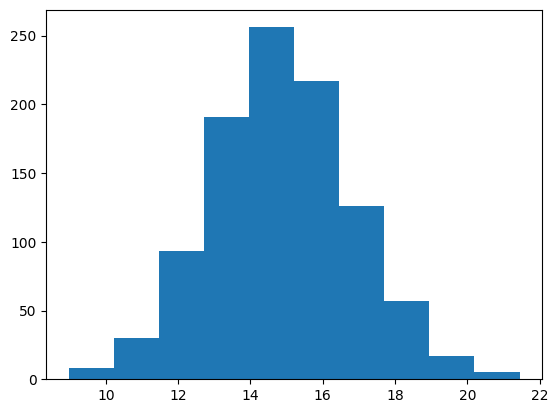
# It is easy to plot ND arrays, given the __array__ interface.
labels = 15 + 2 * tnp.random.randn(1, 1000)
_ = plt.hist(labels)
### Buffer copies
Intermixing TensorFlow NumPy with NumPy code may trigger data copies. This is because TensorFlow NumPy has stricter requirements on memory alignment than those of NumPy.
When a `np.ndarray` is passed to TensorFlow NumPy, it will check for alignment requirements and trigger a copy if needed. When passing an ND array CPU buffer to NumPy, generally the buffer will satisfy alignment requirements and NumPy will not need to create a copy.
ND arrays can refer to buffers placed on devices other than the local CPU memory. In such cases, invoking a NumPy function will trigger copies across the network or device as needed.
Given this, intermixing with NumPy API calls should generally be done with caution and the user should watch out for overheads of copying data. Interleaving TensorFlow NumPy calls with TensorFlow calls is generally safe and avoids copying data. See the section on [TensorFlow interoperability](https://www.tensorflow.org/guide/tf_numpy#tensorflow-interoperability) for more details.
### Operator precedence
TensorFlow NumPy defines an `__array_priority__` higher than NumPy's. This means that for operators involving both ND array and `np.ndarray`, the former will take precedence, i.e., `np.ndarray` input will get converted to an ND array and the TensorFlow NumPy implementation of the operator will get invoked.
x = tnp.ones([2]) + np.ones([2])
print("x = %s\nclass = %s" % (x, x.__class__))
```
x = tf.Tensor([2. 2.], shape=(2,), dtype=float64)
class =
```
## TF NumPy and TensorFlow
TensorFlow NumPy is built on top of TensorFlow and hence interoperates seamlessly with TensorFlow.
### [`tf.Tensor`](https://www.tensorflow.org/api_docs/python/tf/Tensor) and ND array
ND array is an alias to [`tf.Tensor`](https://www.tensorflow.org/api_docs/python/tf/Tensor), so obviously they can be intermixed without triggering actual data copies.
x = tf.constant([1, 2])
print(x)
# `asarray` and `convert_to_tensor` here are no-ops.
tnp_x = tnp.asarray(x)
print(tnp_x)
print(tf.convert_to_tensor(tnp_x))
# Note that tf.Tensor.numpy() will continue to return `np.ndarray`.
print(x.numpy(), x.numpy().__class__)
```
tf.Tensor([1 2], shape=(2,), dtype=int32)
tf.Tensor([1 2], shape=(2,), dtype=int32)
tf.Tensor([1 2], shape=(2,), dtype=int32)
[1 2]
```
### TensorFlow interoperability
An ND array can be passed to TensorFlow APIs, since ND array is just an alias to [`tf.Tensor`](https://www.tensorflow.org/api_docs/python/tf/Tensor). As mentioned earlier, such interoperation does not do data copies, even for data placed on accelerators or remote devices.
Conversely, [`tf.Tensor`](https://www.tensorflow.org/api_docs/python/tf/Tensor) objects can be passed to [`tf.experimental.numpy`](https://www.tensorflow.org/api_docs/python/tf/experimental/numpy) APIs, without performing data copies.
# ND array passed into TensorFlow function.
tf_sum = tf.reduce_sum(tnp.ones([2, 3], tnp.float32))
print("Output = %s" % tf_sum)
# `tf.Tensor` passed into TensorFlow NumPy function.
tnp_sum = tnp.sum(tf.ones([2, 3]))
print("Output = %s" % tnp_sum)
```
Output = tf.Tensor(6.0, shape=(), dtype=float32)
Output = tf.Tensor(6.0, shape=(), dtype=float32)
```
### Gradients and Jacobians: tf.GradientTape
TensorFlow's GradientTape can be used for backpropagation through TensorFlow and TensorFlow NumPy code.
Use the model created in [Example Model](https://www.tensorflow.org/guide/tf_numpy#example-model) section, and compute gradients and jacobians.
def create_batch(batch_size=32):
"""Creates a batch of input and labels."""
return (tnp.random.randn(batch_size, 32).astype(tnp.float32),
tnp.random.randn(batch_size, 2).astype(tnp.float32))
def compute_gradients(model, inputs, labels):
"""Computes gradients of squared loss between model prediction and labels."""
with tf.GradientTape() as tape:
assert model.weights is not None
# Note that `model.weights` need to be explicitly watched since they
# are not tf.Variables.
tape.watch(model.weights)
# Compute prediction and loss
prediction = model.predict(inputs)
loss = tnp.sum(tnp.square(prediction - labels))
# This call computes the gradient through the computation above.
return tape.gradient(loss, model.weights)
inputs, labels = create_batch()
gradients = compute_gradients(model, inputs, labels)
# Inspect the shapes of returned gradients to verify they match the
# parameter shapes.
print("Parameter shapes:", [w.shape for w in model.weights])
print("Gradient shapes:", [g.shape for g in gradients])
# Verify that gradients are of type ND array.
assert isinstance(gradients[0], tnp.ndarray)
```
Parameter shapes: [TensorShape([32, 64]), TensorShape([64]), TensorShape([64, 2])]
Gradient shapes: [TensorShape([32, 64]), TensorShape([64]), TensorShape([64, 2])]
```
# Computes a batch of jacobians. Each row is the jacobian of an element in the
# batch of outputs w.r.t. the corresponding input batch element.
def prediction_batch_jacobian(inputs):
with tf.GradientTape() as tape:
tape.watch(inputs)
prediction = model.predict(inputs)
return prediction, tape.batch_jacobian(prediction, inputs)
inp_batch = tnp.ones([16, 32], tnp.float32)
output, batch_jacobian = prediction_batch_jacobian(inp_batch)
# Note how the batch jacobian shape relates to the input and output shapes.
print("Output shape: %s, input shape: %s" % (output.shape, inp_batch.shape))
print("Batch jacobian shape:", batch_jacobian.shape)
```
Output shape: (16, 2), input shape: (16, 32)
Batch jacobian shape: (16, 2, 32)
```
### Trace compilation: tf.function
TensorFlow's [`tf.function`](https://www.tensorflow.org/api_docs/python/tf/function) works by "trace compiling" the code and then optimizing these traces for much faster performance. See the [Introduction to Graphs and Functions](https://www.tensorflow.org/guide/intro_to_graphs).
[`tf.function`](https://www.tensorflow.org/api_docs/python/tf/function) can be used to optimize TensorFlow NumPy code as well. Here is a simple example to demonstrate the speedups. Note that the body of [`tf.function`](https://www.tensorflow.org/api_docs/python/tf/function) code includes calls to TensorFlow NumPy APIs.
inputs, labels = create_batch(512)
print("Eager performance")
compute_gradients(model, inputs, labels)
print(timeit.timeit(lambda: compute_gradients(model, inputs, labels),
number=10) * 100, "ms")
print("\ntf.function compiled performance")
compiled_compute_gradients = tf.function(compute_gradients)
compiled_compute_gradients(model, inputs, labels) # warmup
print(timeit.timeit(lambda: compiled_compute_gradients(model, inputs, labels),
number=10) * 100, "ms")
```
Eager performance
3.3580271003302187 ms
tf.function compiled performance
0.7627720005984884 ms
```
### Vectorization: tf.vectorized_map
TensorFlow has inbuilt support for vectorizing parallel loops, which allows speedups of one to two orders of magnitude. These speedups are accessible via the [`tf.vectorized_map`](https://www.tensorflow.org/api_docs/python/tf/vectorized_map) API and apply to TensorFlow NumPy code as well.
It is sometimes useful to compute the gradient of each output in a batch w.r.t. the corresponding input batch element. Such computation can be done efficiently using [`tf.vectorized_map`](https://www.tensorflow.org/api_docs/python/tf/vectorized_map) as shown below.
@tf.function
def vectorized_per_example_gradients(inputs, labels):
def single_example_gradient(arg):
inp, label = arg
return compute_gradients(model,
tnp.expand_dims(inp, 0),
tnp.expand_dims(label, 0))
# Note that a call to `tf.vectorized_map` semantically maps
# `single_example_gradient` over each row of `inputs` and `labels`.
# The interface is similar to `tf.map_fn`.
# The underlying machinery vectorizes away this map loop which gives
# nice speedups.
return tf.vectorized_map(single_example_gradient, (inputs, labels))
batch_size = 128
inputs, labels = create_batch(batch_size)
per_example_gradients = vectorized_per_example_gradients(inputs, labels)
for w, p in zip(model.weights, per_example_gradients):
print("Weight shape: %s, batch size: %s, per example gradient shape: %s " % (
w.shape, batch_size, p.shape))
```
Weight shape: (32, 64), batch size: 128, per example gradient shape: (128, 32, 64)
Weight shape: (64,), batch size: 128, per example gradient shape: (128, 64)
Weight shape: (64, 2), batch size: 128, per example gradient shape: (128, 64, 2)
```
# Benchmark the vectorized computation above and compare with
# unvectorized sequential computation using `tf.map_fn`.
@tf.function
def unvectorized_per_example_gradients(inputs, labels):
def single_example_gradient(arg):
inp, label = arg
return compute_gradients(model,
tnp.expand_dims(inp, 0),
tnp.expand_dims(label, 0))
return tf.map_fn(single_example_gradient, (inputs, labels),
fn_output_signature=(tf.float32, tf.float32, tf.float32))
print("Running vectorized computation")
print(timeit.timeit(lambda: vectorized_per_example_gradients(inputs, labels),
number=10) * 100, "ms")
print("\nRunning unvectorized computation")
per_example_gradients = unvectorized_per_example_gradients(inputs, labels)
print(timeit.timeit(lambda: unvectorized_per_example_gradients(inputs, labels),
number=10) * 100, "ms")
```
Running vectorized computation
0.7744472997728735 ms
Running unvectorized computation
30.282336899836082 ms
```
### Device placement
TensorFlow NumPy can place operations on CPUs, GPUs, TPUs and remote devices. It uses standard TensorFlow mechanisms for device placement. Below a simple example shows how to list all devices and then place some computation on a particular device.
TensorFlow also has APIs for replicating computation across devices and performing collective reductions which will not be covered here.
#### List devices
[`tf.config.list_logical_devices`](https://www.tensorflow.org/api_docs/python/tf/config/list_logical_devices) and [`tf.config.list_physical_devices`](https://www.tensorflow.org/api_docs/python/tf/config/list_physical_devices) can be used to find what devices to use.
print("All logical devices:", tf.config.list_logical_devices())
print("All physical devices:", tf.config.list_physical_devices())
# Try to get the GPU device. If unavailable, fallback to CPU.
try:
device = tf.config.list_logical_devices(device_type="GPU")[0]
except IndexError:
device = "/device:CPU:0"
```
All logical devices: [LogicalDevice(name='/device:CPU:0', device_type='CPU'), LogicalDevice(name='/device:GPU:0', device_type='GPU'), LogicalDevice(name='/device:GPU:1', device_type='GPU'), LogicalDevice(name='/device:GPU:2', device_type='GPU'), LogicalDevice(name='/device:GPU:3', device_type='GPU')]
All physical devices: [PhysicalDevice(name='/physical_device:CPU:0', device_type='CPU'), PhysicalDevice(name='/physical_device:GPU:0', device_type='GPU'), PhysicalDevice(name='/physical_device:GPU:1', device_type='GPU'), PhysicalDevice(name='/physical_device:GPU:2', device_type='GPU'), PhysicalDevice(name='/physical_device:GPU:3', device_type='GPU')]
```
#### Placing operations: **[`tf.device`](https://www.tensorflow.org/api_docs/python/tf/device)**
Operations can be placed on a device by calling it in a [`tf.device`](https://www.tensorflow.org/api_docs/python/tf/device) scope.
print("Using device: %s" % str(device))
# Run operations in the `tf.device` scope.
# If a GPU is available, these operations execute on the GPU and outputs are
# placed on the GPU memory.
with tf.device(device):
prediction = model.predict(create_batch(5)[0])
print("prediction is placed on %s" % prediction.device)
```
Using device: LogicalDevice(name='/device:GPU:0', device_type='GPU')
prediction is placed on /job:localhost/replica:0/task:0/device:GPU:0
```
#### Copying ND arrays across devices: **`tnp.copy`**
A call to `tnp.copy`, placed in a certain device scope, will copy the data to that device, unless the data is already on that device.
with tf.device("/device:CPU:0"):
prediction_cpu = tnp.copy(prediction)
print(prediction.device)
print(prediction_cpu.device)
```
/job:localhost/replica:0/task:0/device:GPU:0
/job:localhost/replica:0/task:0/device:CPU:0
```
## Performance comparisons
TensorFlow NumPy uses highly optimized TensorFlow kernels that can be dispatched on CPUs, GPUs and TPUs. TensorFlow also performs many compiler optimizations, like operation fusion, which translate to performance and memory improvements. See [TensorFlow graph optimization with Grappler](https://www.tensorflow.org/guide/graph_optimization) to learn more.
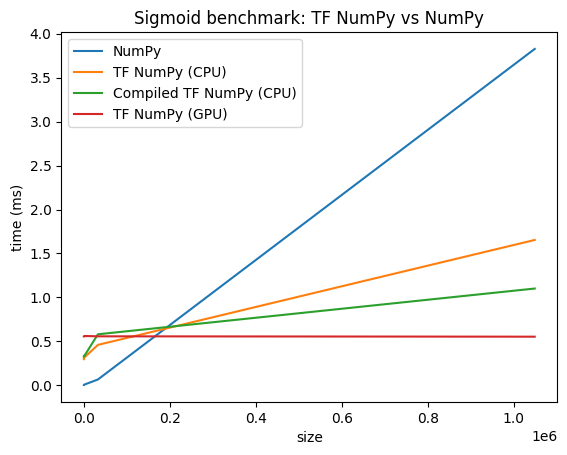
However TensorFlow has higher overheads for dispatching operations compared to NumPy. For workloads composed of small operations (less than about 10 microseconds), these overheads can dominate the runtime and NumPy could provide better performance. For other cases, TensorFlow should generally provide better performance.
Run the benchmark below to compare NumPy and TensorFlow NumPy performance for different input sizes.
def benchmark(f, inputs, number=30, force_gpu_sync=False):
"""Utility to benchmark `f` on each value in `inputs`."""
times = []
for inp in inputs:
def _g():
if force_gpu_sync:
one = tnp.asarray(1)
f(inp)
if force_gpu_sync:
with tf.device("CPU:0"):
tnp.copy(one) # Force a sync for GPU case
_g() # warmup
t = timeit.timeit(_g, number=number)
times.append(t * 1000. / number)
return times
def plot(np_times, tnp_times, compiled_tnp_times, has_gpu, tnp_times_gpu):
"""Plot the different runtimes."""
plt.xlabel("size")
plt.ylabel("time (ms)")
plt.title("Sigmoid benchmark: TF NumPy vs NumPy")
plt.plot(sizes, np_times, label="NumPy")
plt.plot(sizes, tnp_times, label="TF NumPy (CPU)")
plt.plot(sizes, compiled_tnp_times, label="Compiled TF NumPy (CPU)")
if has_gpu:
plt.plot(sizes, tnp_times_gpu, label="TF NumPy (GPU)")
plt.legend()
# Define a simple implementation of `sigmoid`, and benchmark it using
# NumPy and TensorFlow NumPy for different input sizes.
def np_sigmoid(y):
return 1. / (1. + np.exp(-y))
def tnp_sigmoid(y):
return 1. / (1. + tnp.exp(-y))
@tf.function
def compiled_tnp_sigmoid(y):
return tnp_sigmoid(y)
sizes = (2 ** 0, 2 ** 5, 2 ** 10, 2 ** 15, 2 ** 20)
np_inputs = [np.random.randn(size).astype(np.float32) for size in sizes]
np_times = benchmark(np_sigmoid, np_inputs)
with tf.device("/device:CPU:0"):
tnp_inputs = [tnp.random.randn(size).astype(np.float32) for size in sizes]
tnp_times = benchmark(tnp_sigmoid, tnp_inputs)
compiled_tnp_times = benchmark(compiled_tnp_sigmoid, tnp_inputs)
has_gpu = len(tf.config.list_logical_devices("GPU"))
if has_gpu:
with tf.device("/device:GPU:0"):
tnp_inputs = [tnp.random.randn(size).astype(np.float32) for size in sizes]
tnp_times_gpu = benchmark(compiled_tnp_sigmoid, tnp_inputs, 100, True)
else:
tnp_times_gpu = None
plot(np_times, tnp_times, compiled_tnp_times, has_gpu, tnp_times_gpu)
## Further reading
- [TensorFlow NumPy: Distributed Image Classification Tutorial](https://github.com/tensorflow/tensorflow/blob/master/tensorflow/python/ops/numpy_ops/g3doc/TensorFlow_Numpy_Distributed_Image_Classification.ipynb)
- [TensorFlow NumPy: Keras and Distribution Strategy](https://github.com/tensorflow/tensorflow/blob/master/tensorflow/python/ops/numpy_ops/g3doc/TensorFlow_NumPy_Keras_and_Distribution_Strategy.ipynb)
- [Sentiment Analysis with Trax and TensorFlow NumPy](https://github.com/google/trax/blob/master/trax/tf_numpy_and_keras.ipynb)