|---|---|---|---|
| [View on TensorFlow.org](https://www.tensorflow.org/hub/tutorials/bangla_article_classifier) | [Run in Google Colab](https://colab.research.google.com/github/tensorflow/docs/blob/master/site/en/hub/tutorials/bangla_article_classifier.ipynb) | [View on GitHub](https://github.com/tensorflow/docs/blob/master/site/en/hub/tutorials/bangla_article_classifier.ipynb) | [Download notebook](https://storage.googleapis.com/tensorflow_docs/docs/site/en/hub/tutorials/bangla_article_classifier.ipynb) |
> [!CAUTION]
> **Caution:** In addition to installing Python packages with pip, this notebook uses `sudo apt install` to install system packages: `unzip`.
This Colab is a demonstration of using [Tensorflow Hub](https://www.tensorflow.org/hub/) for text classification in non-English/local languages. Here we choose [Bangla](https://en.wikipedia.org/wiki/Bengali_language) as the local language and use pretrained word embeddings to solve a multiclass classification task where we classify Bangla news articles in 5 categories. The pretrained embeddings for Bangla comes from [fastText](https://fasttext.cc/docs/en/crawl-vectors.html) which is a library by Facebook with released pretrained word vectors for 157 languages.
We'll use TF-Hub's pretrained embedding exporter for converting the word embeddings to a text embedding module first and then use the module to train a classifier with [tf.keras](https://www.tensorflow.org/api_docs/python/tf/keras), Tensorflow's high level user friendly API to build deep learning models. Even if we are using fastText embeddings here, it's possible to export any other embeddings pretrained from other tasks and quickly get results with Tensorflow hub.
## Setup
pip install gdown tf-keras
```
Error processing line 1 of /tmpfs/src/tf_docs_env/lib/python3.11/site-packages/tfdocs_sitecustomize.
pth:
Traceback (most recent call last):
File "", line 195, in addpackage
File "", line 1
import _tfdocs_sitecustomize\n
^
SyntaxErr
or: unexpected character after line continuation character
Remainder of file ignored
Error processing line 1 of /tmpfs/src/tf_docs_env/lib/python3.11/site-packages/tfdocs_sitecustomize.
pth:
Traceback (most recent call last):
File "", line 195, in addpackage
Fil
e "", line 1
import _tfdocs_sitecustomize\n
^
Syn
taxError: unexpected character after line continuation character
Remainder of file ignored
```
sudo apt-get install -y unzip
```
Reading package lists...
Building dependency tree...
Reading state information...
unzip is already the newest version (6.0-25ubuntu1.2).
0 upgraded, 0 newly installed, 0 to remove an
d 190 not upgraded.
```
import os
os.environ['TF_USE_LEGACY_KERAS'] = '1'
import tensorflow as tf
import tensorflow_hub as hub
import gdown
import numpy as np
from sklearn.metrics import classification_report
import matplotlib.pyplot as plt
import seaborn as sns
```
/tmpfs/src/tf_docs_env/lib/python3.11/site-packages/tensorflow_hub/__init__.py:61: UserWarning: pkg_resources is deprecated as an API. See https://setuptools.pypa.io/en/latest/pkg_resources.html. The pkg_resources package is slated for removal as early as 2025-11-30. Refrain from using this package or pin to Setuptools<81.
from pkg_resources import parse_version
```
# Dataset
We will use [BARD](https://www.researchgate.net/publication/328214545_BARD_Bangla_Article_Classification_Using_a_New_Comprehensive_Dataset) (Bangla Article Dataset) which has around 376,226 articles collected from different Bangla news portals and labelled with 5 categories: economy, state, international, sports, and entertainment. We download the file from Google Drive this ([bit.ly/BARD_DATASET](https://bit.ly/BARD_DATASET)) link is referring to from [this](https://github.com/tanvirfahim15/BARD-Bangla-Article-Classifier) GitHub repository.
gdown.download(
url='https://drive.google.com/uc?id=1Ag0jd21oRwJhVFIBohmX_ogeojVtapLy',
output='bard.zip',
quiet=True
)
```
'bard.zip'
```
unzip -qo bard.zip
# Export pretrained word vectors to TF-Hub module
TF-Hub provides some useful scripts for converting word embeddings to TF-hub text embedding modules [here](https://github.com/tensorflow/hub/tree/master/examples/text_embeddings_v2). To make the module for Bangla or any other languages, we simply have to download the word embedding `.txt` or `.vec` file to the same directory as `export_v2.py` and run the script.
The exporter reads the embedding vectors and exports it to a Tensorflow [SavedModel](https://www.tensorflow.org/beta/guide/saved_model). A SavedModel contains a complete TensorFlow program including weights and graph. TF-Hub can load the SavedModel as a [module](https://www.tensorflow.org/hub/api_docs/python/hub/Module), which we will use to build the model for text classification. Since we are using [`tf.keras`](https://www.tensorflow.org/api_docs/python/tf/keras) to build the model, we will use [hub.KerasLayer](https://www.tensorflow.org/hub/api_docs/python/hub/KerasLayer), which provides a wrapper for a TF-Hub module to use as a Keras Layer.
First we will get our word embeddings from fastText and embedding exporter from TF-Hub [repo](https://github.com/tensorflow/hub).
curl -O https://dl.fbaipublicfiles.com/fasttext/vectors-crawl/cc.bn.300.vec.gz
curl -O https://raw.githubusercontent.com/tensorflow/hub/master/examples/text_embeddings_v2/export_v2.py
gunzip -qf cc.bn.300.vec.gz --k
```
% Total % Received % Xferd Average Speed Time
Time Time Current
Dload Upload Total Spent Left Speed
0 0 0 0 0
0 0 0 --:--:-- --:--:-- --:--:-- 0
5 840M 5 48.6M 0 0 69.2M 0 0:00:12 --:--:-- 0:00:12 69.1M
29 840M 29 245M 0 0 144M 0 0:00:05 0:00:01 0:00:04 144M
53 840M 53 451M 0 0 167M 0 0:00:05 0:00:02 0:00:03 167M
78 840M 78 662M 0 0 179M 0 0:00:04 0:00:03 0:00:01 178M
100 840M 100 840M 0 0 186M 0 0:00:04 0:00:04 --:--:-- 186M
% Total % Received % Xferd Average Speed Time Time Time Current
Dload Upload Tota
l Spent Left Speed
0 0 0 0 0 0 0 0 --:--:-- --:--:-- --:--:-- 0
100 7500 100 7500 0 0 44642 0 --:--:-- --:--:-- --:--:-- 44642
```
Then, we will run the exporter script on our embedding file. Since fastText embeddings have a header line and are pretty large (around 3.3 GB for Bangla after converting to a module) we ignore the first line and export only the first 100, 000 tokens to the text embedding module.
python export_v2.py --embedding_file=cc.bn.300.vec --export_path=text_module --num_lines_to_ignore=1 --num_lines_to_use=100000
```
Error processing line 1 of /tmpfs/src/tf_docs_env/lib/python3.11/site-packages/tfdocs_sitecustomize.
pth:
Traceback (most recent call last):
File "", line 195, in addpackage
File "", line 1
import _tfdocs_sitecustomize\n
^
SyntaxErr
or: unexpected character after line continuation character
Remainder of file ignored
Error processing line 1 of /tmpfs/src/tf_docs_env/lib/python3.11/site-packages/tfdocs_sitecustomize.
pth:
Traceback (most recent call last):
File "", line 195, in addpackage
Fil
e "", line 1
import _tfdocs_sitecustomize\n
^
Syn
taxError: unexpected character after line continuation character
Remainder of file ignored
WARNING: All log messages before absl::InitializeLog() is called are written to STDERR
E0000 00:00:1
793885087.219438 79951 cuda_platform.cc:52] failed call to cuInit: INTERNAL: CUDA error: Failed ca
ll to cuInit: CUDA_ERROR_NO_DEVICE: no CUDA-capable device is detected
I1105 13:24:58.324103 140072277776192 functional_saver.py:440] Sharding callback duration: 10 micros
econds
I1105 13:24:58.361042 140072277776192 functional_saver.py:440] Sharding callback duration: 6 microse
conds
INFO:tensorflow:Assets written to: text_module/assets
I1105 13:24:58.711314 140072277776192 builder_
impl.py:838] Assets written to: text_module/assets
I1105 13:24:58.712100 140072277776192 fingerprinting_utils.py:49] Writing fingerprint to text_module
/fingerprint.pb
```
module_path = "text_module"
embedding_layer = hub.KerasLayer(module_path, trainable=False)
```
WARNING: All log messages before absl::InitializeLog() is called are written to STDERR
E0000 00:00:1793885099.728154 79845 cuda_platform.cc:52] failed call to cuInit: INTERNAL: CUDA error: Failed call to cuInit: CUDA_ERROR_NO_DEVICE: no CUDA-capable device is detected
```
The text embedding module takes a batch of sentences in a 1D tensor of strings as input and outputs the embedding vectors of shape (batch_size, embedding_dim) corresponding to the sentences. It preprocesses the input by splitting on spaces. Word embeddings are combined to sentence embeddings with the `sqrtn` combiner(See [here](https://www.tensorflow.org/api_docs/python/tf/nn/embedding_lookup_sparse)). For demonstration we pass a list of Bangla words as input and get the corresponding embedding vectors.
embedding_layer(['বাস', 'বসবাস', 'ট্রেন', 'যাত্রী', 'ট্রাক'])
```
```
# Convert to Tensorflow Dataset
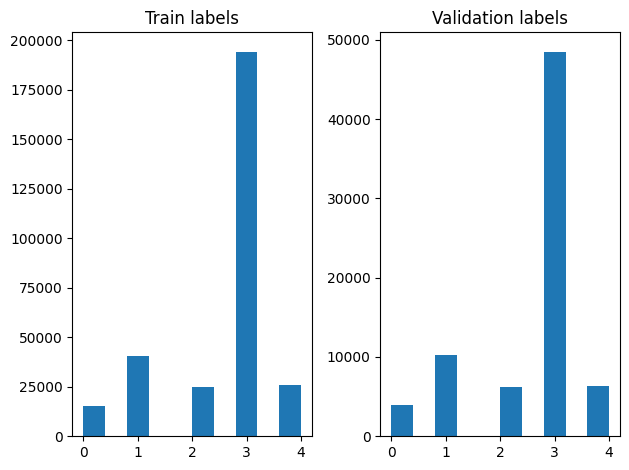
Since the dataset is really large instead of loading the entire dataset in memory we will use a generator to yield samples in run-time in batches using [Tensorflow Dataset](https://www.tensorflow.org/api_docs/python/tf/data/Dataset) functions. The dataset is also very imbalanced, so, before using the generator, we will shuffle the dataset.
dir_names = ['economy', 'sports', 'entertainment', 'state', 'international']
file_paths = []
labels = []
for i, dir in enumerate(dir_names):
file_names = ["/".join([dir, name]) for name in os.listdir(dir)]
file_paths += file_names
labels += [i] * len(os.listdir(dir))
np.random.seed(42)
permutation = np.random.permutation(len(file_paths))
file_paths = np.array(file_paths)[permutation]
labels = np.array(labels)[permutation]
We can check the distribution of labels in the training and validation examples after shuffling.
train_frac = 0.8
train_size = int(len(file_paths) * train_frac)
# plot training vs validation distribution
plt.subplot(1, 2, 1)
plt.hist(labels[0:train_size])
plt.title("Train labels")
plt.subplot(1, 2, 2)
plt.hist(labels[train_size:])
plt.title("Validation labels")
plt.tight_layout()
To create a [Dataset](https://www.tensorflow.org/api_docs/python/tf/data/Dataset) using a generator, we first write a generator function which reads each of the articles from `file_paths` and the labels from the label array, and yields one training example at each step. We pass this generator function to the [`tf.data.Dataset.from_generator`](https://www.tensorflow.org/api_docs/python/tf/data/Dataset#from_generator) method and specify the output types. Each training example is a tuple containing an article of [`tf.string`](https://www.tensorflow.org/api_docs/python/tf#string) data type and one-hot encoded label. We split the dataset with a train-validation split of 80-20 using [`tf.data.Dataset.skip`](https://www.tensorflow.org/api_docs/python/tf/data/Dataset#skip) and [`tf.data.Dataset.take`](https://www.tensorflow.org/api_docs/python/tf/data/Dataset#take) methods.
def load_file(path, label):
return tf.io.read_file(path), label
def make_datasets(train_size):
batch_size = 256
train_files = file_paths[:train_size]
train_labels = labels[:train_size]
train_ds = tf.data.Dataset.from_tensor_slices((train_files, train_labels))
train_ds = train_ds.map(load_file).shuffle(5000)
train_ds = train_ds.batch(batch_size).prefetch(tf.data.AUTOTUNE)
test_files = file_paths[train_size:]
test_labels = labels[train_size:]
test_ds = tf.data.Dataset.from_tensor_slices((test_files, test_labels))
test_ds = test_ds.map(load_file)
test_ds = test_ds.batch(batch_size).prefetch(tf.data.AUTOTUNE)
return train_ds, test_ds
train_data, validation_data = make_datasets(train_size)
# Model Training and Evaluation
Since we have already added a wrapper around our module to use it as any other layer in Keras, we can create a small [Sequential](https://www.tensorflow.org/api_docs/python/tf/keras/Sequential) model which is a linear stack of layers. We can add our text embedding module with `model.add` just like any other layer. We compile the model by specifying the loss and optimizer and train it for 10 epochs. The [`tf.keras`](https://www.tensorflow.org/api_docs/python/tf/keras) API can handle Tensorflow Datasets as input, so we can pass a Dataset instance to the fit method for model training. Since we are using the generator function, [`tf.data`](https://www.tensorflow.org/api_docs/python/tf/data) will handle generating the samples, batching them and feeding them to the model.
## Model
def create_model():
model = tf.keras.Sequential([
tf.keras.layers.Input(shape=[], dtype=tf.string),
embedding_layer,
tf.keras.layers.Dense(64, activation="relu"),
tf.keras.layers.Dense(16, activation="relu"),
tf.keras.layers.Dense(5),
])
model.compile(loss=tf.losses.SparseCategoricalCrossentropy(from_logits=True),
optimizer="adam", metrics=['accuracy'])
return model
model = create_model()
# Create earlystopping callback
early_stopping_callback = tf.keras.callbacks.EarlyStopping(monitor='val_loss', min_delta=0, patience=3)
## Training
history = model.fit(train_data,
validation_data=validation_data,
epochs=5,
callbacks=[early_stopping_callback])
```
Epoch 1/5
1176/1176 [==============================] - 42s 35ms/step - loss: 0.2368 - accuracy: 0.9223 - val_loss: 0.1552 - val_accuracy: 0.9458
Epoch 2/5
1176/1176 [==============================] - 41s 34ms/step - loss: 0.1441 - accuracy: 0.9496 - val_loss: 0.1386 - val_accuracy: 0.9502
Epoch 3/5
1176/1176 [==============================] - 41s 35ms/step - loss: 0.1331 - accuracy: 0.9523 - val_loss: 0.1374 - val_accuracy: 0.9494
Epoch 4/5
1176/1176 [==============================] - 41s 35ms/step - loss: 0.1252 - accuracy: 0.9546 - val_loss: 0.1296 - val_accuracy: 0.9530
Epoch 5/5
1176/1176 [==============================] - 41s 35ms/step - loss: 0.1200 - accuracy: 0.9561 - val_loss: 0.1214 - val_accuracy: 0.9560
```
## Evaluation
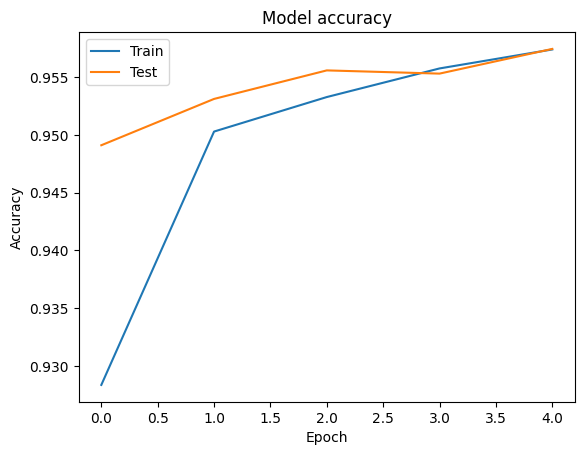
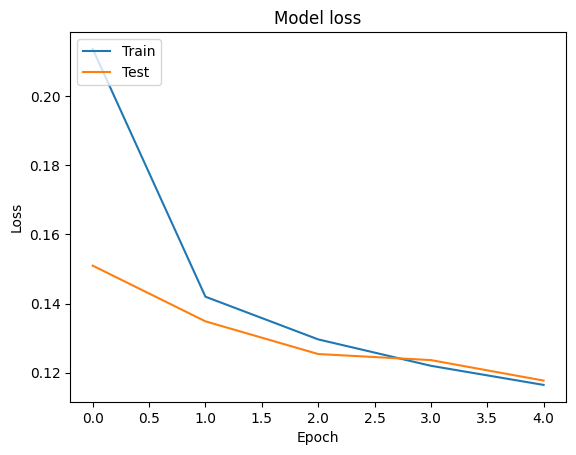
We can visualize the accuracy and loss curves for training and validation data using the [`tf.keras.callbacks.History`](https://www.tensorflow.org/api_docs/python/tf/keras/callbacks/History) object returned by the [`tf.keras.Model.fit`](https://www.tensorflow.org/api_docs/python/tf/keras/Model#fit) method, which contains the loss and accuracy value for each epoch.
# Plot training & validation accuracy values
plt.plot(history.history['accuracy'])
plt.plot(history.history['val_accuracy'])
plt.title('Model accuracy')
plt.ylabel('Accuracy')
plt.xlabel('Epoch')
plt.legend(['Train', 'Test'], loc='upper left')
plt.show()
# Plot training & validation loss values
plt.plot(history.history['loss'])
plt.plot(history.history['val_loss'])
plt.title('Model loss')
plt.ylabel('Loss')
plt.xlabel('Epoch')
plt.legend(['Train', 'Test'], loc='upper left')
plt.show()
## Prediction
We can get the predictions for the validation data and check the confusion matrix to see the model's performance for each of the 5 classes. Because [`tf.keras.Model.predict`](https://www.tensorflow.org/api_docs/python/tf/keras/Model#predict) method returns an n-d array for probabilities for each class, they can be converted to class labels using `np.argmax`.
y_pred = model.predict(validation_data)
```
294/294 [==============================] - 8s 27ms/step
```
y_pred = np.argmax(y_pred, axis=1)
samples = file_paths[0:3]
for i, sample in enumerate(samples):
f = open(sample)
text = f.read()
print(text[0:100])
print("True Class: ", sample.split("/")[0])
print("Predicted Class: ", dir_names[y_pred[i]])
f.close()
```
মোস্তফা সরয়ার ফারুকীর টেলিভিশন ছবিতে চিরকুট ব্যান্ডের গাওয়া ‘কানামাছি’ গানটি দারুণ জনপ্রিয় হয়। এবার
True Class: entertainment
Predicted Class: state
দিনে প্রখর রোদ, তীব্র দাবদাহ। রাতে ভ্যাপসা গরম। সঙ্গে লোডশেডিং। সব মিলিয়ে জনজীবন অতিষ্ঠ। লোডশেডি
True Class: state
Predicted Class: state
টেস্টে বোলিং করার অভিজ্ঞতা তামিম ইকবালের আছে। ওয়ানডেতেও বল করেছেন। মুশফিকুর রহিমের অবশ্য আন্তর্জা
True Class: sports
Predicted Class: state
```
## Compare Performance
Now we can take the correct labels for the validation data from `labels` and compare them with our predictions to get a [classification_report](http://scikit-learn.org/stable/modules/generated/sklearn.metrics.classification_report.html).
y_true = np.array(labels[train_size:])
print(classification_report(y_true, y_pred, target_names=dir_names))
```
precision recall f1-score support
economy 0.85 0.73 0.79 3897
sports 0.99 0.98 0.98 10204
entertainment 0.91 0.93 0.92 6256
state 0.97 0.98 0.97 48512
international 0.92 0.93 0.93 6377
accuracy 0.96 75246
macro avg 0.93 0.91 0.92 75246
weighted avg 0.96 0.96 0.96 75246
```
We can also compare our model's performance with the published results obtained in the original [paper](https://www.researchgate.net/publication/328214545_BARD_Bangla_Article_Classification_Using_a_New_Comprehensive_Dataset), which had a 0.96 precision .The original authors described many preprocessing steps performed on the dataset, such as dropping punctuations and digits, removing top 25 most frequest stop words. As we can see in the `classification_report`, we also manage to obtain a 0.96 precision and accuracy after training for only 5 epochs without any preprocessing!
In this example, when we created the Keras layer from our embedding module, we set the parameter`trainable=False`, which means the embedding weights will not be updated during training. Try setting it to `True` to reach around 97% accuracy using this dataset after only 2 epochs.