|---|---|---|---|---|
| [View on TensorFlow.org](https://www.tensorflow.org/hub/tutorials/text_classification_with_tf_hub_on_kaggle) | [Run in Google Colab](https://colab.research.google.com/github/tensorflow/docs/blob/master/site/en/hub/tutorials/text_classification_with_tf_hub_on_kaggle.ipynb) | [View on GitHub](https://github.com/tensorflow/docs/blob/master/site/en/hub/tutorials/text_classification_with_tf_hub_on_kaggle.ipynb) | [Download notebook](https://storage.googleapis.com/tensorflow_docs/docs/site/en/hub/tutorials/text_classification_with_tf_hub_on_kaggle.ipynb) | [See TF Hub model](https://tfhub.dev/google/nnlm-en-dim128/1) |
TF-Hub is a platform to share machine learning expertise packaged in reusable resources, notably pre-trained **modules**. In this tutorial, we will use a TF-Hub text embedding module to train a simple sentiment classifier with a reasonable baseline accuracy. We will then submit the predictions to Kaggle.
For more detailed tutorial on text classification with TF-Hub and further steps for improving the accuracy, take a look at [Text classification with TF-Hub](https://colab.research.google.com/github/tensorflow/docs/blob/master/site/en/hub/tutorials/text_classification_with_tf_hub.ipynb).
## Setup
pip install -q kaggle
import tensorflow as tf
import tensorflow_hub as hub
import matplotlib.pyplot as plt
import numpy as np
import pandas as pd
import seaborn as sns
import zipfile
from sklearn import model_selection
```
2024-08-16 12:59:15.944533: E external/local_xla/xla/stream_executor/cuda/cuda_fft.cc:485] Unable to register cuFFT factory: Attempting to register factory for plugin cuFFT when one has already been registered
2024-08-16 12:59:15.967878: E external/local_xla/xla/stream_executor/cuda/cuda_dnn.cc:8454] Unable to register cuDNN factory: Attempting to register factory for plugin cuDNN when one has already been registered
2024-08-16 12:59:15.974969: E external/local_xla/xla/stream_executor/cuda/cuda_blas.cc:1452] Unable to register cuBLAS factory: Attempting to register factory for plugin cuBLAS when one has already been registered
```
Since this tutorial will be using a dataset from Kaggle, it requires [creating an API Token](https://github.com/Kaggle/kaggle-api) for your Kaggle account, and uploading it to the Colab environment.
import os
import pathlib
# Upload the API token.
def get_kaggle():
try:
import kaggle
return kaggle
except OSError:
pass
token_file = pathlib.Path("~/.kaggle/kaggle.json").expanduser()
token_file.parent.mkdir(exist_ok=True, parents=True)
try:
from google.colab import files
except ImportError:
raise ValueError("Could not find kaggle token.")
uploaded = files.upload()
token_content = uploaded.get('kaggle.json', None)
if token_content:
token_file.write_bytes(token_content)
token_file.chmod(0o600)
else:
raise ValueError('Need a file named "kaggle.json"')
import kaggle
return kaggle
kaggle = get_kaggle()
# Getting started
## Data
We will try to solve the [Sentiment Analysis on Movie Reviews](https://www.kaggle.com/c/sentiment-analysis-on-movie-reviews/data) task from Kaggle. The dataset consists of syntactic subphrases of the Rotten Tomatoes movie reviews. The task is to label the phrases as **negative** or **positive** on the scale from 1 to 5.
You must [accept the competition rules](https://www.kaggle.com/c/sentiment-analysis-on-movie-reviews/data) before you can use the API to download the data.
SENTIMENT_LABELS = [
"negative", "somewhat negative", "neutral", "somewhat positive", "positive"
]
# Add a column with readable values representing the sentiment.
def add_readable_labels_column(df, sentiment_value_column):
df["SentimentLabel"] = df[sentiment_value_column].replace(
range(5), SENTIMENT_LABELS)
# Download data from Kaggle and create a DataFrame.
def load_data_from_zip(path):
with zipfile.ZipFile(path, "r") as zip_ref:
name = zip_ref.namelist()[0]
with zip_ref.open(name) as zf:
return pd.read_csv(zf, sep="\t", index_col=0)
# The data does not come with a validation set so we'll create one from the
# training set.
def get_data(competition, train_file, test_file, validation_set_ratio=0.1):
data_path = pathlib.Path("data")
kaggle.api.competition_download_files(competition, data_path)
competition_path = (data_path/competition)
competition_path.mkdir(exist_ok=True, parents=True)
competition_zip_path = competition_path.with_suffix(".zip")
with zipfile.ZipFile(competition_zip_path, "r") as zip_ref:
zip_ref.extractall(competition_path)
train_df = load_data_from_zip(competition_path/train_file)
test_df = load_data_from_zip(competition_path/test_file)
# Add a human readable label.
add_readable_labels_column(train_df, "Sentiment")
# We split by sentence ids, because we don't want to have phrases belonging
# to the same sentence in both training and validation set.
train_indices, validation_indices = model_selection.train_test_split(
np.unique(train_df["SentenceId"]),
test_size=validation_set_ratio,
random_state=0)
validation_df = train_df[train_df["SentenceId"].isin(validation_indices)]
train_df = train_df[train_df["SentenceId"].isin(train_indices)]
print("Split the training data into %d training and %d validation examples." %
(len(train_df), len(validation_df)))
return train_df, validation_df, test_df
train_df, validation_df, test_df = get_data(
"sentiment-analysis-on-movie-reviews",
"train.tsv.zip", "test.tsv.zip")
```
Split the training data into 140315 training and 15745 validation examples.
```
> [!NOTE]
> **Note:** In this competition the task is not to rate entire reviews, but individual phrases from within the reviews. This is a much harder task.
train_df.head(20)
## Training an Model
> [!NOTE]
> **Note:** We could model this task also as a regression, see [Text classification with TF-Hub](https://colab.research.google.com/github/tensorflow/docs/blob/master/site/en/hub/tutorials/text_classification_with_tf_hub.ipynb).\*
class MyModel(tf.keras.Model):
def __init__(self, hub_url):
super().__init__()
self.hub_url = hub_url
self.embed = hub.load(self.hub_url).signatures['default']
self.sequential = tf.keras.Sequential([
tf.keras.layers.Dense(500),
tf.keras.layers.Dense(100),
tf.keras.layers.Dense(5),
])
def call(self, inputs):
phrases = inputs['Phrase'][:,0]
embedding = 5*self.embed(phrases)['default']
return self.sequential(embedding)
def get_config(self):
return {"hub_url":self.hub_url}
model = MyModel("https://tfhub.dev/google/nnlm-en-dim128/1")
model.compile(
loss = tf.losses.SparseCategoricalCrossentropy(from_logits=True),
optimizer=tf.optimizers.Adam(),
metrics = [tf.keras.metrics.SparseCategoricalAccuracy(name="accuracy")])
```
2024-08-16 12:59:28.509412: E external/local_xla/xla/stream_executor/cuda/cuda_driver.cc:266] failed call to cuInit: CUDA_ERROR_NO_DEVICE: no CUDA-capable device is detected
```
history = model.fit(x=dict(train_df), y=train_df['Sentiment'],
validation_data=(dict(validation_df), validation_df['Sentiment']),
epochs = 25)
```
Epoch 1/25
4385/4385 ━━━━━━━━━━━━━━━━━━━━ 17s 4ms/step - accuracy: 0.5688 - loss: 1.0685 - val_accuracy: 0.5899 - val_loss: 0.9943
Epoch 2/25
4385/4385 ━━━━━━━━━━━━━━━━━━━━ 16s 4ms/step - accuracy: 0.5954 - loss: 1.0004 - val_accuracy: 0.5816 - val_loss: 1.0005
Epoch 3/25
4385/4385 ━━━━━━━━━━━━━━━━━━━━ 16s 4ms/step - accuracy: 0.5933 - loss: 0.9996 - val_accuracy: 0.5938 - val_loss: 0.9860
Epoch 4/25
4385/4385 ━━━━━━━━━━━━━━━━━━━━ 16s 4ms/step - accuracy: 0.5974 - loss: 0.9964 - val_accuracy: 0.5939 - val_loss: 0.9821
Epoch 5/25
4385/4385 ━━━━━━━━━━━━━━━━━━━━ 16s 4ms/step - accuracy: 0.5994 - loss: 0.9904 - val_accuracy: 0.5907 - val_loss: 0.9825
Epoch 6/25
4385/4385 ━━━━━━━━━━━━━━━━━━━━ 16s 4ms/step - accuracy: 0.5990 - loss: 0.9881 - val_accuracy: 0.5995 - val_loss: 0.9801
Epoch 7/25
4385/4385 ━━━━━━━━━━━━━━━━━━━━ 16s 4ms/step - accuracy: 0.5976 - loss: 0.9925 - val_accuracy: 0.5953 - val_loss: 0.9839
Epoch 8/25
4385/4385 ━━━━━━━━━━━━━━━━━━━━ 16s 4ms/step - accuracy: 0.5977 - loss: 0.9914 - val_accuracy: 0.5968 - val_loss: 0.9774
Epoch 9/25
4385/4385 ━━━━━━━━━━━━━━━━━━━━ 16s 4ms/step - accuracy: 0.5994 - loss: 0.9855 - val_accuracy: 0.5966 - val_loss: 0.9820
Epoch 10/25
4385/4385 ━━━━━━━━━━━━━━━━━━━━ 16s 4ms/step - accuracy: 0.6006 - loss: 0.9868 - val_accuracy: 0.5920 - val_loss: 0.9846
Epoch 11/25
4385/4385 ━━━━━━━━━━━━━━━━━━━━ 16s 4ms/step - accuracy: 0.6014 - loss: 0.9870 - val_accuracy: 0.5945 - val_loss: 0.9859
Epoch 12/25
4385/4385 ━━━━━━━━━━━━━━━━━━━━ 16s 4ms/step - accuracy: 0.6007 - loss: 0.9856 - val_accuracy: 0.5965 - val_loss: 0.9822
Epoch 13/25
4385/4385 ━━━━━━━━━━━━━━━━━━━━ 16s 4ms/step - accuracy: 0.5993 - loss: 0.9862 - val_accuracy: 0.5979 - val_loss: 0.9795
Epoch 14/25
4385/4385 ━━━━━━━━━━━━━━━━━━━━ 16s 4ms/step - accuracy: 0.5996 - loss: 0.9865 - val_accuracy: 0.5975 - val_loss: 0.9802
Epoch 15/25
4385/4385 ━━━━━━━━━━━━━━━━━━━━ 16s 4ms/step - accuracy: 0.5977 - loss: 0.9910 - val_accuracy: 0.6023 - val_loss: 0.9741
Epoch 16/25
4385/4385 ━━━━━━━━━━━━━━━━━━━━ 16s 4ms/step - accuracy: 0.6013 - loss: 0.9846 - val_accuracy: 0.5916 - val_loss: 0.9868
Epoch 17/25
4385/4385 ━━━━━━━━━━━━━━━━━━━━ 16s 4ms/step - accuracy: 0.5993 - loss: 0.9875 - val_accuracy: 0.5912 - val_loss: 0.9809
Epoch 18/25
4385/4385 ━━━━━━━━━━━━━━━━━━━━ 16s 4ms/step - accuracy: 0.5983 - loss: 0.9889 - val_accuracy: 0.5992 - val_loss: 0.9809
Epoch 19/25
4385/4385 ━━━━━━━━━━━━━━━━━━━━ 16s 4ms/step - accuracy: 0.6017 - loss: 0.9824 - val_accuracy: 0.6026 - val_loss: 0.9778
Epoch 20/25
4385/4385 ━━━━━━━━━━━━━━━━━━━━ 16s 4ms/step - accuracy: 0.6017 - loss: 0.9836 - val_accuracy: 0.5926 - val_loss: 0.9844
Epoch 21/25
4385/4385 ━━━━━━━━━━━━━━━━━━━━ 16s 4ms/step - accuracy: 0.6006 - loss: 0.9864 - val_accuracy: 0.5971 - val_loss: 0.9752
Epoch 22/25
4385/4385 ━━━━━━━━━━━━━━━━━━━━ 16s 4ms/step - accuracy: 0.5989 - loss: 0.9873 - val_accuracy: 0.5951 - val_loss: 0.9765
Epoch 23/25
4385/4385 ━━━━━━━━━━━━━━━━━━━━ 16s 4ms/step - accuracy: 0.5993 - loss: 0.9889 - val_accuracy: 0.5957 - val_loss: 0.9811
Epoch 24/25
4385/4385 ━━━━━━━━━━━━━━━━━━━━ 16s 4ms/step - accuracy: 0.5998 - loss: 0.9869 - val_accuracy: 0.6029 - val_loss: 0.9760
Epoch 25/25
4385/4385 ━━━━━━━━━━━━━━━━━━━━ 16s 4ms/step - accuracy: 0.6012 - loss: 0.9844 - val_accuracy: 0.5959 - val_loss: 0.9785
```
# Prediction
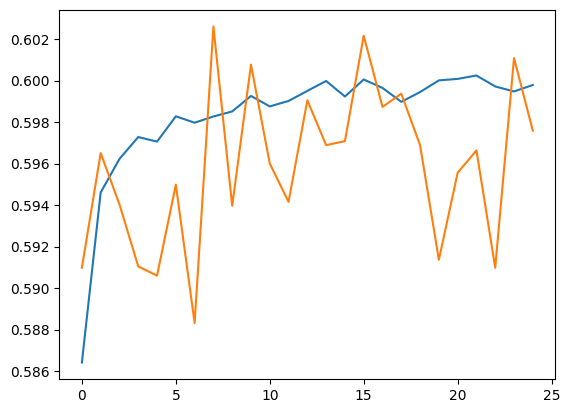
Run predictions for the validation set and training set.
plt.plot(history.history['accuracy'])
plt.plot(history.history['val_accuracy'])
```
[]
```
train_eval_result = model.evaluate(dict(train_df), train_df['Sentiment'])
validation_eval_result = model.evaluate(dict(validation_df), validation_df['Sentiment'])
print(f"Training set accuracy: {train_eval_result[1]}")
print(f"Validation set accuracy: {validation_eval_result[1]}")
```
4385/4385 ━━━━━━━━━━━━━━━━━━━━ 16s 4ms/step - accuracy: 0.6182 - loss: 0.9471
493/493 ━━━━━━━━━━━━━━━━━━━━ 1s 1ms/step - accuracy: 0.6064 - loss: 0.9596
Training set accuracy: 0.5997149348258972
Validation set accuracy: 0.5959352254867554
```
## Confusion matrix
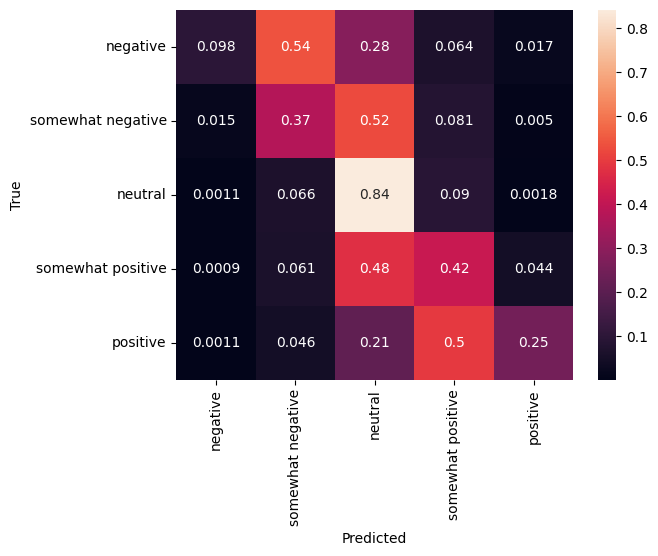
Another very interesting statistic, especially for multiclass problems, is the [confusion matrix](https://en.wikipedia.org/wiki/Confusion_matrix). The confusion matrix allows visualization of the proportion of correctly and incorrectly labelled examples. We can easily see how much our classifier is biased and whether the distribution of labels makes sense. Ideally the largest fraction of predictions should be distributed along the diagonal.
predictions = model.predict(dict(validation_df))
predictions = tf.argmax(predictions, axis=-1)
predictions
```
493/493 ━━━━━━━━━━━━━━━━━━━━ 1s 1ms/step
```
cm = tf.math.confusion_matrix(validation_df['Sentiment'], predictions)
cm = cm/cm.numpy().sum(axis=1)[:, tf.newaxis]
sns.heatmap(
cm, annot=True,
xticklabels=SENTIMENT_LABELS,
yticklabels=SENTIMENT_LABELS)
plt.xlabel("Predicted")
plt.ylabel("True")
```
Text(50.72222222222221, 0.5, 'True')
```
We can easily submit the predictions back to Kaggle by pasting the following code to a code cell and executing it:
test_predictions = model.predict(dict(test_df))
test_predictions = np.argmax(test_predictions, axis=-1)
result_df = test_df.copy()
result_df["Predictions"] = test_predictions
result_df.to_csv(
"predictions.csv",
columns=["Predictions"],
header=["Sentiment"])
kaggle.api.competition_submit("predictions.csv", "Submitted from Colab",
"sentiment-analysis-on-movie-reviews")
After submitting, [check the leaderboard](https://www.kaggle.com/c/sentiment-analysis-on-movie-reviews/leaderboard) to see how you did.