|---|---|---|---|---|
| [View on TensorFlow.org](https://www.tensorflow.org/hub/tutorials/tf_hub_generative_image_module) | [Run in Google Colab](https://colab.research.google.com/github/tensorflow/docs/blob/master/site/en/hub/tutorials/tf_hub_generative_image_module.ipynb) | [View on GitHub](https://github.com/tensorflow/docs/blob/master/site/en/hub/tutorials/tf_hub_generative_image_module.ipynb) | [Download notebook](https://storage.googleapis.com/tensorflow_docs/docs/site/en/hub/tutorials/tf_hub_generative_image_module.ipynb) | [See TF Hub model](https://tfhub.dev/google/progan-128/1) |
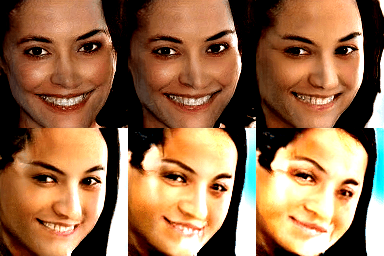
This Colab demonstrates use of a TF Hub module based on a generative adversarial network (GAN). The module maps from N-dimensional vectors, called latent space, to RGB images.
Two examples are provided:
- **Mapping** from latent space to images, and
- Given a target image, **using gradient descent to find** a latent vector that generates an image similar to the target image.
## Optional prerequisites
- Familiarity with [low level Tensorflow concepts](https://www.tensorflow.org/guide/eager).
- [Generative Adversarial Network](https://en.wikipedia.org/wiki/Generative_adversarial_network) on Wikipedia.
- Paper on Progressive GANs: [Progressive Growing of GANs for Improved Quality, Stability, and Variation](https://arxiv.org/abs/1710.10196).
### More models
[Here](https://tfhub.dev/s?module-type=image-generator) you can find all models currently hosted on [tfhub.dev](https://tfhub.dev/) that can generate images.
## Setup
# Install imageio for creating animations.
pip -q install imageio
pip -q install scikit-image
pip install git+https://github.com/tensorflow/docs
### Imports and function definitions
from absl import logging
import imageio
import PIL.Image
import matplotlib.pyplot as plt
import numpy as np
import tensorflow as tf
tf.random.set_seed(0)
import tensorflow_hub as hub
from tensorflow_docs.vis import embed
import time
try:
from google.colab import files
except ImportError:
pass
from IPython import display
from skimage import transform
# We could retrieve this value from module.get_input_shapes() if we didn't know
# beforehand which module we will be using.
latent_dim = 512
# Interpolates between two vectors that are non-zero and don't both lie on a
# line going through origin. First normalizes v2 to have the same norm as v1.
# Then interpolates between the two vectors on the hypersphere.
def interpolate_hypersphere(v1, v2, num_steps):
v1_norm = tf.norm(v1)
v2_norm = tf.norm(v2)
v2_normalized = v2 * (v1_norm / v2_norm)
vectors = []
for step in range(num_steps):
interpolated = v1 + (v2_normalized - v1) * step / (num_steps - 1)
interpolated_norm = tf.norm(interpolated)
interpolated_normalized = interpolated * (v1_norm / interpolated_norm)
vectors.append(interpolated_normalized)
return tf.stack(vectors)
# Simple way to display an image.
def display_image(image):
image = tf.constant(image)
image = tf.image.convert_image_dtype(image, tf.uint8)
return PIL.Image.fromarray(image.numpy())
# Given a set of images, show an animation.
def animate(images):
images = np.array(images)
converted_images = np.clip(images * 255, 0, 255).astype(np.uint8)
imageio.mimsave('./animation.gif', converted_images)
return embed.embed_file('./animation.gif')
logging.set_verbosity(logging.ERROR)
```
/tmpfs/src/tf_docs_env/lib/python3.11/site-packages/tensorflow_hub/__init__.py:61: UserWarning: pkg_resources is deprecated as an API. See https://setuptools.pypa.io/en/latest/pkg_resources.html. The pkg_resources package is slated for removal as early as 2025-11-30. Refrain from using this package or pin to Setuptools<81.
from pkg_resources import parse_version
```
## Latent space interpolation
### Random vectors
Latent space interpolation between two randomly initialized vectors. We will use a TF Hub module [progan-128](https://tfhub.dev/google/progan-128/1) that contains a pre-trained Progressive GAN.
progan = hub.load("https://tfhub.dev/google/progan-128/1").signatures['default']
```
WARNING: All log messages before absl::InitializeLog() is called are written to STDERR
E0000 00:00:1793447195.462360 65765 cuda_platform.cc:52] failed call to cuInit: INTERNAL: CUDA error: Failed call to cuInit: CUDA_ERROR_NO_DEVICE: no CUDA-capable device is detected
```
def interpolate_between_vectors():
v1 = tf.random.normal([latent_dim])
v2 = tf.random.normal([latent_dim])
# Creates a tensor with 25 steps of interpolation between v1 and v2.
vectors = interpolate_hypersphere(v1, v2, 50)
# Uses module to generate images from the latent space.
interpolated_images = progan(vectors)['default']
return interpolated_images
interpolated_images = interpolate_between_vectors()
animate(interpolated_images)
## Finding closest vector in latent space
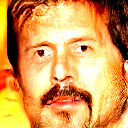
Fix a target image. As an example use an image generated from the module or upload your own.
image_from_module_space = True # @param { isTemplate:true, type:"boolean" }
def get_module_space_image():
vector = tf.random.normal([1, latent_dim])
images = progan(vector)['default'][0]
return images
def upload_image():
uploaded = files.upload()
image = imageio.imread(uploaded[list(uploaded.keys())[0]])
return transform.resize(image, [128, 128])
if image_from_module_space:
target_image = get_module_space_image()
else:
target_image = upload_image()
display_image(target_image)
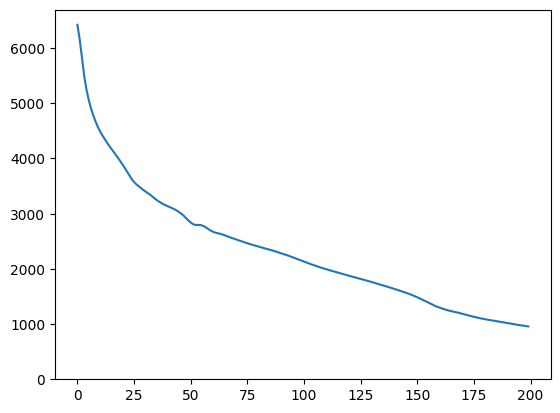
After defining a loss function between the target image and the image generated by a latent space variable, we can use gradient descent to find variable values that minimize the loss.
tf.random.set_seed(42)
initial_vector = tf.random.normal([1, latent_dim])
display_image(progan(initial_vector)['default'][0])

def find_closest_latent_vector(initial_vector, num_optimization_steps,
steps_per_image):
images = []
losses = []
vector = tf.Variable(initial_vector)
optimizer = tf.optimizers.Adam(learning_rate=0.01)
loss_fn = tf.losses.MeanAbsoluteError(reduction="sum")
for step in range(num_optimization_steps):
if (step % 100)==0:
print()
print('.', end='')
with tf.GradientTape() as tape:
image = progan(vector.read_value())['default'][0]
if (step % steps_per_image) == 0:
images.append(image.numpy())
target_image_difference = loss_fn(image, target_image[:,:,:3])
# The latent vectors were sampled from a normal distribution. We can get
# more realistic images if we regularize the length of the latent vector to
# the average length of vector from this distribution.
regularizer = tf.abs(tf.norm(vector) - np.sqrt(latent_dim))
loss = target_image_difference + regularizer
losses.append(loss.numpy())
grads = tape.gradient(loss, [vector])
optimizer.apply_gradients(zip(grads, [vector]))
return images, losses
num_optimization_steps=200
steps_per_image=5
images, loss = find_closest_latent_vector(initial_vector, num_optimization_steps, steps_per_image)
```
.
.
.
.
.
.
.
.
.
.
.
.
.
.
.
.
.
.
.
.
.
.
.
.
.
.
.
.
.
.
.
.
.
.
.
.
.
.
.
.
.
.
.
.
.
.
.
.
.
.
.
.
.
.
.
.
.
.
.
.
.
.
.
.
.
.
.
.
.
.
.
.
.
.
.
.
.
.
.
.
.
.
.
.
.
.
.
.
.
.
.
.
.
.
.
.
.
.
.
.
.
.
.
.
.
.
.
.
.
.
.
.
.
.
.
.
.
.
.
.
.
.
.
.
.
.
.
.
.
.
.
.
.
.
.
.
.
.
.
.
.
.
.
.
.
.
.
.
.
.
.
.
.
.
.
.
.
.
.
.
.
.
.
.
.
.
.
.
.
.
.
.
.
.
.
.
.
.
.
.
.
.
.
.
.
.
.
.
.
.
.
.
.
.
.
.
.
.
.
.
```
plt.plot(loss)
plt.ylim([0,max(plt.ylim())])
```
(0.0, 6696.3041717529295)
```
animate(np.stack(images))

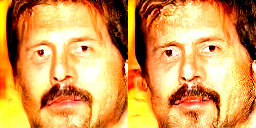
Compare the result to the target:
display_image(np.concatenate([images[-1], target_image], axis=1))
### Playing with the above example
If image is from the module space, the descent is quick and converges to a reasonable sample. Try out descending to an image that is **not from the module space**. The descent will only converge if the image is reasonably close to the space of training images.
How to make it descend faster and to a more realistic image? One can try:
- using different loss on the image difference, e.g., quadratic,
- using different regularizer on the latent vector,
- initializing from a random vector in multiple runs,
- etc.