|---|---|---|---|
| [View on TensorFlow.org](https://www.tensorflow.org/tutorials/distribute/keras) | [Run in Google Colab](https://colab.research.google.com/github/tensorflow/docs/blob/master/site/en/tutorials/distribute/keras.ipynb) | [View source on GitHub](https://github.com/tensorflow/docs/blob/master/site/en/tutorials/distribute/keras.ipynb) | [Download notebook](https://storage.googleapis.com/tensorflow_docs/docs/site/en/tutorials/distribute/keras.ipynb) |
## Overview
The [`tf.distribute.Strategy`](https://www.tensorflow.org/api_docs/python/tf/distribute/Strategy) API provides an abstraction for distributing your training across multiple processing units. It allows you to carry out distributed training using existing models and training code with minimal changes.
This tutorial demonstrates how to use the [`tf.distribute.MirroredStrategy`](https://www.tensorflow.org/api_docs/python/tf/distribute/MirroredStrategy) to perform in-graph replication with *synchronous training on many GPUs on one machine* . The strategy essentially copies all of the model's variables to each processor. Then, it uses [all-reduce](http://mpitutorial.com/tutorials/mpi-reduce-and-allreduce/) to combine the gradients from all processors, and applies the combined value to all copies of the model.
You will use the [`tf.keras`](https://www.tensorflow.org/api_docs/python/tf/keras) APIs to build the model and [`Model.fit`](https://www.tensorflow.org/api_docs/python/tf/keras/Model#fit) for training it. (To learn about distributed training with a custom training loop and the `MirroredStrategy`, check out [this tutorial](https://www.tensorflow.org/tutorials/distribute/custom_training).)
`MirroredStrategy` trains your model on multiple GPUs on a single machine. For *synchronous training on many GPUs on multiple workers* , use the [`tf.distribute.MultiWorkerMirroredStrategy`](https://www.tensorflow.org/api_docs/python/tf/distribute/MultiWorkerMirroredStrategy) with the [Keras Model.fit](https://www.tensorflow.org/tutorials/distribute/multi_worker_with_keras) or [a custom training loop](https://www.tensorflow.org/tutorials/distribute/multi_worker_with_ctl). For other options, refer to the [Distributed training guide](https://www.tensorflow.org/guide/distributed_training).
To learn about various other strategies, there is the [Distributed training with TensorFlow](https://www.tensorflow.org/guide/distributed_training) guide.
## Setup
import tensorflow_datasets as tfds
import tensorflow as tf
import os
# Load the TensorBoard notebook extension.
%load_ext tensorboard
print(tf.__version__)
```
2.21.0
```
## Download the dataset
Load the MNIST dataset from [TensorFlow Datasets](https://www.tensorflow.org/datasets). This returns a dataset in the [`tf.data`](https://www.tensorflow.org/api_docs/python/tf/data) format.
Setting the `with_info` argument to `True` includes the metadata for the entire dataset, which is being saved here to `info`. Among other things, this metadata object includes the number of train and test examples.
datasets, info = tfds.load(name='mnist', with_info=True, as_supervised=True)
mnist_train, mnist_test = datasets['train'], datasets['test']
## Define the distribution strategy
Create a `MirroredStrategy` object. This will handle distribution and provide a context manager ([`MirroredStrategy.scope`](https://www.tensorflow.org/api_docs/python/tf/distribute/MirroredStrategy#scope)) to build your model inside.
strategy = tf.distribute.MirroredStrategy()
```
INFO:tensorflow:Using MirroredStrategy with devices ('/job:localhost/replica:0/task:0/device:GPU:0', '/job:localhost/replica:0/task:0/device:GPU:1', '/job:localhost/replica:0/task:0/device:GPU:2', '/job:localhost/replica:0/task:0/device:GPU:3')
INFO:tensorflow:Using MirroredStrategy with devices ('/job:localhost/replica:0/task:0/device:GPU:0', '/job:localhost/replica:0/task:0/device:GPU:1', '/job:localhost/replica:0/task:0/device:GPU:2', '/job:localhost/replica:0/task:0/device:GPU:3')
```
print('Number of devices: {}'.format(strategy.num_replicas_in_sync))
```
Number of devices: 4
```
## Set up the input pipeline
When training a model with multiple GPUs, you can use the extra computing power effectively by increasing the batch size. In general, use the largest batch size that fits the GPU memory and tune the learning rate accordingly.
# You can also do info.splits.total_num_examples to get the total
# number of examples in the dataset.
num_train_examples = info.splits['train'].num_examples
num_test_examples = info.splits['test'].num_examples
BUFFER_SIZE = 10000
BATCH_SIZE_PER_REPLICA = 64
BATCH_SIZE = BATCH_SIZE_PER_REPLICA * strategy.num_replicas_in_sync
Define a function that normalizes the image pixel values from the `[0, 255]` range to the `[0, 1]` range ([feature scaling](https://en.wikipedia.org/wiki/Feature_scaling)):
def scale(image, label):
image = tf.cast(image, tf.float32)
image /= 255
return image, label
Apply this `scale` function to the training and test data, and then use the [`tf.data.Dataset`](https://www.tensorflow.org/api_docs/python/tf/data/Dataset) APIs to shuffle the training data ([`Dataset.shuffle`](https://www.tensorflow.org/api_docs/python/tf/data/Dataset#shuffle)), and batch it ([`Dataset.batch`](https://www.tensorflow.org/api_docs/python/tf/data/Dataset#batch)). Notice that you are also keeping an in-memory cache of the training data to improve performance ([`Dataset.cache`](https://www.tensorflow.org/api_docs/python/tf/data/Dataset#cache)).
train_dataset = mnist_train.map(scale).cache().shuffle(BUFFER_SIZE).batch(BATCH_SIZE)
eval_dataset = mnist_test.map(scale).batch(BATCH_SIZE)
## Create the model and instantiate the optimizer
Within the context of [`Strategy.scope`](https://www.tensorflow.org/api_docs/python/tf/distribute/MirroredStrategy#scope), create and compile the model using the Keras API:
with strategy.scope():
model = tf.keras.Sequential([
tf.keras.layers.Conv2D(32, 3, activation='relu', input_shape=(28, 28, 1)),
tf.keras.layers.MaxPooling2D(),
tf.keras.layers.Flatten(),
tf.keras.layers.Dense(64, activation='relu'),
tf.keras.layers.Dense(10)
])
model.compile(loss=tf.keras.losses.SparseCategoricalCrossentropy(from_logits=True),
optimizer=tf.keras.optimizers.Adam(learning_rate=0.001),
metrics=['accuracy'])
```
/tmpfs/src/tf_docs_env/lib/python3.13/site-packages/keras/src/layers/convolutional/base_conv.py:113: UserWarning: Do not pass an `input_shape`/`input_dim` argument to a layer. When using Sequential models, prefer using an `Input(shape)` object as the first layer in the model instead.
super().__init__(activity_regularizer=activity_regularizer, **kwargs)
```
For this toy example with the MNIST dataset, you will be using the Adam optimizer's default learning rate of 0.001.
For larger datasets, the key benefit of distributed training is to learn more in each training step, because each step processes more training data in parallel, which allows for a larger learning rate (within the limits of the model and dataset).
## Define the callbacks
Define the following [Keras Callbacks](https://www.tensorflow.org/guide/keras/train_and_evaluate):
- [`tf.keras.callbacks.TensorBoard`](https://www.tensorflow.org/api_docs/python/tf/keras/callbacks/TensorBoard): writes a log for TensorBoard, which allows you to visualize the graphs.
- [`tf.keras.callbacks.ModelCheckpoint`](https://www.tensorflow.org/api_docs/python/tf/keras/callbacks/ModelCheckpoint): saves the model at a certain frequency, such as after every epoch.
- [`tf.keras.callbacks.BackupAndRestore`](https://www.tensorflow.org/api_docs/python/tf/keras/callbacks/BackupAndRestore): provides the fault tolerance functionality by backing up the model and current epoch number. Learn more in the *Fault tolerance* section of the [Multi-worker training with Keras](https://www.tensorflow.org/tutorials/distribute/multi_worker_with_keras) tutorial.
- [`tf.keras.callbacks.LearningRateScheduler`](https://www.tensorflow.org/api_docs/python/tf/keras/callbacks/LearningRateScheduler): schedules the learning rate to change after, for example, every epoch/batch.
For illustrative purposes, add a [custom callback](https://www.tensorflow.org/guide/keras/custom_callback) called `PrintLR` to display the *learning rate* in the notebook.
> [!NOTE]
> **Note:** Use the `BackupAndRestore` callback instead of `ModelCheckpoint` as the main mechanism to restore the training state upon a restart from a job failure. Since `BackupAndRestore` only supports eager mode, in graph mode consider using `ModelCheckpoint`.
# Define the checkpoint directory to store the checkpoints.
checkpoint_dir = './training_checkpoints'
# Define the name of the checkpoint files.
checkpoint_prefix = os.path.join(checkpoint_dir, "ckpt_{epoch:04d}.weights.h5")
# Define a function for decaying the learning rate.
# You can define any decay function you need.
def decay(epoch):
if epoch < 3:
return 1e-3
elif epoch >= 3 and epoch < 7:
return 1e-4
else:
return 1e-5
# Define a callback for printing the learning rate at the end of each epoch.
class PrintLR(tf.keras.callbacks.Callback):
def on_epoch_end(self, epoch, logs=None):
print('\nLearning rate for epoch {} is {}'.format(epoch + 1, model.optimizer.learning_rate.numpy()))
# Put all the callbacks together.
callbacks = [
tf.keras.callbacks.TensorBoard(log_dir='./logs'),
tf.keras.callbacks.ModelCheckpoint(filepath=checkpoint_prefix,
save_weights_only=True),
tf.keras.callbacks.LearningRateScheduler(decay),
PrintLR()
]
## Train and evaluate
Now, train the model in the usual way by calling Keras [`Model.fit`](https://www.tensorflow.org/api_docs/python/tf/keras/Model#fit) on the model and passing in the dataset created at the beginning of the tutorial. This step is the same whether you are distributing the training or not.
EPOCHS = 12
model.fit(train_dataset, epochs=EPOCHS, callbacks=callbacks)
```
/tmpfs/src/tf_docs_env/lib/python3.13/site-packages/keras/src/trainers/epoch_iterator.py:74: UserWarning: `shuffle=True` was passed, but will be ignored since the data `x` was provided as a tf.data.Dataset. The Dataset is expected to already be shuffled (via `.shuffle(buffer_size)`).
self.data_adapter = data_adapters.get_data_adapter(
WARNING: All log messages before absl::InitializeLog() is called are written to STDERR
W0000 00:00:1793412319.451733 77395 auto_shard.cc:559] The `assert_cardinality` transformation is currently not handled by the auto-shard rewrite and will be removed.
INFO:tensorflow:Reduce to /job:localhost/replica:0/task:0/device:CPU:0 then broadcast to ('/job:localhost/replica:0/task:0/device:CPU:0',).
INFO:tensorflow:Reduce to /job:localhost/replica:0/task:0/device:CPU:0 then broadcast to ('/job:localhost/replica:0/task:0/device:CPU:0',).
INFO:tensorflow:Reduce to /job:localhost/replica:0/task:0/device:CPU:0 then broadcast to ('/job:localhost/replica:0/task:0/device:CPU:0',).
INFO:tensorflow:Reduce to /job:localhost/replica:0/task:0/device:CPU:0 then broadcast to ('/job:localhost/replica:0/task:0/device:CPU:0',).
INFO:tensorflow:Reduce to /job:localhost/replica:0/task:0/device:CPU:0 then broadcast to ('/job:localhost/replica:0/task:0/device:CPU:0',).
INFO:tensorflow:Reduce to /job:localhost/replica:0/task:0/device:CPU:0 then broadcast to ('/job:localhost/replica:0/task:0/device:CPU:0',).
INFO:tensorflow:Reduce to /job:localhost/replica:0/task:0/device:CPU:0 then broadcast to ('/job:localhost/replica:0/task:0/device:CPU:0',).
INFO:tensorflow:Reduce to /job:localhost/replica:0/task:0/device:CPU:0 then broadcast to ('/job:localhost/replica:0/task:0/device:CPU:0',).
W0000 00:00:1793412320.371057 77395 cache_dataset_ops.cc:912] The calling iterator did not fully read the dataset being cached. In order to avoid unexpected truncation of the dataset, the partially cached contents of the dataset will be discarded. This can happen if you have an input pipeline similar to `dataset.cache().take(k).repeat()`. You should use `dataset.take(k).cache().repeat()` instead.
W0000 00:00:1793412320.374156 77395 cache_dataset_ops.cc:912] The calling iterator did not fully read the dataset being cached. In order to avoid unexpected truncation of the dataset, the partially cached contents of the dataset will be discarded. This can happen if you have an input pipeline similar to `dataset.cache().take(k).repeat()`. You should use `dataset.take(k).cache().repeat()` instead.
INFO:tensorflow:Reduce to /job:localhost/replica:0/task:0/device:CPU:0 then broadcast to ('/job:localhost/replica:0/task:0/device:CPU:0',).
INFO:tensorflow:Reduce to /job:localhost/replica:0/task:0/device:CPU:0 then broadcast to ('/job:localhost/replica:0/task:0/device:CPU:0',).
INFO:tensorflow:Reduce to /job:localhost/replica:0/task:0/device:CPU:0 then broadcast to ('/job:localhost/replica:0/task:0/device:CPU:0',).
INFO:tensorflow:Reduce to /job:localhost/replica:0/task:0/device:CPU:0 then broadcast to ('/job:localhost/replica:0/task:0/device:CPU:0',).
INFO:tensorflow:Reduce to /job:localhost/replica:0/task:0/device:CPU:0 then broadcast to ('/job:localhost/replica:0/task:0/device:CPU:0',).
INFO:tensorflow:Reduce to /job:localhost/replica:0/task:0/device:CPU:0 then broadcast to ('/job:localhost/replica:0/task:0/device:CPU:0',).
INFO:tensorflow:Reduce to /job:localhost/replica:0/task:0/device:CPU:0 then broadcast to ('/job:localhost/replica:0/task:0/device:CPU:0',).
INFO:tensorflow:Reduce to /job:localhost/replica:0/task:0/device:CPU:0 then broadcast to ('/job:localhost/replica:0/task:0/device:CPU:0',).
Epoch 1/12
INFO:tensorflow:Collective all_reduce tensors: 6 all_reduces, num_devices = 4, group_size = 4, implementation = CommunicationImplementation.NCCL, num_packs = 1
INFO:tensorflow:Collective all_reduce tensors: 6 all_reduces, num_devices = 4, group_size = 4, implementation = CommunicationImplementation.NCCL, num_packs = 1
235/235 ━━━━━━━━━━━━━━━━━━━━ 0s 10ms/step - accuracy: 0.9065 - loss: 0.3391
INFO:tensorflow:Reduce to /job:localhost/replica:0/task:0/device:CPU:0 then broadcast to ('/job:localhost/replica:0/task:0/device:CPU:0',).
INFO:tensorflow:Reduce to /job:localhost/replica:0/task:0/device:CPU:0 then broadcast to ('/job:localhost/replica:0/task:0/device:CPU:0',).
INFO:tensorflow:Reduce to /job:localhost/replica:0/task:0/device:CPU:0 then broadcast to ('/job:localhost/replica:0/task:0/device:CPU:0',).
INFO:tensorflow:Reduce to /job:localhost/replica:0/task:0/device:CPU:0 then broadcast to ('/job:localhost/replica:0/task:0/device:CPU:0',).
Learning rate for epoch 1 is 0.0010000000474974513
235/235 ━━━━━━━━━━━━━━━━━━━━ 9s 11ms/step - accuracy: 0.9065 - loss: 0.3391 - learning_rate: 0.0010
Epoch 2/12
234/235 ━━━━━━━━━━━━━━━━━━━━ 0s 9ms/step - accuracy: 0.9697 - loss: 0.1070
Learning rate for epoch 2 is 0.0010000000474974513
235/235 ━━━━━━━━━━━━━━━━━━━━ 3s 10ms/step - accuracy: 0.9697 - loss: 0.1070 - learning_rate: 0.0010
Epoch 3/12
231/235 ━━━━━━━━━━━━━━━━━━━━ 0s 9ms/step - accuracy: 0.9797 - loss: 0.0710
Learning rate for epoch 3 is 0.0010000000474974513
235/235 ━━━━━━━━━━━━━━━━━━━━ 3s 10ms/step - accuracy: 0.9798 - loss: 0.0708 - learning_rate: 0.0010
Epoch 4/12
230/235 ━━━━━━━━━━━━━━━━━━━━ 0s 9ms/step - accuracy: 0.9859 - loss: 0.0507
Learning rate for epoch 4 is 9.999999747378752e-05
235/235 ━━━━━━━━━━━━━━━━━━━━ 3s 10ms/step - accuracy: 0.9859 - loss: 0.0507 - learning_rate: 1.0000e-04
Epoch 5/12
235/235 ━━━━━━━━━━━━━━━━━━━━ 0s 9ms/step - accuracy: 0.9870 - loss: 0.0480
Learning rate for epoch 5 is 9.999999747378752e-05
235/235 ━━━━━━━━━━━━━━━━━━━━ 3s 10ms/step - accuracy: 0.9870 - loss: 0.0480 - learning_rate: 1.0000e-04
Epoch 6/12
230/235 ━━━━━━━━━━━━━━━━━━━━ 0s 9ms/step - accuracy: 0.9871 - loss: 0.0464
Learning rate for epoch 6 is 9.999999747378752e-05
235/235 ━━━━━━━━━━━━━━━━━━━━ 3s 10ms/step - accuracy: 0.9872 - loss: 0.0463 - learning_rate: 1.0000e-04
Epoch 7/12
230/235 ━━━━━━━━━━━━━━━━━━━━ 0s 9ms/step - accuracy: 0.9877 - loss: 0.0451
Learning rate for epoch 7 is 9.999999747378752e-05
235/235 ━━━━━━━━━━━━━━━━━━━━ 3s 10ms/step - accuracy: 0.9878 - loss: 0.0448 - learning_rate: 1.0000e-04
Epoch 8/12
235/235 ━━━━━━━━━━━━━━━━━━━━ 0s 9ms/step - accuracy: 0.9887 - loss: 0.0428
Learning rate for epoch 8 is 9.999999747378752e-06
235/235 ━━━━━━━━━━━━━━━━━━━━ 3s 10ms/step - accuracy: 0.9887 - loss: 0.0428 - learning_rate: 1.0000e-05
Epoch 9/12
230/235 ━━━━━━━━━━━━━━━━━━━━ 0s 9ms/step - accuracy: 0.9886 - loss: 0.0426
Learning rate for epoch 9 is 9.999999747378752e-06
235/235 ━━━━━━━━━━━━━━━━━━━━ 3s 10ms/step - accuracy: 0.9886 - loss: 0.0425 - learning_rate: 1.0000e-05
Epoch 10/12
235/235 ━━━━━━━━━━━━━━━━━━━━ 0s 9ms/step - accuracy: 0.9887 - loss: 0.0423
Learning rate for epoch 10 is 9.999999747378752e-06
235/235 ━━━━━━━━━━━━━━━━━━━━ 3s 10ms/step - accuracy: 0.9887 - loss: 0.0423 - learning_rate: 1.0000e-05
Epoch 11/12
235/235 ━━━━━━━━━━━━━━━━━━━━ 0s 9ms/step - accuracy: 0.9887 - loss: 0.0421
Learning rate for epoch 11 is 9.999999747378752e-06
235/235 ━━━━━━━━━━━━━━━━━━━━ 3s 10ms/step - accuracy: 0.9887 - loss: 0.0421 - learning_rate: 1.0000e-05
Epoch 12/12
235/235 ━━━━━━━━━━━━━━━━━━━━ 0s 9ms/step - accuracy: 0.9888 - loss: 0.0419
Learning rate for epoch 12 is 9.999999747378752e-06
235/235 ━━━━━━━━━━━━━━━━━━━━ 3s 10ms/step - accuracy: 0.9888 - loss: 0.0420 - learning_rate: 1.0000e-05
```
Check for saved checkpoints:
# Check the checkpoint directory.
ls {checkpoint_dir}
```
ckpt_0001.weights.h5 ckpt_0005.weights.h5 ckpt_0009.weights.h5
ckpt_0002.weights.h5 ckpt_0006.weights.h5 ckpt_0010.weights.h5
ckpt_0003.weights.h5 ckpt_0007.weights.h5 ckpt_0011.weights.h5
ckpt_0004.weights.h5 ckpt_0008.weights.h5 ckpt_0012.weights.h5
```
To check how well the model performs, load the latest checkpoint and call [`Model.evaluate`](https://www.tensorflow.org/api_docs/python/tf/keras/Model#evaluate) on the test data:
import pathlib
latest_checkpoint = sorted(pathlib.Path(checkpoint_dir).glob('*'))[-1]
model.load_weights(latest_checkpoint)
eval_loss, eval_acc = model.evaluate(eval_dataset)
print('Eval loss: {}, Eval accuracy: {}'.format(eval_loss, eval_acc))
```
W0000 00:00:1793412360.256617 77395 auto_shard.cc:559] The `assert_cardinality` transformation is currently not handled by the auto-shard rewrite and will be removed.
W0000 00:00:1793412360.806822 77395 cache_dataset_ops.cc:912] The calling iterator did not fully read the dataset being cached. In order to avoid unexpected truncation of the dataset, the partially cached contents of the dataset will be discarded. This can happen if you have an input pipeline similar to `dataset.cache().take(k).repeat()`. You should use `dataset.take(k).cache().repeat()` instead.
40/40 ━━━━━━━━━━━━━━━━━━━━ 2s 15ms/step - accuracy: 0.9827 - loss: 0.0520
Eval loss: 0.052022337913513184, Eval accuracy: 0.982699990272522
```
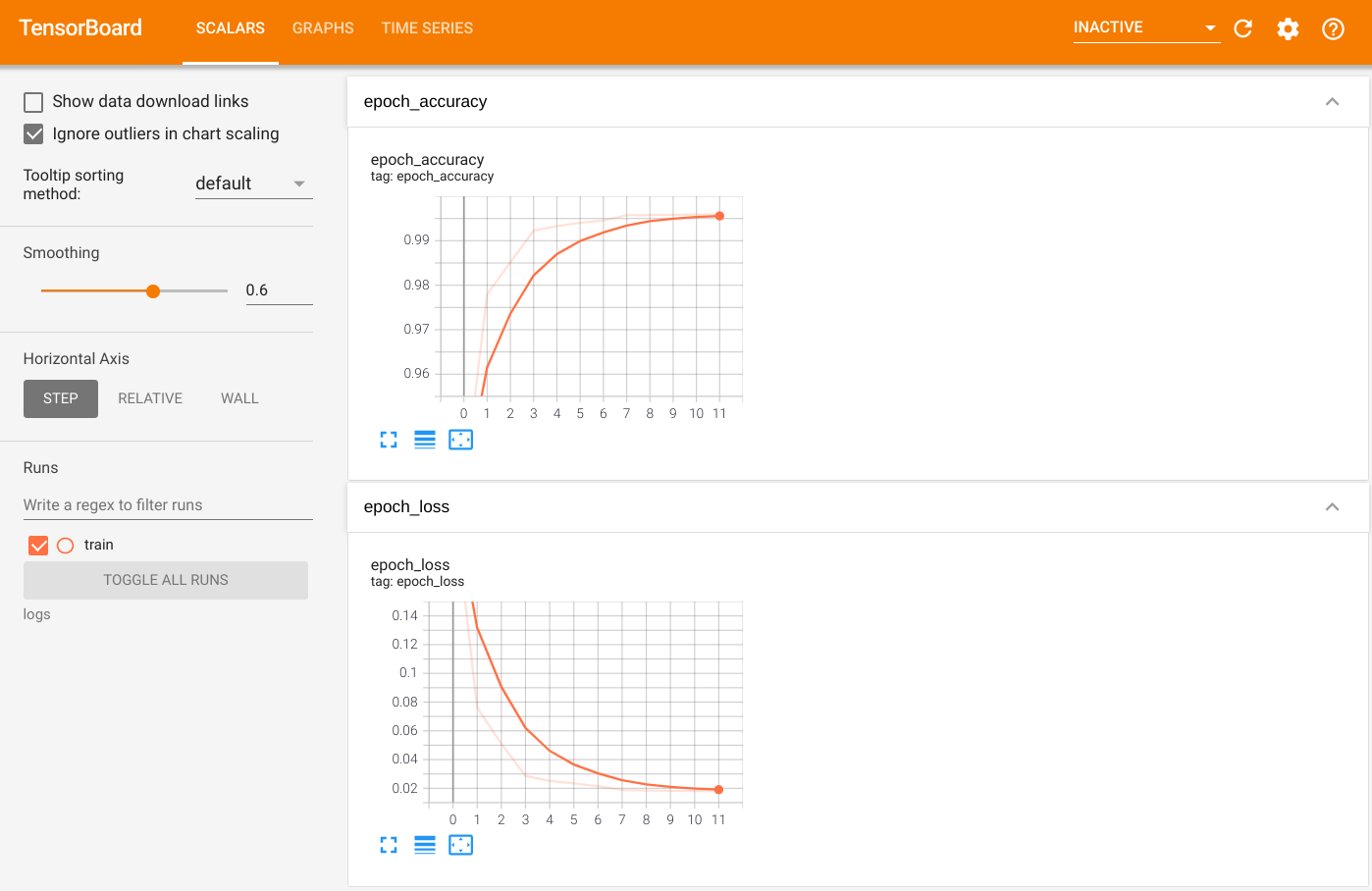
To visualize the output, launch TensorBoard and view the logs:
%tensorboard --logdir=logs
ls -sh ./logs
```
total 4.0K
4.0K train
```
## Save the model
Save the model to a `.keras` zip archive using [`Model.save`](https://www.tensorflow.org/api_docs/python/tf/keras/Model#save). After your model is saved, you can load it with or without the [`Strategy.scope`](https://www.tensorflow.org/api_docs/python/tf/distribute/MirroredStrategy#scope).
path = 'my_model.keras'
model.save(path)
Now, load the model without [`Strategy.scope`](https://www.tensorflow.org/api_docs/python/tf/distribute/MirroredStrategy#scope):
unreplicated_model = tf.keras.models.load_model(path)
unreplicated_model.compile(
loss=tf.keras.losses.SparseCategoricalCrossentropy(from_logits=True),
optimizer=tf.keras.optimizers.Adam(),
metrics=['accuracy'])
eval_loss, eval_acc = unreplicated_model.evaluate(eval_dataset)
print('Eval loss: {}, Eval Accuracy: {}'.format(eval_loss, eval_acc))
```
40/40 ━━━━━━━━━━━━━━━━━━━━ 2s 26ms/step - accuracy: 0.9827 - loss: 0.0520
Eval loss: 0.052022337913513184, Eval Accuracy: 0.982699990272522
```
Load the model with [`Strategy.scope`](https://www.tensorflow.org/api_docs/python/tf/distribute/MirroredStrategy#scope):
with strategy.scope():
replicated_model = tf.keras.models.load_model(path)
replicated_model.compile(loss=tf.keras.losses.SparseCategoricalCrossentropy(from_logits=True),
optimizer=tf.keras.optimizers.Adam(),
metrics=['accuracy'])
eval_loss, eval_acc = replicated_model.evaluate(eval_dataset)
print ('Eval loss: {}, Eval Accuracy: {}'.format(eval_loss, eval_acc))
```
W0000 00:00:1793412366.114774 77395 auto_shard.cc:559] The `assert_cardinality` transformation is currently not handled by the auto-shard rewrite and will be removed.
40/40 ━━━━━━━━━━━━━━━━━━━━ 1s 13ms/step - accuracy: 0.9827 - loss: 0.0520
Eval loss: 0.052022337913513184, Eval Accuracy: 0.982699990272522
```
### Additional resources
More examples that use different distribution strategies with the Keras [`Model.fit`](https://www.tensorflow.org/api_docs/python/tf/keras/Model#fit) API:
1. The [Solve GLUE tasks using BERT on TPU](https://www.tensorflow.org/text/tutorials/bert_glue) tutorial uses [`tf.distribute.MirroredStrategy`](https://www.tensorflow.org/api_docs/python/tf/distribute/MirroredStrategy) for training on GPUs and [`tf.distribute.TPUStrategy`](https://www.tensorflow.org/api_docs/python/tf/distribute/TPUStrategy) on TPUs.
2. The [Save and load a model using a distribution strategy](https://www.tensorflow.org/tutorials/distribute/save_and_load) tutorial demonstates how to use the SavedModel APIs with [`tf.distribute.Strategy`](https://www.tensorflow.org/api_docs/python/tf/distribute/Strategy).
3. The [official TensorFlow models](https://github.com/tensorflow/models/tree/master/official) can be configured to run multiple distribution strategies.
To learn more about TensorFlow distribution strategies:
1. The [Custom training with tf.distribute.Strategy](https://www.tensorflow.org/tutorials/distribute/custom_training) tutorial shows how to use the [`tf.distribute.MirroredStrategy`](https://www.tensorflow.org/api_docs/python/tf/distribute/MirroredStrategy) for single-worker training with a custom training loop.
2. The [Multi-worker training with Keras](https://www.tensorflow.org/tutorials/distribute/multi_worker_with_keras) tutorial shows how to use the `MultiWorkerMirroredStrategy` with [`Model.fit`](https://www.tensorflow.org/api_docs/python/tf/keras/Model#fit).
3. The [Custom training loop with Keras and MultiWorkerMirroredStrategy](https://www.tensorflow.org/tutorials/distribute/multi_worker_with_ctl) tutorial shows how to use the `MultiWorkerMirroredStrategy` with Keras and a custom training loop.
4. The [Distributed training in TensorFlow](https://www.tensorflow.org/guide/distributed_training) guide provides an overview of the available distribution strategies.
5. The [Better performance with tf.function](https://www.tensorflow.org/guide/function) guide provides information about other strategies and tools, such as the [TensorFlow Profiler](https://www.tensorflow.org/guide/profiler) you can use to optimize the performance of your TensorFlow models.
> [!NOTE]
> **Note:** [`tf.distribute.Strategy`](https://www.tensorflow.org/api_docs/python/tf/distribute/Strategy) is actively under development and TensorFlow will be adding more examples and tutorials in the near future. Please give it a try. Your feedback is welcome---feel free to submit it via [issues on GitHub](https://github.com/tensorflow/tensorflow/issues/new).