
 View on TensorFlow.org View on TensorFlow.org
|
 Run in Google Colab Run in Google Colab
|
 View source on GitHub View source on GitHub
|
 Download notebook Download notebook
|
This tutorial demonstrates how to generate text using a character-based RNN. You will work with a dataset of Shakespeare's writing from Andrej Karpathy's The Unreasonable Effectiveness of Recurrent Neural Networks. Given a sequence of characters from this data ("Shakespear"), train a model to predict the next character in the sequence ("e"). Longer sequences of text can be generated by calling the model repeatedly.
This tutorial includes runnable code implemented using tf.keras and eager execution. The following is the sample output when the model in this tutorial trained for 30 epochs, and started with the prompt "Q":
QUEENE:
I had thought thou hadst a Roman; for the oracle,
Thus by All bids the man against the word,
Which are so weak of care, by old care done;
Your children were in your holy love,
And the precipitation through the bleeding throne.

BISHOP OF ELY:
Marry, and will, my lord, to weep in such a one were prettiest;
Yet now I was adopted heir
Of the world's lamentable day,
To watch the next way with his father with his face?

ESCALUS:
The cause why then we are all resolved more sons.

VOLUMNIA:
O, no, no, no, no, no, no, no, no, no, no, no, no, no, no, no, no, no, no, no, no, it is no sin it should be dead,
And love and pale as any will to that word.

QUEEN ELIZABETH:
But how long have I heard the soul for this world,
And show his hands of life be proved to stand.

PETRUCHIO:
I say he look'd on, if I must be content
To stay him from the fatal of our country's bliss.
His lordship pluck'd from this sentence then for prey,
And then let us twain, being the moon,
were she such a case as fills m
While some of the sentences are grammatical, most do not make sense. The model has not learned the meaning of words, but consider:
The model is character-based. When training started, the model did not know how to spell an English word, or that words were even a unit of text.
The structure of the output resembles a play—blocks of text generally begin with a speaker name, in all capital letters similar to the dataset.
As demonstrated below, the model is trained on small batches of text (100 characters each), and is still able to generate a longer sequence of text with coherent structure.
Setup
Import TensorFlow and other libraries
!pip install -q -U tf-keras

import os
import time

os.environ['TF_USE_LEGACY_KERAS'] = '1'

import numpy as np
import tensorflow as tf
Download the Shakespeare dataset
Change the following line to run this code on your own data.
path_to_file = tf.keras.utils.get_file('shakespeare.txt', 'https://storage.googleapis.com/download.tensorflow.org/data/shakespeare.txt')
Downloading data from https://storage.googleapis.com/download.tensorflow.org/data/shakespeare.txt
1115394/1115394 [==============================] - 0s 0us/step
Read the data
First, look in the text:
# Read, then decode for py2 compat.
text = open(path_to_file, 'rb').read().decode(encoding='utf-8')
# length of text is the number of characters in it
print(f'Length of text: {len(text)} characters')
Length of text: 1115394 characters
# Take a look at the first 250 characters in text
print(text[:250])
First Citizen:
Before we proceed any further, hear me speak.

All:
Speak, speak.

First Citizen:
You are all resolved rather to die than to famish?

All:
Resolved. resolved.

First Citizen:
First, you know Caius Marcius is chief enemy to the people.
# The unique characters in the file
vocab = sorted(set(text))
print(f'{len(vocab)} unique characters')
65 unique characters
Process the text
Vectorize the text
Before training, you need to convert the strings to a numerical representation.
The tf.keras.layers.StringLookup layer can convert each character into a numeric ID. It just needs the text to be split into tokens first.
example_texts = ['abcdefg', 'xyz']

chars = tf.strings.unicode_split(example_texts, input_encoding='UTF-8')
chars
<tf.RaggedTensor [[b'a', b'b', b'c', b'd', b'e', b'f', b'g'], [b'x', b'y', b'z']]>
Now create the tf.keras.layers.StringLookup layer:
ids_from_chars = tf.keras.layers.StringLookup(
    vocabulary=list(vocab), mask_token=None)
It converts from tokens to character IDs:
ids = ids_from_chars(chars)
ids
<tf.RaggedTensor [[40, 41, 42, 43, 44, 45, 46], [63, 64, 65]]>
Since the goal of this tutorial is to generate text, it will also be important to invert this representation and recover human-readable strings from it. For this you can use tf.keras.layers.StringLookup(..., invert=True).
chars_from_ids = tf.keras.layers.StringLookup(
    vocabulary=ids_from_chars.get_vocabulary(), invert=True, mask_token=None)
This layer recovers the characters from the vectors of IDs, and returns them as a tf.RaggedTensor of characters:
chars = chars_from_ids(ids)
chars
<tf.RaggedTensor [[b'a', b'b', b'c', b'd', b'e', b'f', b'g'], [b'x', b'y', b'z']]>
You can tf.strings.reduce_join to join the characters back into strings.
tf.strings.reduce_join(chars, axis=-1).numpy()
array([b'abcdefg', b'xyz'], dtype=object)
def text_from_ids(ids):
  return tf.strings.reduce_join(chars_from_ids(ids), axis=-1)
The prediction task
Given a character, or a sequence of characters, what is the most probable next character? This is the task you're training the model to perform. The input to the model will be a sequence of characters, and you train the model to predict the output—the following character at each time step.
Since RNNs maintain an internal state that depends on the previously seen elements, given all the characters computed until this moment, what is the next character?
Create training examples and targets
Next divide the text into example sequences. Each input sequence will contain seq_length characters from the text.
For each input sequence, the corresponding targets contain the same length of text, except shifted one character to the right.
So break the text into chunks of seq_length+1. For example, say seq_length is 4 and our text is "Hello". The input sequence would be "Hell", and the target sequence "ello".
To do this first use the tf.data.Dataset.from_tensor_slices function to convert the text vector into a stream of character indices.
all_ids = ids_from_chars(tf.strings.unicode_split(text, 'UTF-8'))
all_ids
<tf.Tensor: shape=(1115394,), dtype=int64, numpy=array([19, 48, 57, ..., 46, 9, 1], shape=(1115394,))>
ids_dataset = tf.data.Dataset.from_tensor_slices(all_ids)
for ids in ids_dataset.take(10):
    print(chars_from_ids(ids).numpy().decode('utf-8'))
F
i
r
s
t

C
i
t
i
seq_length = 100
The batch method lets you easily convert these individual characters to sequences of the desired size.
sequences = ids_dataset.batch(seq_length+1, drop_remainder=True)

for seq in sequences.take(1):
  print(chars_from_ids(seq))
tf.Tensor(
[b'F' b'i' b'r' b's' b't' b' ' b'C' b'i' b't' b'i' b'z' b'e' b'n' b':'
 b'\n' b'B' b'e' b'f' b'o' b'r' b'e' b' ' b'w' b'e' b' ' b'p' b'r' b'o'
 b'c' b'e' b'e' b'd' b' ' b'a' b'n' b'y' b' ' b'f' b'u' b'r' b't' b'h'
 b'e' b'r' b',' b' ' b'h' b'e' b'a' b'r' b' ' b'm' b'e' b' ' b's' b'p'
 b'e' b'a' b'k' b'.' b'\n' b'\n' b'A' b'l' b'l' b':' b'\n' b'S' b'p' b'e'
 b'a' b'k' b',' b' ' b's' b'p' b'e' b'a' b'k' b'.' b'\n' b'\n' b'F' b'i'
 b'r' b's' b't' b' ' b'C' b'i' b't' b'i' b'z' b'e' b'n' b':' b'\n' b'Y'
 b'o' b'u' b' '], shape=(101,), dtype=string)
It's easier to see what this is doing if you join the tokens back into strings:
for seq in sequences.take(5):
  print(text_from_ids(seq).numpy())
b'First Citizen:\nBefore we proceed any further, hear me speak.\n\nAll:\nSpeak, speak.\n\nFirst Citizen:\nYou '
b'are all resolved rather to die than to famish?\n\nAll:\nResolved. resolved.\n\nFirst Citizen:\nFirst, you k'
b"now Caius Marcius is chief enemy to the people.\n\nAll:\nWe know't, we know't.\n\nFirst Citizen:\nLet us ki"
b"ll him, and we'll have corn at our own price.\nIs't a verdict?\n\nAll:\nNo more talking on't; let it be d"
b'one: away, away!\n\nSecond Citizen:\nOne word, good citizens.\n\nFirst Citizen:\nWe are accounted poor citi'
For training you'll need a dataset of (input, label) pairs. Where input and
label are sequences. At each time step the input is the current character and the label is the next character.
Here's a function that takes a sequence as input, duplicates, and shifts it to align the input and label for each timestep:
def split_input_target(sequence):
    input_text = sequence[:-1]
    target_text = sequence[1:]
    return input_text, target_text
split_input_target(list("Tensorflow"))
(['T', 'e', 'n', 's', 'o', 'r', 'f', 'l', 'o'],
 ['e', 'n', 's', 'o', 'r', 'f', 'l', 'o', 'w'])
dataset = sequences.map(split_input_target)
for input_example, target_example in dataset.take(1):
    print("Input :", text_from_ids(input_example).numpy())
    print("Target:", text_from_ids(target_example).numpy())
Input : b'First Citizen:\nBefore we proceed any further, hear me speak.\n\nAll:\nSpeak, speak.\n\nFirst Citizen:\nYou'
Target: b'irst Citizen:\nBefore we proceed any further, hear me speak.\n\nAll:\nSpeak, speak.\n\nFirst Citizen:\nYou '
Create training batches
You used tf.data to split the text into manageable sequences. But before feeding this data into the model, you need to shuffle the data and pack it into batches.
# Batch size
BATCH_SIZE = 64

# Buffer size to shuffle the dataset
# (TF data is designed to work with possibly infinite sequences,
# so it doesn't attempt to shuffle the entire sequence in memory. Instead,
# it maintains a buffer in which it shuffles elements).
BUFFER_SIZE = 10000

dataset = (
    dataset
    .shuffle(BUFFER_SIZE)
    .batch(BATCH_SIZE, drop_remainder=True)
    .prefetch(tf.data.experimental.AUTOTUNE))

dataset
<_PrefetchDataset element_spec=(TensorSpec(shape=(64, 100), dtype=tf.int64, name=None), TensorSpec(shape=(64, 100), dtype=tf.int64, name=None))>
Build The Model
This section defines the model as a keras.Model subclass (For details see Making new Layers and Models via subclassing).
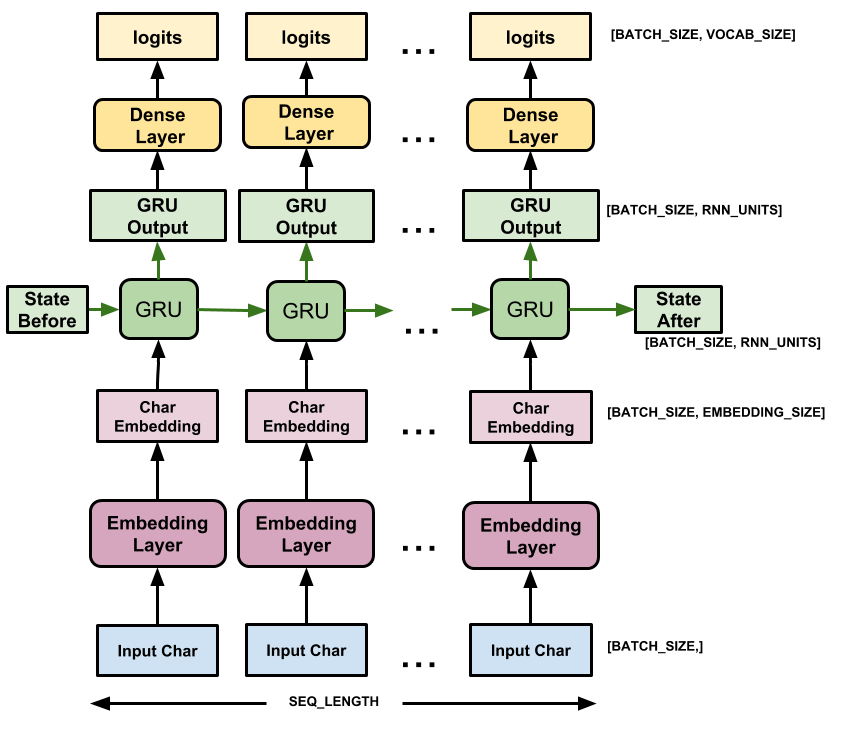
This model has three layers:
tf.keras.layers.Embedding: The input layer. A trainable lookup table that will map each character-ID to a vector withembedding_dimdimensions;tf.keras.layers.GRU: A type of RNN with sizeunits=rnn_units(You can also use an LSTM layer here.)tf.keras.layers.Dense: The output layer, withvocab_sizeoutputs. It outputs one logit for each character in the vocabulary. These are the log-likelihood of each character according to the model.
# Length of the vocabulary in StringLookup Layer
vocab_size = len(ids_from_chars.get_vocabulary())

# The embedding dimension
embedding_dim = 256

# Number of RNN units
rnn_units = 1024
class MyModel(tf.keras.Model):
  def __init__(self, vocab_size, embedding_dim, rnn_units):
    super().__init__()
    self.embedding = tf.keras.layers.Embedding(vocab_size, embedding_dim)
    self.gru = tf.keras.layers.GRU(rnn_units,
                                   return_sequences=True,
                                   return_state=True)
    self.dense = tf.keras.layers.Dense(vocab_size)

  def call(self, inputs, states=None, return_state=False, training=False):
    x = inputs
    x = self.embedding(x, training=training)
    if states is None:
      states = self.gru.get_initial_state(x)
    x, states = self.gru(x, initial_state=states, training=training)
    x = self.dense(x, training=training)

    if return_state:
      return x, states
    else:
      return x
model = MyModel(
    vocab_size=vocab_size,
    embedding_dim=embedding_dim,
    rnn_units=rnn_units)
For each character the model looks up the embedding, runs the GRU one timestep with the embedding as input, and applies the dense layer to generate logits predicting the log-likelihood of the next character:
Try the model
Now run the model to see that it behaves as expected.
First check the shape of the output:
for input_example_batch, target_example_batch in dataset.take(1):
    example_batch_predictions = model(input_example_batch)
    print(example_batch_predictions.shape, "# (batch_size, sequence_length, vocab_size)")
(64, 100, 66) # (batch_size, sequence_length, vocab_size)
In the above example the sequence length of the input is 100 but the model can be run on inputs of any length:
model.summary()
Model: "my_model"
_________________________________________________________________
Layer (type)                Output Shape              Param #
=================================================================
embedding (Embedding)       multiple                  16896

gru (GRU)                   multiple                  3938304

dense (Dense)               multiple                  67650

=================================================================
Total params: 4022850 (15.35 MB)
Trainable params: 4022850 (15.35 MB)
Non-trainable params: 0 (0.00 Byte)
_________________________________________________________________
To get actual predictions from the model you need to sample from the output distribution, to get actual character indices. This distribution is defined by the logits over the character vocabulary.
Try it for the first example in the batch:
sampled_indices = tf.random.categorical(example_batch_predictions[0], num_samples=1)
sampled_indices = tf.squeeze(sampled_indices, axis=-1).numpy()
This gives us, at each timestep, a prediction of the next character index:
sampled_indices
array([10, 57, 27, 51,  4, 49, 26,  0, 49, 25, 30, 56,  9, 58,  3, 16, 23,
       61, 39, 40, 27, 50, 37, 18, 10, 53, 13, 25, 10, 10, 39, 59, 17, 52,
        4, 46, 15,  7, 42, 34, 29, 23, 65, 60,  6, 40,  9, 42,  5, 19, 53,
        9, 50, 14,  4, 28,  0, 12, 47, 65, 37, 53, 57, 35, 53, 23, 35,  2,
       37, 15, 42, 41, 48, 23, 46, 26,  5, 24, 17,  4, 19,  1,  7, 60,  9,
       49,  8, 46, 49, 50, 60, 40, 21, 61, 38, 18, 61, 44, 62, 35])
Decode these to see the text predicted by this untrained model:
print("Input:\n", text_from_ids(input_example_batch[0]).numpy())
print()
print("Next Char Predictions:\n", text_from_ids(sampled_indices).numpy())
Input:
 b'Citizens:\nNow the gods keep you!\n\nBoth Tribunes:\nFarewell, farewell.\n\nSICINIUS:\nThis is a happier an'

Next Char Predictions:
 b"3rNl\\(jM[UNK]jLQq.s!CJvZaNkXE3n?L33ZtDm\\)gB,cUPJzu'a.c&Fn.kA\\(O[UNK];hzXnrVnJV XBcbiJgM&KD\\)F\n,u.j-gjkuaHvYEvewV"
Train the model
At this point the problem can be treated as a standard classification problem. Given the previous RNN state, and the input this time step, predict the class of the next character.
Attach an optimizer, and a loss function
The standard tf.keras.losses.sparse_categorical_crossentropy loss function works in this case because it is applied across the last dimension of the predictions.
Because your model returns logits, you need to set the from_logits flag.
loss = tf.losses.SparseCategoricalCrossentropy(from_logits=True)
example_batch_mean_loss = loss(target_example_batch, example_batch_predictions)
print("Prediction shape: ", example_batch_predictions.shape, " # (batch_size, sequence_length, vocab_size)")
print("Mean loss:        ", example_batch_mean_loss)
Prediction shape:  (64, 100, 66)  # (batch_size, sequence_length, vocab_size)
Mean loss:         tf.Tensor(4.189836, shape=(), dtype=float32)
A newly initialized model shouldn't be too sure of itself, the output logits should all have similar magnitudes. To confirm this you can check that the exponential of the mean loss is approximately equal to the vocabulary size. A much higher loss means the model is sure of its wrong answers, and is badly initialized:
tf.exp(example_batch_mean_loss).numpy()
np.float32(66.01196)
Configure the training procedure using the tf.keras.Model.compile method. Use tf.keras.optimizers.Adam with default arguments and the loss function.
model.compile(optimizer='adam', loss=loss)
Configure checkpoints
Use a tf.keras.callbacks.ModelCheckpoint to ensure that checkpoints are saved during training:
# Directory where the checkpoints will be saved
checkpoint_dir = './training_checkpoints'
# Name of the checkpoint files
checkpoint_prefix = os.path.join(checkpoint_dir, "ckpt_{epoch}")

checkpoint_callback = tf.keras.callbacks.ModelCheckpoint(
    filepath=checkpoint_prefix,
    save_weights_only=True)
Execute the training
To keep training time reasonable, use 10 epochs to train the model. In Colab, set the runtime to GPU for faster training.
EPOCHS = 20
history = model.fit(dataset, epochs=EPOCHS, callbacks=[checkpoint_callback])
Epoch 1/20
172/172 [==============================] - 13s 57ms/step - loss: 2.7215
Epoch 2/20
172/172 [==============================] - 10s 55ms/step - loss: 1.9839
Epoch 3/20
172/172 [==============================] - 11s 58ms/step - loss: 1.7094
Epoch 4/20
172/172 [==============================] - 12s 61ms/step - loss: 1.5506
Epoch 5/20
172/172 [==============================] - 12s 62ms/step - loss: 1.4530
Epoch 6/20
172/172 [==============================] - 12s 62ms/step - loss: 1.3844
Epoch 7/20
172/172 [==============================] - 12s 66ms/step - loss: 1.3315
Epoch 8/20
172/172 [==============================] - 12s 67ms/step - loss: 1.2862
Epoch 9/20
172/172 [==============================] - 12s 63ms/step - loss: 1.2448
Epoch 10/20
172/172 [==============================] - 12s 62ms/step - loss: 1.2050
Epoch 11/20
172/172 [==============================] - 12s 61ms/step - loss: 1.1651
Epoch 12/20
172/172 [==============================] - 12s 61ms/step - loss: 1.1239
Epoch 13/20
172/172 [==============================] - 12s 62ms/step - loss: 1.0813
Epoch 14/20
172/172 [==============================] - 12s 62ms/step - loss: 1.0356
Epoch 15/20
172/172 [==============================] - 12s 63ms/step - loss: 0.9876
Epoch 16/20
172/172 [==============================] - 12s 63ms/step - loss: 0.9386
Epoch 17/20
172/172 [==============================] - 12s 62ms/step - loss: 0.8855
Epoch 18/20
172/172 [==============================] - 12s 62ms/step - loss: 0.8335
Epoch 19/20
172/172 [==============================] - 12s 62ms/step - loss: 0.7828
Epoch 20/20
172/172 [==============================] - 12s 61ms/step - loss: 0.7337
Generate text
The simplest way to generate text with this model is to run it in a loop, and keep track of the model's internal state as you execute it.
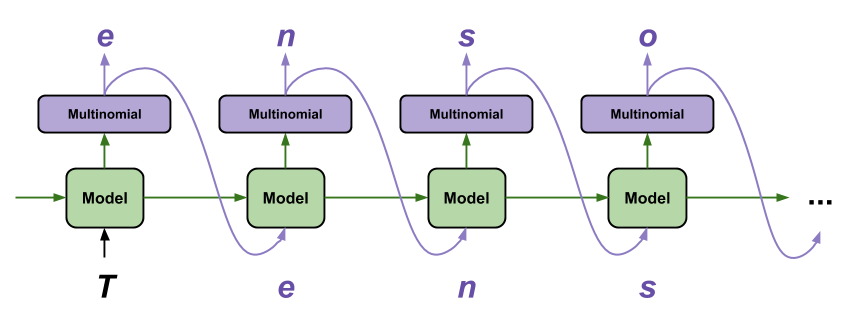
Each time you call the model you pass in some text and an internal state. The model returns a prediction for the next character and its new state. Pass the prediction and state back in to continue generating text.
The following makes a single step prediction:
class OneStep(tf.keras.Model):
  def __init__(self, model, chars_from_ids, ids_from_chars, temperature=1.0):
    super().__init__()
    self.temperature = temperature
    self.model = model
    self.chars_from_ids = chars_from_ids
    self.ids_from_chars = ids_from_chars

    # Create a mask to prevent "[UNK]" from being generated.
    skip_ids = self.ids_from_chars(['[UNK]'])[:, None]
    sparse_mask = tf.SparseTensor(
        # Put a -inf at each bad index.
        values=[-float('inf')]*len(skip_ids),
        indices=skip_ids,
        # Match the shape to the vocabulary
        dense_shape=[len(ids_from_chars.get_vocabulary())])
    self.prediction_mask = tf.sparse.to_dense(sparse_mask)

  @tf.function
  def generate_one_step(self, inputs, states=None):
    # Convert strings to token IDs.
    input_chars = tf.strings.unicode_split(inputs, 'UTF-8')
    input_ids = self.ids_from_chars(input_chars).to_tensor()

    # Run the model.
    # predicted_logits.shape is [batch, char, next_char_logits]
    predicted_logits, states = self.model(inputs=input_ids, states=states,
                                          return_state=True)
    # Only use the last prediction.
    predicted_logits = predicted_logits[:, -1, :]
    predicted_logits = predicted_logits/self.temperature
    # Apply the prediction mask: prevent "[UNK]" from being generated.
    predicted_logits = predicted_logits + self.prediction_mask

    # Sample the output logits to generate token IDs.
    predicted_ids = tf.random.categorical(predicted_logits, num_samples=1)
    predicted_ids = tf.squeeze(predicted_ids, axis=-1)

    # Convert from token ids to characters
    predicted_chars = self.chars_from_ids(predicted_ids)

    # Return the characters and model state.
    return predicted_chars, states
one_step_model = OneStep(model, chars_from_ids, ids_from_chars)
Run it in a loop to generate some text. Looking at the generated text, you'll see the model knows when to capitalize, make paragraphs and imitates a Shakespeare-like writing vocabulary. With the small number of training epochs, it has not yet learned to form coherent sentences.
start = time.time()
states = None
next_char = tf.constant(['ROMEO:'])
result = [next_char]

for n in range(1000):
  next_char, states = one_step_model.generate_one_step(next_char, states=states)
  result.append(next_char)

result = tf.strings.join(result)
end = time.time()
print(result[0].numpy().decode('utf-8'), '\n\n' + '_'*80)
print('\nRun time:', end - start)
ROMEO:
I dare not stay'd as well to lie consent
yew that resceiet hereafter, I will plead
as going. Soote a maid and aumber out whose graves
Shall be a hurdier'd hearts without myself: if
Yond county do it leave to pass. Know, at the comfort.

SEBASTIAN:
I' the complex, or, being dangerous,
Thou curst not hold it to execute them.
Besides, for, as thou a heaveth hours!

WARWICK:
So your dislooker body, which was said
Hath not yet shamed the like upon my pare
To think upon your grace.

BAPTISTA:
If you could scap all nature should infect.

JULIET:
It is without asking more sconfest son!
Despair no more pour worldly slain.
So, now the leaves me far one hate these rouse on sunder-law,
And make her hence that plate, as 'twere a thomal.

HENRY BOLINGBROKE:
In God for sicking to do some.
And kiss when he shall absolucius silker be thy habit,
Who learn'd your majesty as bright would hanging
And faults at made me kins was denied.

GLOUCESTER:
My lord, good grief.

ISABELLA:
Because some sup, Jaudes,

________________________________________________________________________________

Run time: 2.973536729812622
The easiest thing you can do to improve the results is to train it for longer (try EPOCHS = 30).
You can also experiment with a different start string, try adding another RNN layer to improve the model's accuracy, or adjust the temperature parameter to generate more or less random predictions.
If you want the model to generate text faster the easiest thing you can do is batch the text generation. In the example below the model generates 5 outputs in about the same time it took to generate 1 above.
start = time.time()
states = None
next_char = tf.constant(['ROMEO:', 'ROMEO:', 'ROMEO:', 'ROMEO:', 'ROMEO:'])
result = [next_char]

for n in range(1000):
  next_char, states = one_step_model.generate_one_step(next_char, states=states)
  result.append(next_char)

result = tf.strings.join(result)
end = time.time()
print(result, '\n\n' + '_'*80)
print('\nRun time:', end - start)
tf.Tensor(
[b"ROMEO:\nBy a vice: I am our tune mine.\n\nPROSPERO:\nThy fair sir.\n\nMENENIUS:\nWhat say you?\n\nMERCUTIO:\nYea. I pray this, hox my heart to see this\nfall behove the gates, wherein thou canst mine honour,\nI'll let me seek down this hand.\n\nCLEOMENES:\nNay, let him be content.\n\nWARWICK:\nCome, cousin, our becomes both. Blowning your knee.\n\nDUKE OF AUMERLE:\nGood morning to you! Soon is your enemies;\nSo travily see hope in holy hours.\n\nCLAUDIO:\nCome, sir; I will boast to Berkeley, and I'll pass\nTo England, and let him leave the world is he,\nTo-minglock hum: ill's in it at himself\nAbove her privother and nobleness.\n\nWARWICK:\nHow now! shall we do? for which I wot with the time\nWould bring fire much of commandment but with the king\nShall bear away'd by numed again:\nOn what sister, break out stoen soon for our father.\n\nHad IAth OMINGH:\nIf you be so, I can you goes not of ham.\n\nBRUTUS:\nGet you hence, my good lord.\n\nHENRY BOLINGBROKE:\nWhat fife is dead, and let him seek for silver.\n\nMISTRESS OVERDONE:\nThink'st "
 b"ROMEO:\nThe eyes of heaven, I will not say if her dreamed\npurses. What, ho? should a messenger than you\nOr Nortanor, no benother in thee?\n\nFirst Soldier:\nThou dream'd is full of spending; a moiety means,\nSo twoil, awake a barbation folks\na woman and wants and wanting-fick's men in knaves.\n\nLUCENTIO:\nHere, hark! what mistressing should must be, Barnardine.\n\nBRAKENBURY:\nIf they are coming?\n\nSEBASTIAN:\nFauth in a queen, your honour ne'er act from\nyour forwardness. I know Here comes him and rear.\nNow, when dreament the earth Warwick and\nthat your pleasure,\nIs, ay: therefore each one the expect, how she\nserved out.\n\nARIEL:\nHe doth conveying, I'll pare to me.\n\nKING RICHARD III:\nO Gen, his neck, roud me about your master.\n\nPETRUCHIO:\n\nKING RICHARD III:\nHe loved him to the tribunes: let thee go.\n\nROMEO:\nWhat, art thou not if nothing to be the royal peofle in this laugh\nHath paped in groud from the devil's accustom'd\nface, though long imports sweet and decrees,\nHow came it Clifford's safety, and charg"
 b"ROMEO:\nO princely Bianca, sir.\n\nWESTMORELAND:\nHas he died enough to be inhormed, tasken your\nin banishment; Stay awhile: the\nseems, no worse to Eve al other, which if some news\nWho pray now, but love's head: dissemblen shame\nIn orderly revenge for them; a wandering voice\nUnten the common muck: I see your promise upon hoot!\nThou that, that, losk her: then true I love him:\nHe regling unto advise the fight,\nAnd bourt Her Robe and both, and ask thy daughter\nShould no fighter coal, like dives of mone.\n\nLEONTES:\nNo.\n\nPARIS:\nNo good music the lives.\n\nDUKE VINCENTIO:\nNuntingly,\nSo hon safe glory, good my lord; and\nyour friendship drown his own desires acheed;\nAnd that when I am thus: the other part;\nHence, did not of them, for these my friends,\nBruned in the field. First if they can but stay about,\nAnd when the present earthes and towards and\nbeating impediment to sural; that\nYour learned quests of day intoness\nAndigund the time to be inclined my body.\n\nGentleman:\nAy, madam, nor time home, good man;"
 b"ROMEO:\nI come, that they say that thou hear'st of tandress!\nHathand the Duke of Buckingham and Report,\nFor maid our country Frantic, why the Devil:\nYou have pitcher this hand, which will I rouse thee.\n\nKING HENRY VI:\nBut, sister, let us to himself to\nhave had lent her to send to thy answer.\n\nPETRUCHIO:\nNo, good madam, bear her; humble my heart betide.\nThen, good my lord, if over-many cousin's maidenhead,\nIt will command, which way I make,\nWhich once your rose and damnable coal-boand\nHath Bolingbroll'd a prince agree; with him!\n\nDUCHESS OF YORK:\nHis noble masters had so dear's death?\nIf thou leanness of heaven, I will, level\nRomeo, no, not by marry and tell him!\n\nSecond Keeper:\nSo, rather had we mercy well.\n\nESCALUS:\nAy, my good selves, my lords, betake from Lenouily\nThan to rejoice the hodeful men of sorrow.\n\nCLIFFORD:\nHe is. Tell me, then, since they kiss myself;\nMy land as means Marcius hath no better brother\nTo execute this kind and crown. But have your grace\nSome hated more tender bawds "
 b"ROMEO:\nI love you, trans'd you no abbed to the sea:\nSome coring in Romeo letter, that will presented\nThese wreech-entersoined that with me,\nDesires 'twast and Decumberther; besides he would\nHave take the utterance to Bolingbroke.'\n\nKING EDWARD IV:\nNow, king! the citizens are luckness of that, with\nsuch sails, my most strong Edward, and your members,\nOr, and against my lucks and more such shipps, dim'd soul\nTo take away myself instials all; yet I could fain\nFor you, and that with some him to my fairer take,\nWhen Henry so that ever.\n\nLEONTES:\nGood my lord, be executed.\n\nLUCENTIO:\nI flamed myself. For hand, no remedy.\n\nKING RICHARD III:\nSapless thy life.\n\nAUTOLYCUS:\n\nClown:\nIn this was, madam? the truth living son!\nThe matter brought you forth hosom, spheateness.\nIf ever I was large. I now read indeed\nThan foes this wrinklen for his presence.\n\nBUCKINGHAM:\nNothing to make come men; and did about the\ntribute, at his smoken chinger\nI would have joint with years to hear her anger:\nI'll shine his po"], shape=(5,), dtype=string)

________________________________________________________________________________

Run time: 2.9849956035614014
Export the generator
This single-step model can easily be saved and restored, allowing you to use it anywhere a tf.saved_model is accepted.
tf.saved_model.save(one_step_model, 'one_step')
one_step_reloaded = tf.saved_model.load('one_step')
WARNING:tensorflow:Skipping full serialization of TF-Keras layer <__main__.OneStep object at 0x7f43145212d0>, because it is not built.
WARNING:tensorflow:Skipping full serialization of TF-Keras layer <__main__.OneStep object at 0x7f43145212d0>, because it is not built.
WARNING:tensorflow:Model's `__init__()` arguments contain non-serializable objects. Please implement a `get_config()` method in the subclassed Model for proper saving and loading. Defaulting to empty config.
WARNING:tensorflow:Model's `__init__()` arguments contain non-serializable objects. Please implement a `get_config()` method in the subclassed Model for proper saving and loading. Defaulting to empty config.
WARNING:tensorflow:Model's `__init__()` arguments contain non-serializable objects. Please implement a `get_config()` method in the subclassed Model for proper saving and loading. Defaulting to empty config.
WARNING:tensorflow:Model's `__init__()` arguments contain non-serializable objects. Please implement a `get_config()` method in the subclassed Model for proper saving and loading. Defaulting to empty config.
INFO:tensorflow:Assets written to: one_step/assets
INFO:tensorflow:Assets written to: one_step/assets
states = None
next_char = tf.constant(['ROMEO:'])
result = [next_char]

for n in range(100):
  next_char, states = one_step_reloaded.generate_one_step(next_char, states=states)
  result.append(next_char)

print(tf.strings.join(result)[0].numpy().decode("utf-8"))
ROMEO:
In commission with the king! Would you have worn
My daughter calchy bones upon thy maging.

EDWARD:
Advanced: Customized Training
The above training procedure is simple, but does not give you much control. It uses teacher-forcing which prevents bad predictions from being fed back to the model, so the model never learns to recover from mistakes.
So now that you've seen how to run the model manually next you'll implement the training loop. This gives a starting point if, for example, you want to implement curriculum learning to help stabilize the model's open-loop output.
The most important part of a custom training loop is the train step function.
Use tf.GradientTape to track the gradients. You can learn more about this approach by reading the eager execution guide.
The basic procedure is:
- Execute the model and calculate the loss under a
tf.GradientTape. - Calculate the updates and apply them to the model using the optimizer.
class CustomTraining(MyModel):
  @tf.function
  def train_step(self, inputs):
      inputs, labels = inputs
      with tf.GradientTape() as tape:
          predictions = self(inputs, training=True)
          loss = self.loss(labels, predictions)
      grads = tape.gradient(loss, model.trainable_variables)
      self.optimizer.apply_gradients(zip(grads, model.trainable_variables))

      return {'loss': loss}
The above implementation of the train_step method follows Keras' train_step conventions. This is optional, but it allows you to change the behavior of the train step and still use keras' Model.compile and Model.fit methods.
model = CustomTraining(
    vocab_size=len(ids_from_chars.get_vocabulary()),
    embedding_dim=embedding_dim,
    rnn_units=rnn_units)
model.compile(optimizer = tf.keras.optimizers.Adam(),
              loss=tf.keras.losses.SparseCategoricalCrossentropy(from_logits=True))
model.fit(dataset, epochs=1)
172/172 [==============================] - 14s 63ms/step - loss: 2.7108
<tf_keras.src.callbacks.History at 0x7f42b7ae2010>
Or if you need more control, you can write your own complete custom training loop:
EPOCHS = 10

mean = tf.metrics.Mean()

for epoch in range(EPOCHS):
    start = time.time()

    mean.reset_states()
    for (batch_n, (inp, target)) in enumerate(dataset):
        logs = model.train_step([inp, target])
        mean.update_state(logs['loss'])

        if batch_n % 50 == 0:
            template = f"Epoch {epoch+1} Batch {batch_n} Loss {logs['loss']:.4f}"
            print(template)

    # saving (checkpoint) the model every 5 epochs
    if (epoch + 1) % 5 == 0:
        model.save_weights(checkpoint_prefix.format(epoch=epoch))

    print()
    print(f'Epoch {epoch+1} Loss: {mean.result().numpy():.4f}')
    print(f'Time taken for 1 epoch {time.time() - start:.2f} sec')
    print("_"*80)

model.save_weights(checkpoint_prefix.format(epoch=epoch))
Epoch 1 Batch 0 Loss 2.1700
Epoch 1 Batch 50 Loss 2.0350
Epoch 1 Batch 100 Loss 1.9724
Epoch 1 Batch 150 Loss 1.8517
Epoch 1 Loss: 1.9836
Time taken for 1 epoch 13.52 sec
________________________________________________________________________________
Epoch 2 Batch 0 Loss 1.8410
Epoch 2 Batch 50 Loss 1.7810
Epoch 2 Batch 100 Loss 1.7181
Epoch 2 Batch 150 Loss 1.6140
Epoch 2 Loss: 1.7114
Time taken for 1 epoch 12.65 sec
________________________________________________________________________________
Epoch 3 Batch 0 Loss 1.6167
Epoch 3 Batch 50 Loss 1.5415
Epoch 3 Batch 100 Loss 1.5237
Epoch 3 Batch 150 Loss 1.5486
Epoch 3 Loss: 1.5521
Time taken for 1 epoch 12.16 sec
________________________________________________________________________________
Epoch 4 Batch 0 Loss 1.4840
Epoch 4 Batch 50 Loss 1.4919
Epoch 4 Batch 100 Loss 1.4146
Epoch 4 Batch 150 Loss 1.4439
Epoch 4 Loss: 1.4542
Time taken for 1 epoch 11.48 sec
________________________________________________________________________________
Epoch 5 Batch 0 Loss 1.3974
Epoch 5 Batch 50 Loss 1.4051
Epoch 5 Batch 100 Loss 1.3659
Epoch 5 Batch 150 Loss 1.3594
Epoch 5 Loss: 1.3869
Time taken for 1 epoch 11.71 sec
________________________________________________________________________________
Epoch 6 Batch 0 Loss 1.3642
Epoch 6 Batch 50 Loss 1.3522
Epoch 6 Batch 100 Loss 1.3442
Epoch 6 Batch 150 Loss 1.2968
Epoch 6 Loss: 1.3339
Time taken for 1 epoch 11.46 sec
________________________________________________________________________________
Epoch 7 Batch 0 Loss 1.2371
Epoch 7 Batch 50 Loss 1.2765
Epoch 7 Batch 100 Loss 1.3428
Epoch 7 Batch 150 Loss 1.2735
Epoch 7 Loss: 1.2886
Time taken for 1 epoch 11.49 sec
________________________________________________________________________________
Epoch 8 Batch 0 Loss 1.2133
Epoch 8 Batch 50 Loss 1.2739
Epoch 8 Batch 100 Loss 1.2441
Epoch 8 Batch 150 Loss 1.2538
Epoch 8 Loss: 1.2482
Time taken for 1 epoch 11.55 sec
________________________________________________________________________________
Epoch 9 Batch 0 Loss 1.1690
Epoch 9 Batch 50 Loss 1.1491
Epoch 9 Batch 100 Loss 1.2206
Epoch 9 Batch 150 Loss 1.1687
Epoch 9 Loss: 1.2085
Time taken for 1 epoch 11.78 sec
________________________________________________________________________________
Epoch 10 Batch 0 Loss 1.1250
Epoch 10 Batch 50 Loss 1.1691
Epoch 10 Batch 100 Loss 1.1638
Epoch 10 Batch 150 Loss 1.1606
Epoch 10 Loss: 1.1689
Time taken for 1 epoch 12.01 sec
________________________________________________________________________________