
 TensorFlow.org で表示 TensorFlow.org で表示
|
 Google Colabで実行 Google Colabで実行
|
 GitHub でソースを表示 GitHub でソースを表示 |
 ノートブックをダウンロード ノートブックをダウンロード |
 TF Hub モデルを参照 TF Hub モデルを参照 |
この Colab では、生成敵対的ネットワーク(GAN)に基づく TF-Hub モジュールの使用を実現します。このモジュールは、潜在空間と呼ばれる N 次元のベクトルから RGB 画像へのマッピングを行います。
次の 2 つの例が提供されています。
- 潜在空間から画像へのマッピング
- 特定のターゲット画像がある場合、ターゲット画像に似た画像を生成する潜在ベクトルを求めるために勾配降下を使用する。
オプションの前提条件
- 低レベル Tensorflow の概念に精通していること
- ウィキペディアの 敵対的生成ネットワーク
- Progressive GAN に関する論文: Progressive Growing of GANs for Improved Quality, Stability, and Variation
その他のモデル
こちらでは、現在 tfhub.dev にホストされている、画像を生成できるすべてのモデルをご覧いただけます。
セットアップ
# Install imageio for creating animations.pip -q install imageiopip -q install scikit-imagepip install git+https://github.com/tensorflow/docs
Imports and function definitions
from absl import logging

import imageio
import PIL.Image
import matplotlib.pyplot as plt
import numpy as np

import tensorflow as tf
tf.random.set_seed(0)

import tensorflow_hub as hub
from tensorflow_docs.vis import embed
import time

try:
  from google.colab import files
except ImportError:
  pass

from IPython import display
from skimage import transform

# We could retrieve this value from module.get_input_shapes() if we didn't know
# beforehand which module we will be using.
latent_dim = 512


# Interpolates between two vectors that are non-zero and don't both lie on a
# line going through origin. First normalizes v2 to have the same norm as v1.
# Then interpolates between the two vectors on the hypersphere.
def interpolate_hypersphere(v1, v2, num_steps):
  v1_norm = tf.norm(v1)
  v2_norm = tf.norm(v2)
  v2_normalized = v2 * (v1_norm / v2_norm)

  vectors = []
  for step in range(num_steps):
    interpolated = v1 + (v2_normalized - v1) * step / (num_steps - 1)
    interpolated_norm = tf.norm(interpolated)
    interpolated_normalized = interpolated * (v1_norm / interpolated_norm)
    vectors.append(interpolated_normalized)
  return tf.stack(vectors)

# Simple way to display an image.
def display_image(image):
  image = tf.constant(image)
  image = tf.image.convert_image_dtype(image, tf.uint8)
  return PIL.Image.fromarray(image.numpy())

# Given a set of images, show an animation.
def animate(images):
  images = np.array(images)
  converted_images = np.clip(images * 255, 0, 255).astype(np.uint8)
  imageio.mimsave('./animation.gif', converted_images)
  return embed.embed_file('./animation.gif')

logging.set_verbosity(logging.ERROR)
2024-01-11 19:47:45.233809: E external/local_xla/xla/stream_executor/cuda/cuda_dnn.cc:9261] Unable to register cuDNN factory: Attempting to register factory for plugin cuDNN when one has already been registered
2024-01-11 19:47:45.233856: E external/local_xla/xla/stream_executor/cuda/cuda_fft.cc:607] Unable to register cuFFT factory: Attempting to register factory for plugin cuFFT when one has already been registered
2024-01-11 19:47:45.235413: E external/local_xla/xla/stream_executor/cuda/cuda_blas.cc:1515] Unable to register cuBLAS factory: Attempting to register factory for plugin cuBLAS when one has already been registered
潜在空間の補間
ランダムなベクトル
2 つのランダムに初期化されたベクトル間の潜在空間の補間です。トレーニング済みの Progressive GAN を含む TF-Hub モジュール progan-128 を使用します。
progan = hub.load("https://tfhub.dev/google/progan-128/1").signatures['default']
def interpolate_between_vectors():
  v1 = tf.random.normal([latent_dim])
  v2 = tf.random.normal([latent_dim])

  # Creates a tensor with 25 steps of interpolation between v1 and v2.
  vectors = interpolate_hypersphere(v1, v2, 50)

  # Uses module to generate images from the latent space.
  interpolated_images = progan(vectors)['default']

  return interpolated_images

interpolated_images = interpolate_between_vectors()
animate(interpolated_images)

潜在空間の最も近いベクトルを見つける
ターゲット画像を修正します。例として、モジュールから生成された画像を使用するか、独自の画像をアップロードします。
image_from_module_space = True  # @param { isTemplate:true, type:"boolean" }

def get_module_space_image():
  vector = tf.random.normal([1, latent_dim])
  images = progan(vector)['default'][0]
  return images

def upload_image():
  uploaded = files.upload()
  image = imageio.imread(uploaded[list(uploaded.keys())[0]])
  return transform.resize(image, [128, 128])

if image_from_module_space:
  target_image = get_module_space_image()
else:
  target_image = upload_image()

display_image(target_image)

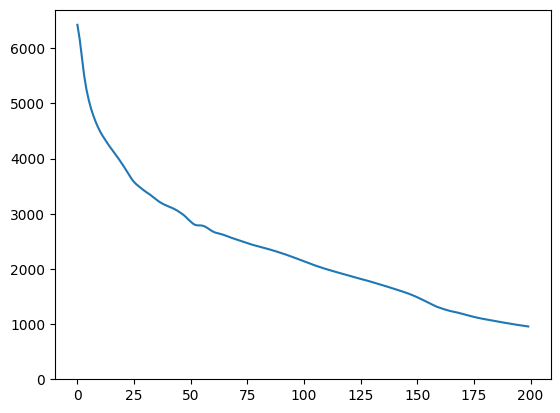
ターゲット画像と潜在空間変数によって生成された画像の間の損失関数を定義した後、勾配降下を使用して、損失を最小限に抑える変数を見つけることができます。
tf.random.set_seed(42)
initial_vector = tf.random.normal([1, latent_dim])
display_image(progan(initial_vector)['default'][0])

def find_closest_latent_vector(initial_vector, num_optimization_steps,
                               steps_per_image):
  images = []
  losses = []

  vector = tf.Variable(initial_vector)
  optimizer = tf.optimizers.Adam(learning_rate=0.01)
  loss_fn = tf.losses.MeanAbsoluteError(reduction="sum")

  for step in range(num_optimization_steps):
    if (step % 100)==0:
      print()
    print('.', end='')
    with tf.GradientTape() as tape:
      image = progan(vector.read_value())['default'][0]
      if (step % steps_per_image) == 0:
        images.append(image.numpy())
      target_image_difference = loss_fn(image, target_image[:,:,:3])
      # The latent vectors were sampled from a normal distribution. We can get
      # more realistic images if we regularize the length of the latent vector to
      # the average length of vector from this distribution.
      regularizer = tf.abs(tf.norm(vector) - np.sqrt(latent_dim))

      loss = target_image_difference + regularizer
      losses.append(loss.numpy())
    grads = tape.gradient(loss, [vector])
    optimizer.apply_gradients(zip(grads, [vector]))

  return images, losses


num_optimization_steps=200
steps_per_image=5
images, loss = find_closest_latent_vector(initial_vector, num_optimization_steps, steps_per_image)
.
WARNING: All log messages before absl::InitializeLog() is called are written to STDERR
I0000 00:00:1705002501.170772  126050 device_compiler.h:186] Compiled cluster using XLA!  This line is logged at most once for the lifetime of the process.
.....
.....
.....
.....
....
..
.....
.....
.....
.....
.....
.....
.....
.....
.....
.....
.....
.....
....
.....
....
.
.....
.....
.....
.....
.....
.....
.....
.....
.....
.....
.....
.....
.....
.....
.....
.....
.....
.....
.....
....
plt.plot(loss)
plt.ylim([0,max(plt.ylim())])
(0.0, 6696.34951171875)
animate(np.stack(images))

結果をターゲットと比較します。
display_image(np.concatenate([images[-1], target_image], axis=1))

上記の例を使って試す
画像がモジュールの空間から得たものである場合、降下は急であり、合理的なサンプルに収束します。モジュール空間からではない画像に降下法を試してみましょう。降下は、画像が合理的に、トレーニング画像の空間に近い場合にのみ収束します。
より現実的な画像への降下を高速化するには、次の項目を試すことができます。
- 画像微分(二次微分など)に別の損失を使用する
- 潜在ベクトルに別のレギュラライザーを使用する
- 複数の実行において、ランダムなベクトルから初期化する
- など